0

Autorun disabled after changing Video Mode

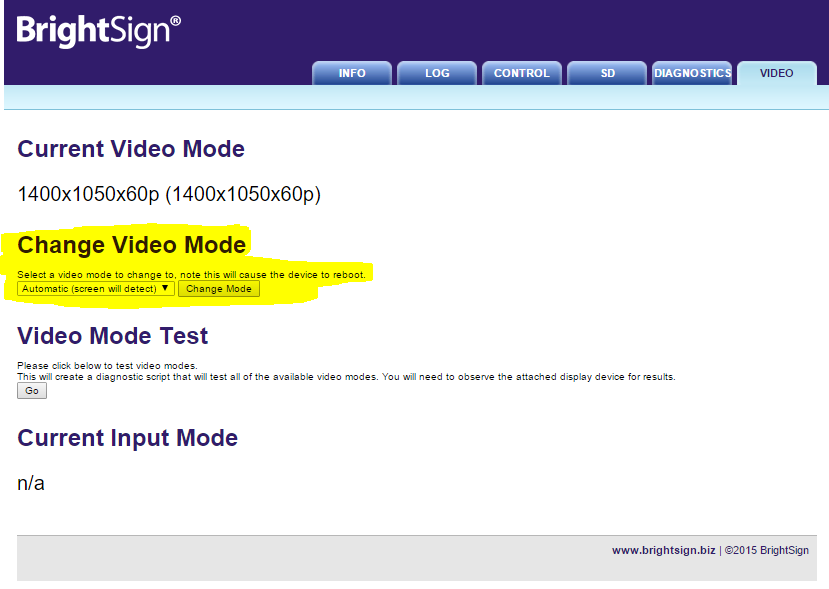
I have noticed that if you manually modify the video output mode of a player from the web page, the system reboots as expected, but autorun is disabled.  Only manually rebooting again engaged autorun.

The url that appears in the browser after modifying the video output mode is:

http://10.110.5.37/action.html?disable=autorun&videomode=1920x1080x60p


Is there a specific reason for this behavior? Also, is there a way to change it?

3 comments

  • 0
    Avatar
    Lyndon

    On that page it explains that if you do this, a script will be created, a new autorun, specifically for testing the video mode. You can't use that page for changing video settings and also use your standard autorun. It's just for test.


    If you want your resolution to be changed while running a playlist or custom script, then you have to do it through your playlist program or in the main script you're running. 

  • 0
    Avatar
    Nick Miller

    I'm not referring to 'Video Test Mode'.  I'm referring to 'Change Video Mode'.  See highlighted area in the screenshot.

  • 0
    Avatar
    Lyndon

    That also isn't meant to be used in conjunction with another autorun. 

Please sign in to leave a comment.