0

XD232 not Displaying on Screen

I have an XD232 that I'm trying to get anything to display on screen that's 1920 x 720.

Project Details

BrightSign Model:XD232

Connector:HDMI

Resolution:?? I've tried multiple different

I followed your tutorials page for the setup, but have been unable to get anything to come up yet. I don't see my resolution in this list. Is there a preferred res for my resolution?

3 comments

  • 0
    Avatar
    Alex

    Hi Nate,

    Try to create a presentation with screen resolution 1920x1080.

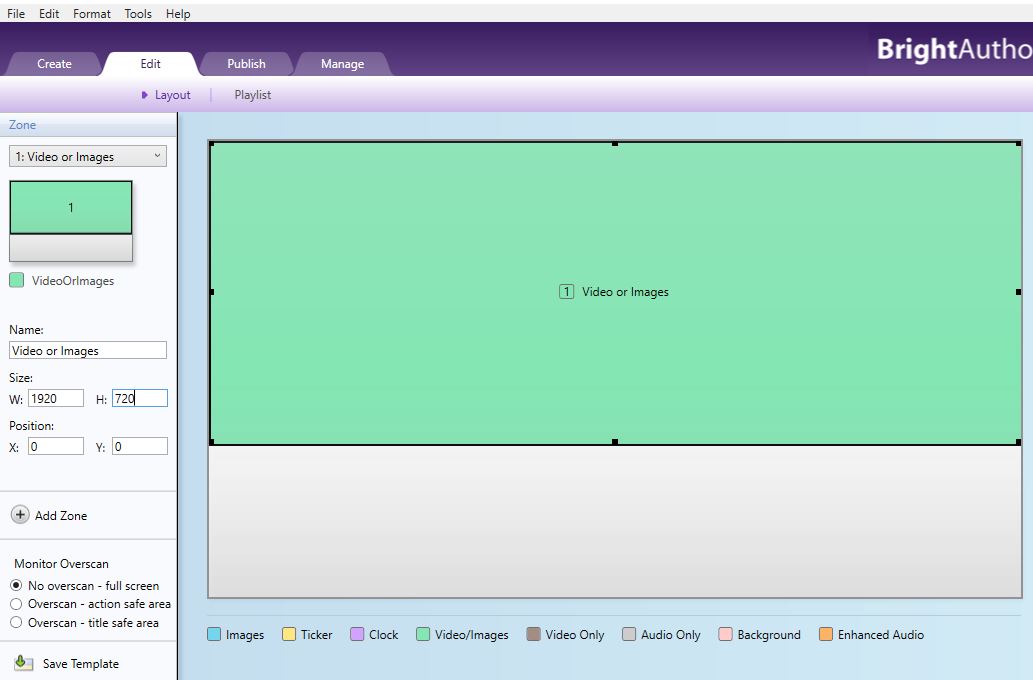
    Then go to Edit -> Layout and decrease the zone size to 1920x720, and put zone in the top. See example below.

    It's recommended that the size of the contents (images/videos) match the size of the zone, i.e. in your case media files should have 1920x720 size/resolution.

  • 0
    Avatar
    Nate Balcom

    Hello BrightSign Support,

    I have tried that and I'm still getting the red error light. I had another guy here try to do the same thing and he was able to publish files that worked. 

    Steps

    1. Format the card FAT32
    2. Updated firmware. brightsign-xd2-6.0.51-update.bsfw <- same as the guys whose worked.
    3. Deleted all files and am trying to load 1 single jpg
    4. Published following the video tutorial.

    Is it possible that it's something to do with my machine? I'm doing the exact same thing as the one that's working. I'm at a loss.


  • 0
    Avatar
    Nate Balcom

    I had the wrong software installed. I didn't realize there was a different version of BrightAuthor for each different device. Once I had the right software on my machine it was a breze.

Please sign in to leave a comment.