0

How to Rename Device Remotely

First and foremost, I'm very green when it comes to configuring these devices. I have a few XD232 devices that I've struggled with getting connected. I believe we've made great progress lately as I can now see them remotely in the BrightAuthor tool (NetOps discovered that the VLAN wasn't configured correctly but now has resolved that issue). I picked up support of these objects after they were set up and implemented, so I'm coming in at the tail end of this.


In a nutshell, I've reconfiugured the setup.xml file that was placed on the SD card, and I've shipped the card to the remote site where the device resides. I've had the site reboot the device, and I can now see it in BrightAuthor.


My question: Is it possible to rename the device remotely? The current name is BrightSign2L2D57K...(the unique ID appended). It appears that I could click Tools\Setup BrightSign Unit to do this, but I don't feel that this is necessary. I don't want to reset up everything (mostly because I don't know what the current settings are) - I simply want to rename it. Currently I can't even see where the name "BrightSign) or the unique "2L2D..." is listed in any of the files on the SD Card.

5 comments

  • 0
    Avatar
    Allen H. Porter

    Not sure if this helps but this is how we do it using our own BSNEE.


    Launch BrightAuthor and sign in to your account.

    Find the player in its group under the manage tab and right click it.

    Select the edit option.

    Change the name and click OK.

    Next time the player checks in it will get a new name.

  • 0
    Avatar
    Lance Lander

    You can find instructions for publishing new setup files over a local network on the link below. The instructions in the Readme.txt are not written well so there can be some confusion. You need to add the autozip.brs file to the folder before you zip it.  So, in the readme.txt, swap number 2 and the first number 3 (yes, there are two step 3's).

    Also, the plugin file from this link was not rebooting automatically.  I opened a support ticket and they sent me a plugin that would reboot automatically.


    http://support.brightsign.biz/hc/en-us/community/posts/209965857-Plugins-Asked-Answered

  • 0
    Avatar
    Mike

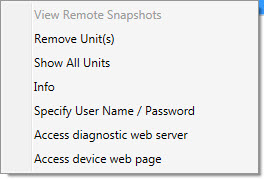
    Thx. I noticed that I don't have an edit option. When I right-click, I only see the following. I'm on BrightAuthor version 4.4.0.15 if that matters.


  • 0
    Avatar
    Shaun

    The BS support staff wrote this not too long ago it should do what you need:

    https://github.com/brightsign/BrightAuthor-Plugins/tree/master/Player-Rename-Local-File-Networking

  • 0
    Avatar
    Mike

    Thx to all.

Please sign in to leave a comment.