0

BrightAuthor Dev - I wish...


- I wish I could drag a media file over an existing media thumbnail on my brightauthor project so that the new file will replace the old one without loosing every link from/to that media file. It happens in every installation that i make a whole project, upload it and suddendly the customer come with a new version of the video... and every time i have to create the project again. It would be great to be able to simply replace one file with another. - I wish i could link a file with itself: if I want to make a video looping itself i have to select the media end event, link video A to video B, than enter the media event settings and replace video B with video A in the next status field. It is not possible to link a video with itself dragging the media end event (or buttons etc.) on his own thumbnail...

2 comments

  • 0
    Avatar
    RokuLyndon


    Both of these are possible.

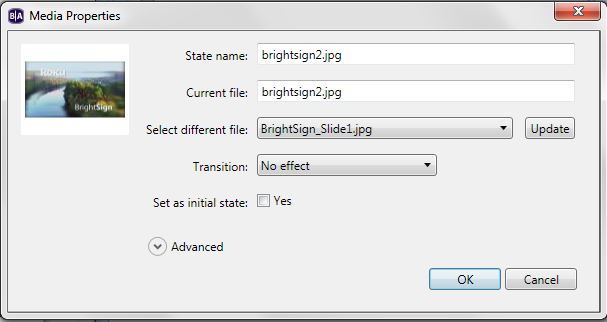
    For #1, you can double click on a file in your interactive project.  There are three file name fields. The 3rd one has a dropdown so you can select a different file, hit the update button, and then hit ok.
    https://www.brightsignnetwork.com/download/screenshots/replacefileinteractive.JPG

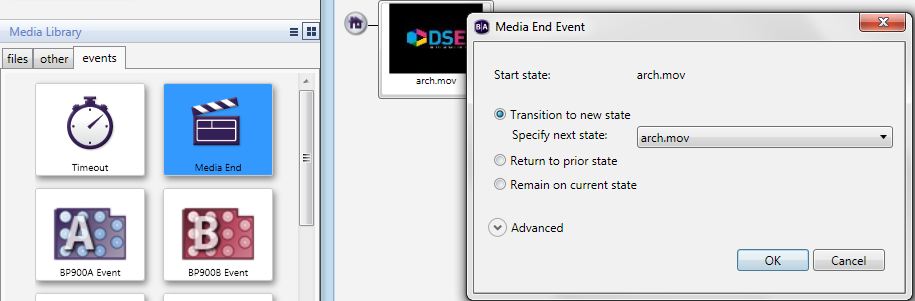
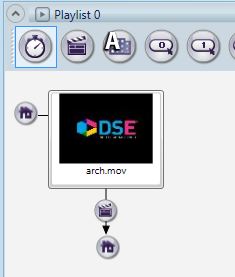
    For item # 2, you can connect a file to itself. There are two ways to do it. You can draw a connection to another file, then open the event and change to to the same starting position. Or, you can click on the Events tab under the media library, and then drag an event onto the file in the playlist window. In this example, the arch.mov file plays, and when it ends, it plays itself again.

    https://www.brightsignnetwork.com/download/screenshots/dragevent-samestate.JPG

    https://www.brightsignnetwork.com/download/screenshots/dragevent-2.JPG
  • 0
    Avatar
    Luca


    thanks lyndon, I never noticed the #1 feature.
Please sign in to leave a comment.