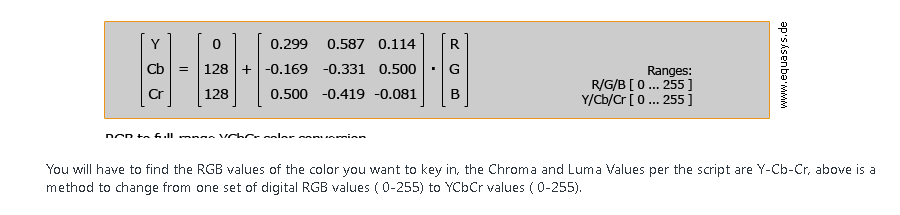
Hi,
I have some content that was created in another digital signage product which I'm trying to figure out if I can move to a BrightSign player. I was excited to hear that the BrightSign XD and 4K players support chroma/luma keying because some of my content that I'm moving over have videos that contain an alpha channel. I was hoping to see if I could simply replace the alpha channel with a color that could be keyed on so I get the same effect on a BrightSign but I'm having some troubles understanding the documentation arround roVideoPlayer.SetKeyingValue. I was able to write a simple autorun script which will play my videos and apply a mask by using the SetKeyingValue method. I know it is obviously applying a mask because pixels are getting turned off but I don't understand well enough what the luma/cr/cb values need to be set to remove the right pixels for the effect I want.
Is there a straight forward way to just remove a certain color (like green for instance)? Is there any guidance that could help figure out what these values should be set to? I searched the internet for some help but nothing really was helpful.
Jesse