1

BrightAuthor Non Printable Keyboard Codes

BrightAuthor Unprintable Keyboard Codes

You may find this list useful at some point

Space <sp>
Left arrow <la>
Right arrow <ra>
Up arrow <ua>
Down arrow <da>
Return <rn>
Enter <en>
Escape <es>
Page Up <pu>
Page Down <pd>
F1 <f1>
F2 <f2>
F3 <f3>
F4 <f4>
F5 <f5>
F6 <f6>
F7 <f7>
F8 <f8>
F9 <f9>
F10 <f10>
F11 <f11>
F12 <f12>
F13 (Print Screen)<ps>
F14 (Scroll Lock) <sl>
F15 (Pause Break) <pb>
Backspace <bs>
Tab <tb>
Insert <in>
Delete <de>
Home <ho>
End <ed>
Capslock <cl>
Mute <mu>
Volume down <vd>
Volume up <vu>
Next track <nt>
Previous track <pt>
Play/Pause <pp>
Stop music <sm>
Stop browsing <sm>
Power <pwr>
Back <bk>
Forward <fw>
Refresh <rf>

2 comments

  • 0
    Avatar
    George Backer

    A bluetooth 10-key produces key codes 99 and 105 for <pu> and <pd>.   

    Are there associated keycodes for those keys as well? 

    The keypad size at a station makes a more friendly user interface and we'd like to use those functions.

  • 1
    Avatar
    JRB Technical

    If  the Bluetooth keypad's Page Up and Page Down to not correspond to the ones in the non-printing characters list, then unfortunately at this time, there is no way to map any codes that BrightSign did not include in the list.

    This has been the problem with the smaller numeric USB Keypads that so many of us like to use. You have to remember to turn Num Lock on first (if you can, depending on keypad model) before using the numbers as keyboard input.

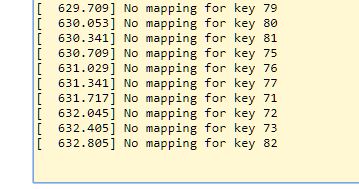
    Even though you can clearly see any unmapped keyboard entries in the BrightSign player log, they have not provided any means for users to map these so you can use them for Keyboard Input Events.

    All they would have to do would be to allow users to use something like <kxx> replacing the xx with any key number that is currently unmapped.

    Hopefully this will be fixed at sometime in the future

    .

Please sign in to leave a comment.