0

Accounting for Frame of Panel

Hello.  I'm working on a 3x1 Setup and building all my content in After Effects.  I can't seem to get the measurement of the frame around the edge of the screen between each panel right.  For instance, as I have text track from screen to screen - there's a visual glitch as it crosses from one panel to another.

Anyone have any tricks for how to accomplish this.  Is there any settings in BrightSign I should be watching?  

Thanks for your help.

3 comments

  • 0
    Avatar
    JRB Technical

    I posted a response, but for some reason it got marked for moderation. If the BrightSign staff doesn't approve it soon, I will repost the answers a different way.

  • 0
    Avatar
    JRB Technical

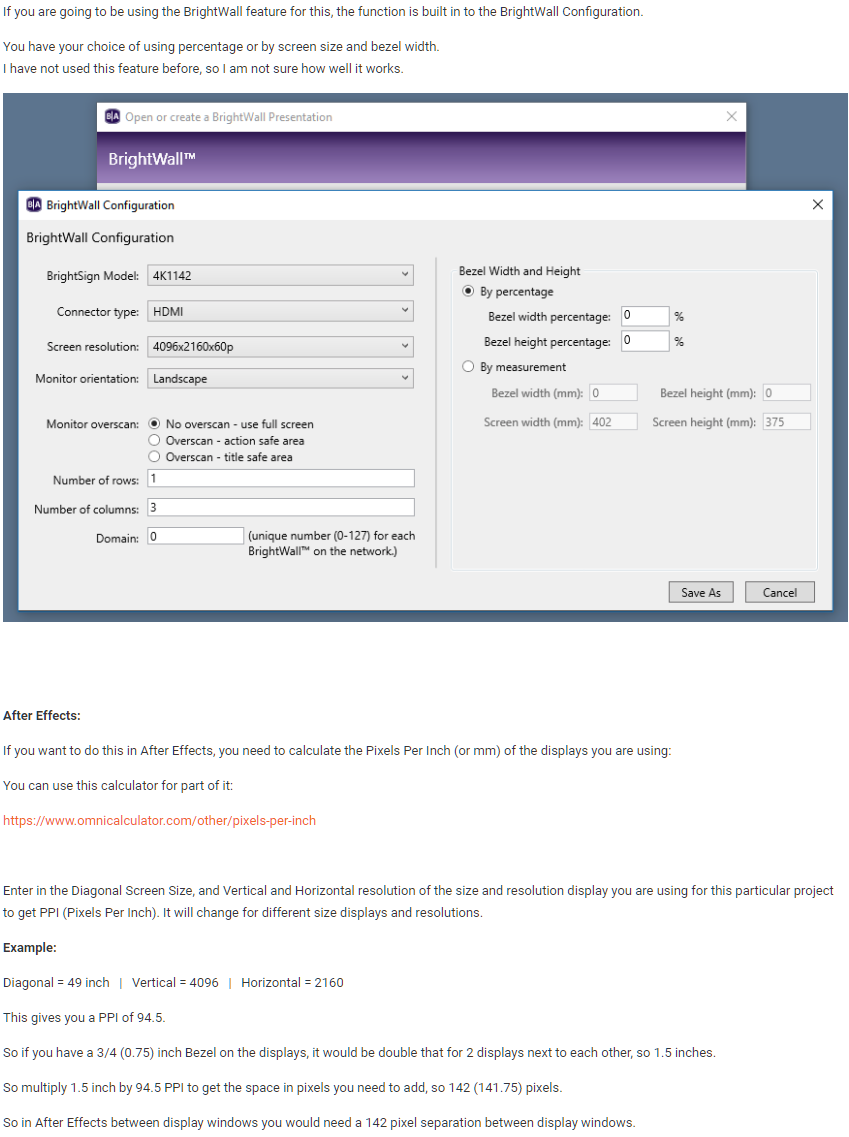
    Here is an image of what I posted (see below). I can only assume that the link to the Pixels Per Inch calculator triggered it for moderation. Since this is an image, the link will not be clickable.

    Unfortunately it may be many days before anyone from BrightSign looks at the forums and sees this.

    (BrightSign staff, please delete this post copy after you approve the one above that is pending approval. Thank you.)


    I hope this helps.

    John

  • 0
    Avatar
    Russel Tait

    To save you some work in AE, I would make the master content the exact screen res. I.e. 2 x 2160 = 4320 px wide.

    then make a new comp that has the additional bezel dims in it. so 4320 + 142 = 4642 px.

    then drop your original comp in place with half masked out and align to one of the comp. duplicate it invert the mask and align it to the opposite side of the comp.

    re-render and test.

    This way you only adjust the spacing comp and dont have to keep changing your master content.

    by the way this is a lot quicker to do than explain lol

Please sign in to leave a comment.