
I am trying to schedule a New Year Eve video that will play from 11:59 to 12:01. I am finding nothing that will let me run a presentation across 2 days.
Date
Votes
4 comments
-

JRB Technical So this might work, but I can't make any guarantees, if I remember later today I will set this up on a player to test at midnight tonight.
Schedule the event at 11:57pm for 2 minutes as normal. Save the schedule.
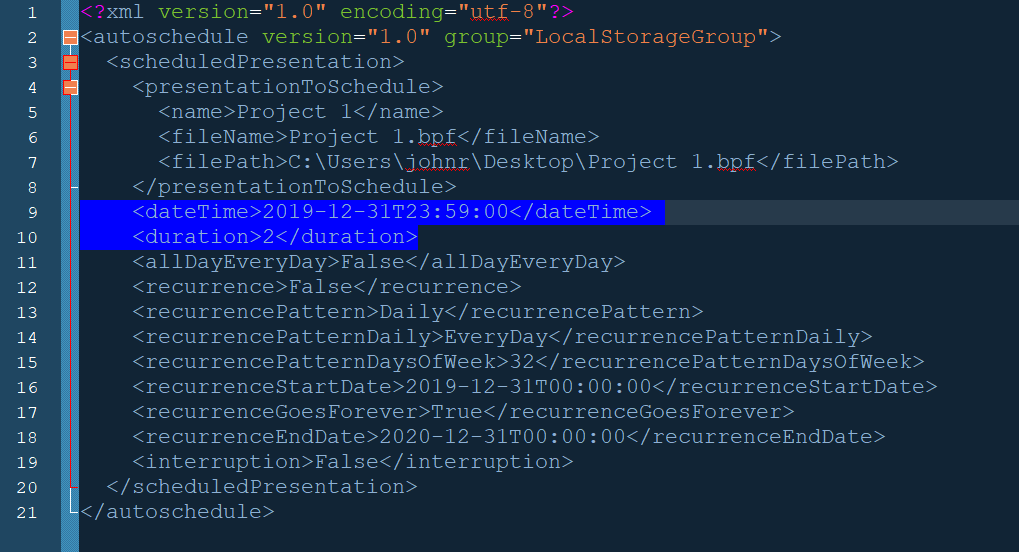
Open up the schedule file with a text editor. Find that presentation in the file, and change the start time from 23:57 to 23:59 (the schedule uses 24 hour time).
Re-save the file and then load the schedule back into BrightAuthor.
Because it only references the Start Time, and Duration, in theory this should work.
When you look at the schedule then in BrightAuthor, it will show 11:57pm to 12:01am, but it does not show up on January 1, so be careful not to start anything until 12:01am on the 1st. You can re-adjust your other scheduled item before this to end at 11:59.
If that doesn't work...
Not the preferred answer, but ran into a similar issue with another system years ago.
The solution ended up changing the clock time, in that case we offset the clock by 12 hours.
But you could probably just change the time zone by an hour or two on the BrightSign player to accomplish what you need.
Unfortunately this will not work if you have the BrightSign clock displayed in a zone. But if you need a clock zone and have a HTML5 capable player, you could do a HTML5 clock in that zone, and code change to the correct time zone to display the correct time.
Just do this for a few days for New Years Eve (of course test a few nights before), and then set back to correct time zone after. Depending on what else you have scheduled, you would need to offset other schedules to compensate for the offset timezone as well.
Good luck
-

Info did anyone ever really figure out how to do this? I have a video that needs to play from 7pm to 1am. There is no way to do this.
-

Victor A little late in commenting; just saw the post. Had a similar need a while ago and had the same idea as JRB Technical above to change the duration variable, but was concerned that this was not necessarily reliable. Then I contacted BrightSign support and was given workaround by Alex (shout out to him for the help!).
The suggestion was to create a presentation that uses Time/Clock events to start playback of a file (or files) specified in the event at a particular time (such as 7pm) and then follow that with another Time/Clock event that stops playback at a specific time (such as 1am). Unfortunately, the start and stop times are not date related, so it starts any time it hits 7pm and stops any time it hits 1am. So it's different than using BrightAuthor to specify playback from one date/time to another date/time. But, it does work to get playback to seamlessly cross the midnight threshold.
Hope this is useful!
-

Bright Scripters You could simplify by creating a video with duration of 2 minutes.
Use a Time/Clock event to start the video.
Use Media End event to switch back to other content or by switching to a different presentation.
Please sign in to leave a comment.