0

Exported PowerPoint VIdeos Are Now BLANK

Wondering if anyone is currently experiencing this.
Users usually create content by exporting their PowerPoint slides as an MP4 video file.

This method has been working for years, but recently it seems the exported video file shows up as a black screen on devices, even though the running LOG shows no BSPLAY errors.
At this point we suspect a recent Microsoft/Microsoft 365 update could be the culprit?

Appreciate any info or details anyone might have.

1 comment

  • 0
    Avatar
    Mark Richards

    You learn something new everyday. I've never considered experting a powerpoint to video to play on a brightsgin. Thanks for thev tip (:

    Testing it out to see if I can recreate youe issue using 365 powerpoint version 2601. The created video plays fine. I wouldnt rule out Microsoft to change this, but i'm assuming you've checked the following:

    1) The video plays fine on your computer?

    2) You dont start with a black slide that exported with a rediculous slide time to it appears to hang?

    3) Is the BS playing out a video screen resolution the monitor cannot handle?

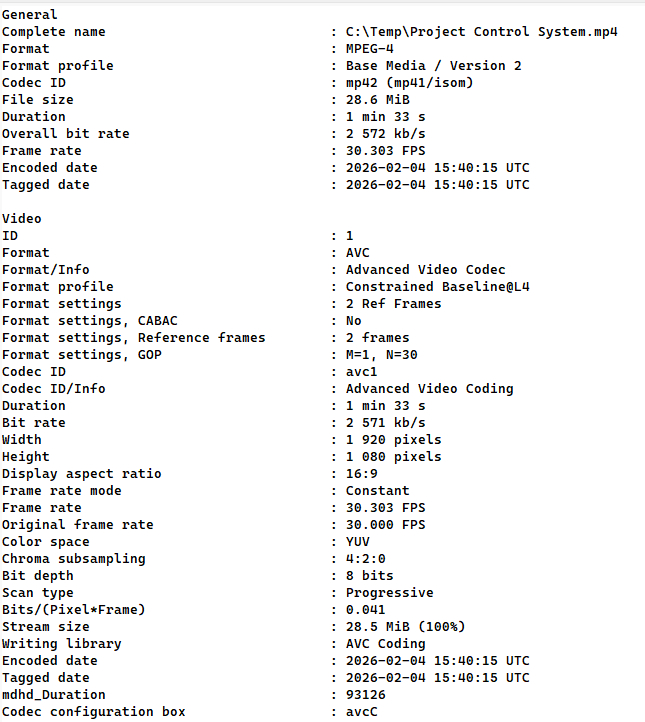
    4) What video settings does the powerpoint output it as?E.g: Mine used the following settings: (which does play on the HD1025 I tested with)

    Have you tried converting the ppt video to a known BS friendly codec with someithing like ffmpeg: E.G:

    ffmpeg.exe -i old.mp4 -c:v libx264 -b:v 20M -maxrate 20M -bufsize 10M -c:a aac -strict -2 -ac 2 -ar 44100 new.mp4

    Will create a constant bitrate version using 264 codec and aac audio. 

Please sign in to leave a comment.