0

having issue with hd224

So im running brightauthor connected latest version.

The device has an IP address and I can login to the web interface.

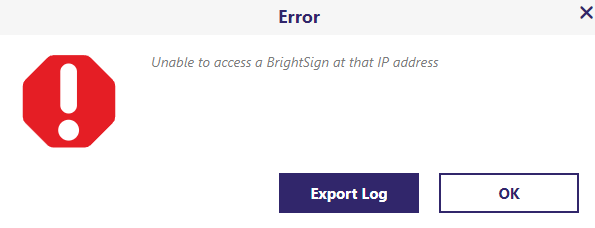
When I try to add the device to the brightauthor using the publish, selecting Local Network then the + sign to add the device, enter the IP of the device I get an error stating the device is not accessible.

I have verified the device is on Production OS: 8.5.64

I dont see anywhere to enter a username or password but cant get any connection from brightauthor.

Hoping someone has any ideas.

I did put the device and the computer on the same network.

I can ping the device web into it.

9 comments

  • Avatar
    Brandon Official comment

    Make sure the applied Device Setup has Include network configuration set under Network Configuration.  If the setup is applied with Use current player settings, you can get this behavior if the player has not already had a network configuration applied previously.

    _________________________________________________________________________
    Friendly reminder, the community forum is intended for user-to-user discussion.  It is not regularly monitored. For troubleshooting problems and to ensure a timely answer from a BrightSign representative, please submit a support ticket

  • 0
    Avatar
    itadmin

    where do I set this network configuration ?

    Is thi in the web console ?

  • 0
    Avatar
    itadmin

    the web page I get to shows nothing related to the network


  • 0
    Avatar
    itadmin

    It does look like the SD card in it has somethign on it, I want to start from scratch so should I reformat this so nothing is on it then go to the page at IP:8008 and try to do somethign there ?

    I tried usint this page and the set values but nothing seemed to happen.


  • 0
    Avatar
    itadmin

    this is the only error I see in the log.

    Uncaught SyntaxError: Invalid or unexpected token

  • 0
    Avatar
    Brandon
  • 0
    Avatar
    itadmin

    still getting tis error


  • 0
    Avatar
    itadmin

    I go to publish, select local network and then enter the ip address of the setup I created using your documented setup process.


  • 0
    Avatar
    Brandon

    This post has been converted to a support ticket.  Further replies will come to you via email. 
    _________________________________________________________________________
    Friendly reminder, the community forum is intended for user-to-user discussion. It is not regularly monitored. For troubleshooting problems and to ensure a timely answer from a BrightSign representative, please submit a support ticket

Post is closed for comments.