0

Problem with set Audio Output

Hi everyone,

I've been having this problem for a few days now.I'm setting up a system for a museum with five LS425s.

I need the audio to not come out of HDMI on any player, but only through analog.

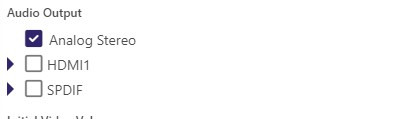
Usually, I just set the zone audio to Analog Stereo and disable HDMI1 and Spdif, but this time it doesn't work.
The audio comes out of HDMI on all players. It seems like no matter what setting I use, it has no effect.


I don't know what else to do!

Thanks.
2 comments

  • 0
    Avatar
    koena57jim

    Helllo,


    I’ve been dealing with this issue for a few days while setting up a system for a museum with five LS425 players. My goal is to ensure that audio only plays through the analog output and not through HDMI. Normally, I would configure the zone audio to Analog Stereo and disable HDMI1 and SPDIF outputs, which usually works without any problems. However, this time the settings seem to have no effect at all. No matter what configuration I apply, the audio continues to come out through HDMI on all players. It’s quite frustrating because the usual solution isn’t working, and I’m unsure what else to try at this point.


    Best Regards


    changehealthcare login

  • 0
    Avatar
    Javi Fuentes

    Hello everyone,

    I am experiencing the same issue with a BrightSign HD225 player.

    My setup is configured to use Analog Stereo audio output only, and I have disabled HDMI output. However, audio is still being sent through HDMI in addition to the analog output.

    Player information:

    • Model: HD225

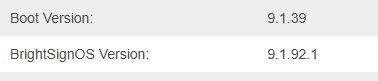
    • Boot Version: 9.0.155

    • BrightSignOS Version: 9.1.92.2

    Has anyone experienced the same behavior or found a solution?

    Any help would be greatly appreciated,

    Thank you.

Please sign in to leave a comment.