0

Author

Hi,

I use BA 4.6.0.15 and i want to know the compatibility with Windows 10.

First three or four times it was working fine. All of a sudden it allways crashes when i start the Author. No changes or additional Programs.

Can you tell me what to do with Windows 10.

Thanks for helping and a gas day

1 comment

  • 0
    Avatar
    Alex

    How do you start BrightAuthor? By double clicking on program icon or by double clicking on presentation file?

    The crash may occur if Bonjour program isn't installed on your PC. Bonjour is used by BrightAuthor to auto-detect local networked players. Bonjour is included in iTunes.

    Try:
    1. Close BrightAuthor
    2. Install latest version of iTunes for Windows http://www.apple.com/itunes/download/
    3. Open BrightAuthor and re-test

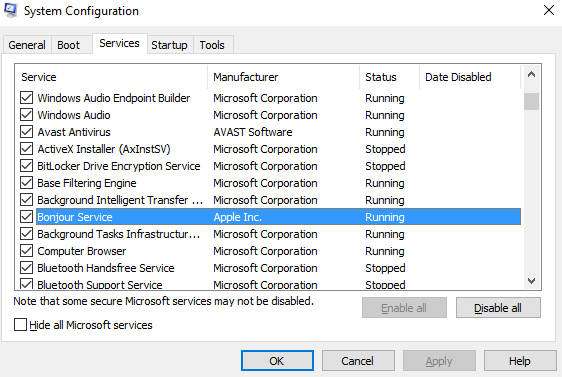
    Also, please verify that Bonjour service is started on your PC.
    Press Win+R keys, type msconfig and hit Enter, select Services tab, locate Bonjour service and make sure it's running.

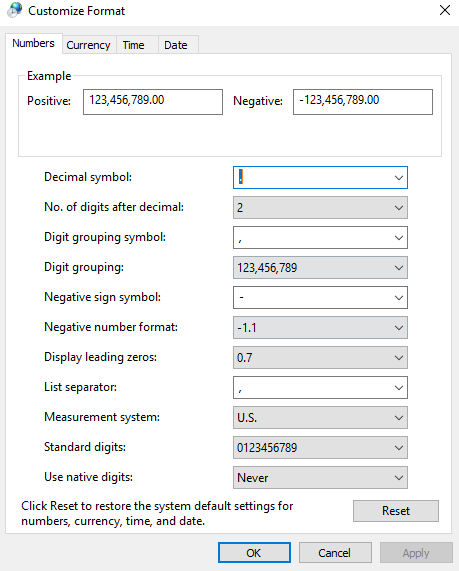
    Also, the crash can be caused by the regional settings on your PC.

    Try this method:
    - close BrightAuthor
    - go to Windows 10 settings
    - Time & language
    - Additional date, time, & regional settings
    - Region
    - Additional settings...
    - set Decimal symbol to dot "."
    - click Apply > OK
    - open BrightAuthor


Please sign in to leave a comment.