
We are trying to add a clock to our presentation but each slide is a different image and so a transparent clock would be very useful. Does anyone have any suggestions? The device model is HD 1023.
Date
Votes
5 comments
-

Alex Transparency works over video only. So you if convert your images to videos and then add clock zone above, clock can be made transparent. Transparency setting is available in the properties of clock zone. Look at screenshot below.
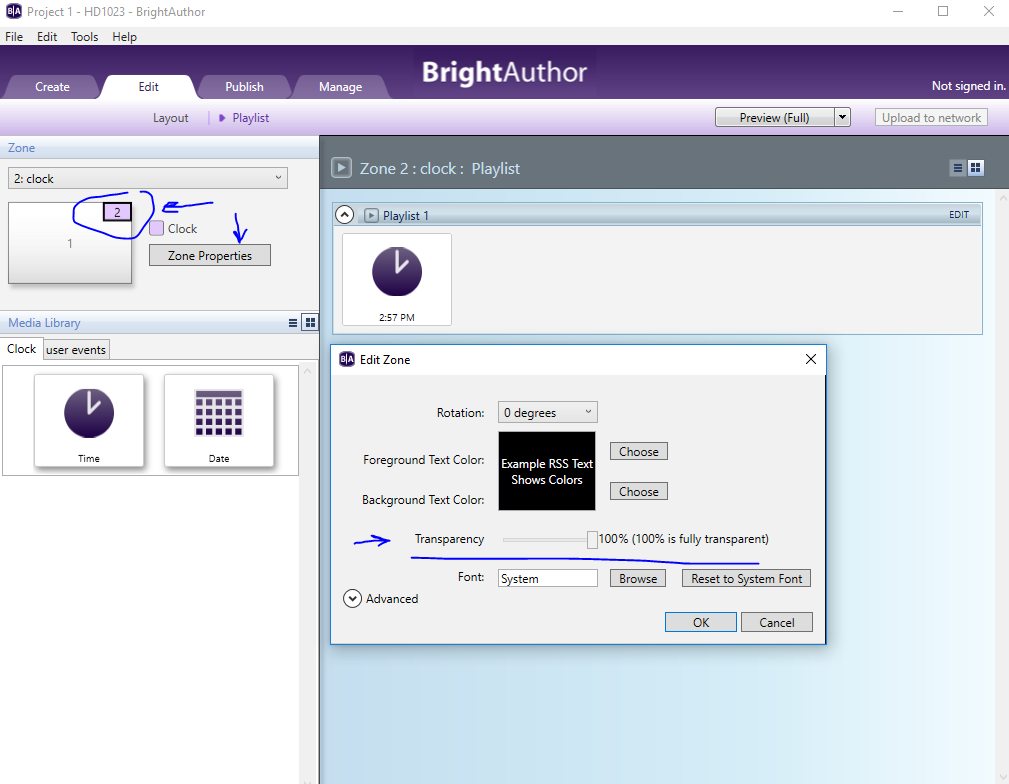
-

JRB Technical Since a Transparent Clock needs to be over a Video Zone, how can you have a full screen video background, a transparent clock, and a Image Only Zone for a transparent PNG overlay all at the same time?
If I do a Video only zone on the bottom, and try to add a Images zone on top, it will not let me add a Media RSS Feed to the Images Zone. It seems Media RSS can only be added to a "Video or Images" Zone, and nothing else. But you use up that option by having a video background so you can use the transparency on the clock.
It's all very frustrating. I need a full screen motion background zone, a transparent Media RSS zone, and a transparent clock zone. But looks like there is no way to do this.
I would give up the clock, and build the time onto all the images in the Media RSS zone in real time, but it seems I can't even do that.
Anyone have any suggestions?
-

Brandon @JohnLBV
What version of BrightAuthor are you using? I just verified that you can add a Media RSS feed to an Image zone in BrightAuthor 4.6.0.14
-
JRB Technical BrightAuthor 4.6.0.14 - Not sure what was going on, but it's OK now.
It got progressively worse, to the point BA would not let me add anything to any zone no matter what. Closing BA and then reopening did not work, but rebooting the machine and then opening BA did (Windows 10). I don't think I have ever seen BA act like quite like that before?
-

Myint Maung Kyan I changed the setting as you showed but it doesn't work for me.
Please sign in to leave a comment.