
I am displaying an external webpage on the brightsign. It requires a login to access the site that uses a standard html form. I do not control the website code. I can publish the site and login manually via a keyboard hooked up to the brightsign. but each time I publish a change or reboot the brightsign the login session is lost. Is there a way to auto login when the brightsign first loads.
Date
Votes
42 comments
-

Graeme Little Jeff,
Assistance appreciated.
Nothing appears in the Username and password and no error messages.
(Text has wrong username and password above for obvious reasons, but with the correct ones, still nothing happens)
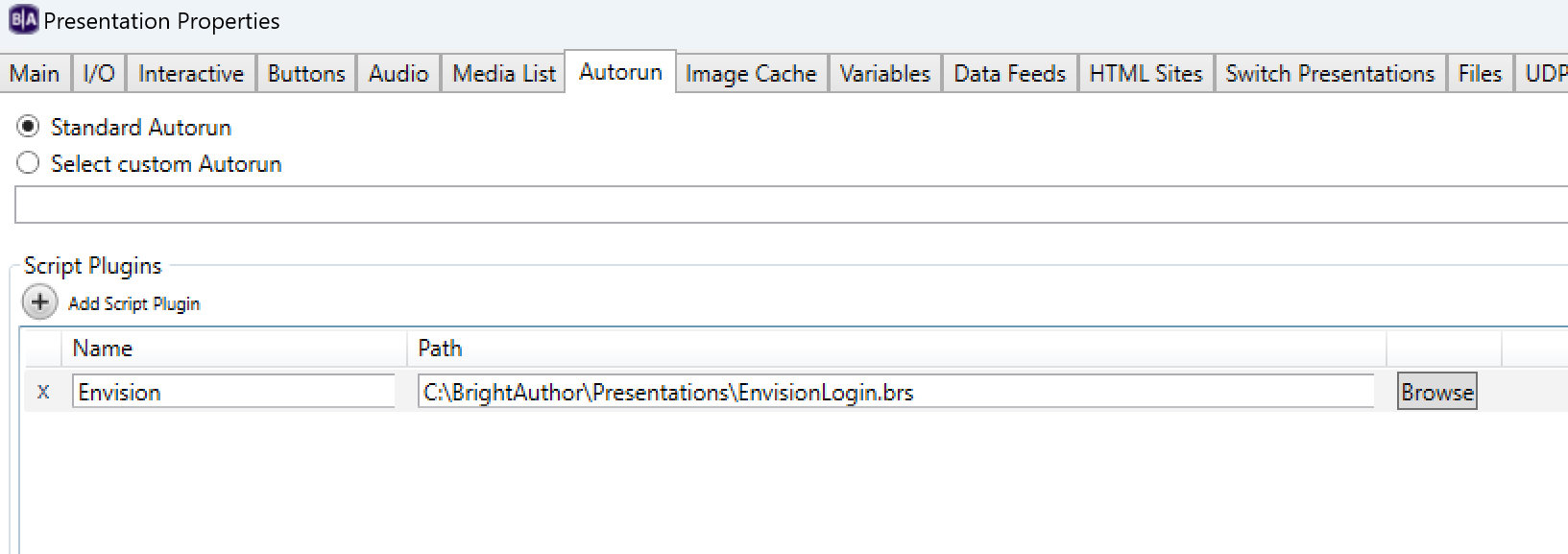
Have the file linked in Autorun and ttlogin.js is on the SD Card.
Graeme -

Jeff E Graeme,
Maybe the js is not getting loaded. You can try to put the script directly in to the InjectJavaScript method like this
Function sendWebLogin_ProcessEvent(event As Object) as boolean

        m.htmlwidget = FindHTMLWidget(m.bsp)
        print "htmlwidget ==>" ; m.htmlwidget
        m.htmlwidget.enableSecurity({insecure_https_enable : true})

      if type(event) = "roHtmlWidgetEvent" then
        eventData = event.getData()
            if type(eventData) = "roAssociativeArray" and type(eventData.reason) = "roString" then
                if eventData.reason = "load-finished" then
                        m.htmlwidget.InjectJavaScript("document.getElementById("username").value='a_username';document.getElementById("passwordfield").value='a_password';document.getElementById('submitbutton').click();")

                end if
            end if
    end if

    return false

End Function -
Graeme Little @Jeff, thank for your time but unfortunately the Username & Pword boxes do not want to complete with the passed data and Submit button function called.
I will have to leave it for now, again thanks for your help. -

Sverre Andersen Graeme, I will suggest that you debug your JavaScript in your browser.
Make sure the content within
m.htmlwidget.InjectJavaScript("")works if you execute it in the console of the browser, eg Chrome.
* Open your browser
* Navigate to your desired login page
* Press F12 to open "Web Developer Tools"
* Select the "Console" tab
* Past your script and press enter to execute.
You should be logged into your page if script is correct and working as expected. If not keep on debugging to find the correct adjustments. Look out for errors in the console window to get hints.
When script works you can return to your BrightSign presentation and test again.
-
Graeme Little Sverre, along with Jeff your assistance and patience is appreciated.
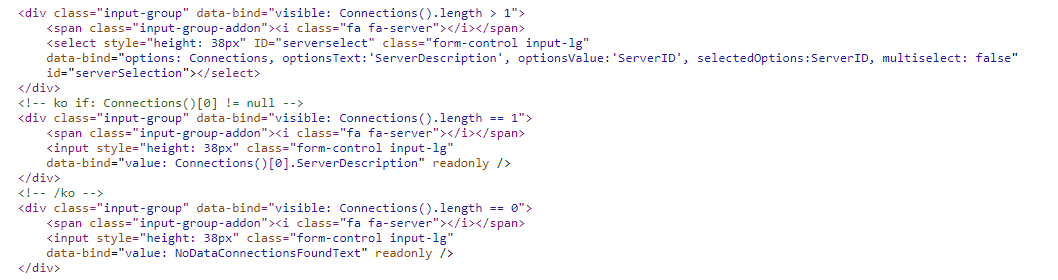
Getting closer now, issue was/ is I need to select a database from the dropdown.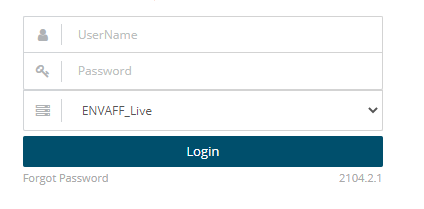
Once I have that field sorted I think I am there.
-

itsme Hi Jeff,
Thanks for the great BrightScript. I have a question. Is it possible that it only works once? I have different zones, but it only works for the first zone. It no longer works for other zones with HTML5 widgets. Do you see an easy way to make it work in multiple zones?
-
Jeff E @itsme
It's been a long time since I have done any brightscript work or debugging, I'm not even sure how to access the console anymore. You might need to have the script specify the zone index to find the htmlWidget?
-
itsme @Jeff E
Thanks for your answer. I rewrote your script a bit and can now manage logging in to multiple HTML widgets across multiple zones. This is the script I'm using now. In case anyone else needs it.
Function sendWebLogin_Initialize(msgPort As Object, userVariables As Object, bsp As Object)sendWebLogin = newSendWebLogin(msgPort, userVariables, bsp)
return sendWebLoginEnd Function
Function newSendWebLogin(msgPort As Object, userVariables As Object, bsp As Object)
'create the new objects={}s.objectName = "sendWebLogin_object"s.msgPort = msgPorts.userVariables = userVariabless.bsp = bsps.htmlwidget = invalid ' We'll use the FindHTMLWidget method to set this laters.ProcessEvent = sendWebLogin_ProcessEventreturn s
End FunctionFunction sendWebLogin_ProcessEvent(event As Object) as boolean
for each baZone in m.bsp.sign.zonesHSM'find the htmlwidgets in the presentationif baZone.loadingHtmlWidget <> invalid then
'Receive a plugin messageif type(event) = "roHtmlWidgetEvent" theneventData = event.getData()if type(eventData) = "roAssociativeArray" and type(eventData.reason) = "roString" thenif eventData.reason = "load-finished" thenbaZone.loadingHtmlWidget.InjectJavaScript("SD:/sendWebLogin.js")end ifend ifend if
end ifend for
return false
End Function -

Michael Butz Hi all,
nice to see that a lot of you already had similar problems to mine here. Probably, my case here is even easier than the ones above were, because in my case, the page I want to load simpy uses HTTP basic authentication.
But still, also with the examples you provided, I was not able to get it to work. The script I wrote and inserted in Brightauthor under "Presentation->Autorun->Script Plugins" doesn't seem to do anything. Dueto the fact, that I'm pretty sure that I'm pretty far off the right way, I guess it even doesn't make much sense to share the script here.Could somebody give me some guidance how to get started in a way that could work?
Thanks a lot in advance! -
itsme Hi Michael,
I think the easiest way would be to write the login data directly into the URL. This has already been discussed here:
-
Michael Butz Hi itsme,
thanks for your reply! After some further testing, I found my problem - had nothing to do with authentication. So everything good for me! Thanks again!
-

Kevin Gardner I have been at this for days now. I am using BrightAuthor:Connected.
I have used Chrome developer tools and have verified the MOD and am able to login using the console.
When I take this verified information and apply it to various scripts, I always end up in a boot loop. I have no video output. All I get are 10 red error flashes and documentation states this is a script issue. But I cannot tell what the issue is!
Function sendWebLogin_Initialize(msgPort As Object, userVariables As Object, bsp As Object)


    sendWebLogin = newSendWebLogin(msgPort, userVariables, bsp)


    return sendWebLogin


End Function


Function newSendWebLogin(msgPort As Object, userVariables As Object, bsp As Object)


    'create the new object


    s={}


    s.objectName = "sendWebLogin_object"


    s.msgPort = msgPort


    s.userVariables = userVariables


    s.bsp = bsp


    s.htmlwidget = invalid ' We'll use the FindHTMLWidget method to set this later


    s.ProcessEvent =  sendWebLogin_ProcessEvent


    return s


End Function


Function sendWebLogin_ProcessEvent(event As Object) as boolean


    for each baZone in m.bsp.sign.zonesHSM


        'find the htmlwidgets in the presentation


        if baZone.loadingHtmlWidget <> invalid then


            'Receive a plugin message


            if type(event) = "roHtmlWidgetEvent" then


                eventData = event.getData()


                if type(eventData) = "roAssociativeArray" and type(eventData.reason) = "roString" then


                    if eventData.reason = "load-finished" then


                        baZone.loadingHtmlWidget.InjectJavaScript("

            document.getElementById('login-emailAddress').value = 'Bryan.watson@domain.com';

            document.getElementById('login-password').value = 'password';

            document.querySelector('[type=\"submit\"]').click();

        ")


                    end if


                end if


            end if


        end if


    end for


    return false


End Function
Please sign in to leave a comment.