0

Default BSN Upload Directory for Presentation Media in BrightAuthor

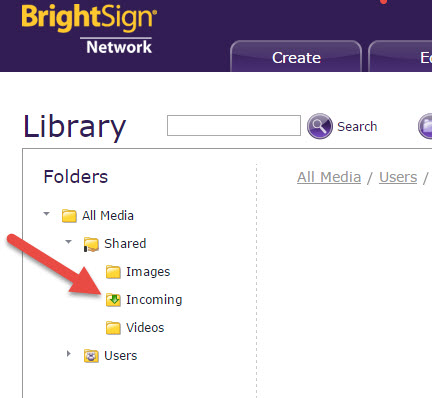
1. When presentations are created in BrightAuthor and uploaded to BSN, the directory images are dumped into the All Media-->Incoming-->Shared directory. This results in everything being dumped into one place. (See attached screen-shot.) Is this behavior by design or is there a way in BrightAuthor to specify the BSN directory to save assets to?

2. Is there any way for a user creating a presentation in BrightAuthor to choose an image not already in the presentation but existing on the BSN? It seems all media assets included in a presentation created in BrightAuthor must originate locally. Is that correct?

3. Is there any way for a user, including the original uploader, to download an image asset from the BSN? It seems that only copy/move/deletion is possible. Is there a way to download an image already present on the BSN via BrightAuthor or the WebUI?

Thanks.
3 comments

  • 0
    Avatar
    ^UD\_$

    1. You can navigate within the Library to the desired destination folder, and click the Add Media button there.

    2. You could reference media on BSN by its URL, if that makes sense. Not the most user friendly workflow.

    3. Downloading media from BSN is not a simple process AFAIK. If you must download a file from BSN, add it to a Live Media Feed. Once the media is in a feed, you can access the direct media url from a web browser, and download the media. You would then need to rename the file, to restore its name and extension. So yes, it is possible, but user friendly it is not.

  • 0
    Avatar
    Louis Warner

    >1. You can navigate within the Library to the desired destination folder, and click the Add Media button there.

    I'll re-phrase my question: In BrightAuthor, when uploading a presentation to BSN, is it possible to specify the folder that the media assets will be saved to?

    Probably not, but I want to ask as I will almost certainly be asked that question.


    >2. You could reference media on BSN by its URL, if that makes sense. Not the most user friendly workflow.

    Thank you. You mean the S3 URL like "http://bsnm.s3.amazonaws.com/acme/92751563c9c183cedd8fafe8c768cab"?

    Most if not all media assets in a BSN account will have a static URL like that? Is there a short-cut way to get the URL of a media asset on the BSN via the WebUI or other way, without having to expose it through something like a Live Media Feed (MRSS)?

    Maybe there is system tag that can be accessed in the WebUI that contains the BSN URL?


  • 0
    Avatar
    ^UD\_$

    1. Sorry I didn't read it carefully. One of the benefits of being ADD :)

    2. I'm not familiar with a way to get the direct url otherwise. I think that the URL is always valid, regardless of whether the media is exposed or not. Creating the feed, is just the way to get to that media. Once you have the URL to the file, you could remove the feed. (Have never tried that though...)


    Something is telling me that you are dealing with large files. If that is the case then, the use of feeds makes a lot of sense. You upload your large file, add it to a feed, and include in the presentation through a media list. When you publish such presentation, the process is instantaneous, because you are not moving any media. The media would then be downloaded to players, and be cached on the SD card.

Please sign in to leave a comment.