0

LS423 Creating zones

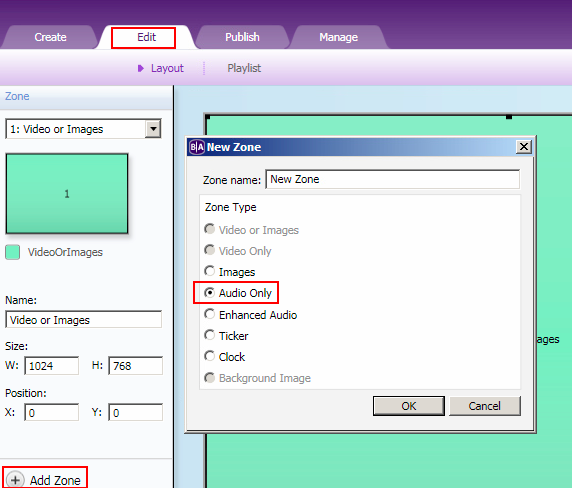
 In search of a solution for breaking into a looping video during playback, several posts discuss creating an audio zone that has Event Handlers. 

eg.  http://support.brightsign.biz/hc/en-us/community/posts/212569888-USB-Input-to-trigger-event

http://support.brightsign.biz/hc/en-us/community/posts/114096512333-Ls422-and-GPIO-button-trigger-event


I can't find any option in Brightauthor 4.6 to create this audio zone.   I'm using LS423 devices, latest firmware. 

Can anybody help? 

Thanks, Dan

4 comments

  • 0
    Avatar
    Bright Scripters

    Is that what you are looking for?

    What type of event do you need to interrupt your video?

    What do you mean by "Breaking into"?


    Bright Scripters
    Helping BrightSign developers wherever they are
    Skype: bright.scripters
  • 0
    Avatar
    Dan Sloane

    Thanks Bright Scripters.  I missed the options under the 'Layout' tab.  

    I have one video that runs on a loop once triggered. Upon a second read of the RFID tag (USB event), the video breaks out (/cut) back to the home state.   My challenge has been to get BS listening to the event whilst a video is playing. 


  • 0
    Avatar
    Bright Scripters

    With pleasure. Thanks for the feedback.

    Drop us a line, should you need further assistance.

  • 0
    Avatar
    Brandon

    Events on the current state for each zone (and the enclosing Super State, if present) are listened for, so you should add the USB event(s) to the video being played.

    If there are multiple videos, consider using a variable and Video Play File, or a Super State to avoid having to add the events to multiple states.

Please sign in to leave a comment.