0

Video or Image Overlay

I have a background image I want to use for my Brightsign.  I then need to overlay a Videos or Images Zone.  I cannot get it to work.  Every time I set the background image (using a png with transparency, png, or jpeg file) the only thing that shows is the video or images zone.  The background is just white.  

So then i though okay, let's try using a image zone for the background.  When I do that only the image zone (background) will appear and the video or Image zone with my other content isn't visible because it's in the background.  Even using a image file with transparency didn't make the video or image zone appear.  


What am I doing wrong?

5 comments

  • 0
    Avatar
    Bright Scripters

    In such situations, it helps to temporarily resize the zones, so they do not completely cover one another, but only partially overlapping.

    That way you'll be able to see how zones are layered.

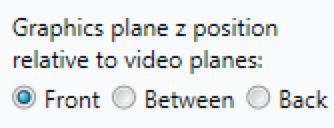
    Also check in the Edit tab -> Layout, how your zones are ordered in the plane z.

  • 0
    Avatar
    CDF Tech Services

    I've tried the graphics plane z position but when I set it for the video or images zone it will also change it for the other zones.

  • 0
    Avatar
    Bright Scripters

    The order at which zones are created matters.

    You may need to recreate the zones, at the order that produces the result that you need.

  • 0
    Avatar
    Scott Erickson

    I am working on a similar project (using an XD1030, so I can use 2 Video Zones) with multiple smaller image zones, a large video and Image zone for main content and a Video Only zone as my background zone. I found that the only way for me to get the BG Zone to stay in the background was to make it a Video Only layer and set it to Back Video Z position, and set my main content Video & Images Layer to Front Video Z Position and the Image Zones to Front Z Position relative to Video planes.

    I originally took my background image and made it into a 10 sec video file of the static image, but later added a small animation to the BG to give it some subtle movement.

    I have found similar issues that Bright Scripters mentioned about creating the zone layers in the correct order, and also found in the past that the most recent active layer will show on top if you have zones overlapping and they are all set to the same Z position. I would like to see more finite controls over Z position in the future for all layers so you could stack multiple Zones and give them a layer number to better determine there Z Position.


  • 0
    Avatar
    Eric

    Yes. This is a burden that has not been addressed yet. Also chewed on this today. I’ve made a feature request for this in the new future request section. Please vote.

    See link; https://brightsign.zendesk.com/hc/en-us/community/posts/115003263514-Zone-Z-position-index-setting

Please sign in to leave a comment.