0

Directories on BSN and Their Intended Purpose

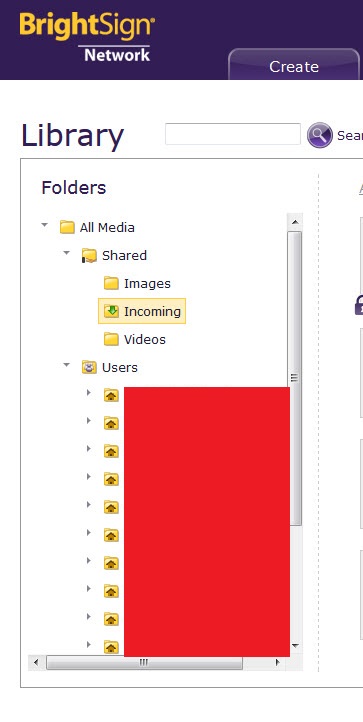
The WebUI shows a directory filesystem that includes a directory for each user as well as upper directories. BA seems to dump everything in one directory named All Media-->Shared-->Incoming.

I've found that tagged playlist creation in BA with media assets outside that directory causes problems.

My questions are:

1.) What is the intended purpose of those directories exposed in the WebUI? Simple storage for users personal files, future plans, etc?

2.) Should All Media-->Shared-->Incoming be the location for all media assets that could possibly be used?

3.) What are the BrightSign best practices for locating media assets? Should any media uploaded to the BSN manually through the WebUI always be placed in the All Media-->Shared-->Incoming folder?

4.) Is there any BrightSign documentation as to the the proper use of the directories?

It's not that I *want* to use them or *need* to use them, but in my role of supporting other users, should I tell people not to put any assets in directories other than All Media-->Shared-->Incoming?
 

2 comments

  • 0
    Avatar
    Alex

    Hello Louis,

    BrightAuthor uploads all media files to the Incoming folder in BSN Library.

    If you manage your network through BrightAuthor, you should not worry about moving the files across the folders.

    Currently multiple folder directories can be used in BSN Web UI only.

    All users with "view content" permission on the account can see media files in the Incoming folder.

    Content in the "Users" folders is visible only to a folder owner and account administrator - this is the intended purpose.

    In Web UI you can upload media files to different folders, and subsequently add them to presentations / dynamic playlists / live media feeds. You can also allow/deny access for certain users to certain files and folders in Library (Web UI > Settings section).

  • 0
    Avatar
    Louis Warner

    >In Web UI you can upload media files to different folders, and subsequently add them to presentations / dynamic playlists / live media feeds.

    That is what prompted the original post and why I'm seeking guidance on system behavior when including active media assets in user directories. I've discovered that tagged playlists created in BA, with media located in user directories with matching tags, won't save in BA. An error message is generated. We spent a lot of hours tracking the cause of the error down.

Please sign in to leave a comment.