0

HDMI in usage XD1230

Hello again all,


My project is going well so far, then of course, there is another request, minutes before the finish line. 

The Monitor I am using for the Brightsign presentation is currently being used as a display for a PC that is used for Demonstrations.


How does the HDMI input work, and how do you switch to it from the Unit? 

Let me give you an example...


Raspberry Pi3 or an intel compute stick, plugged HDMI out to the Bright sign, and Brightsign plugged into the Monitor. If the Brightsign is displaying a presentation, how can we switch it  on demand to the Rpi input?


I cannot seem to find anything regarding this.

Am I looking at this wrong in the usage?

11 comments

  • 0
    Avatar
    Allen H. Porter

    The HDMI In port can be used in several ways.  If you add the "Live Video" object to a hidden zone when creating a Presentation in BA it can then be activated by touch, UDP command (I use an Android app named WiFi TCP/UDP Controller to send UDP commands), GPIO button push, IR remote, etc.  Somewhere floating around is also a script that senses the HDMI cable being attached to the HDMI port and then un-hides the zone with the Live Video object.  To unhide a zone you are actually attaching a "resize zone" command triggered by one of the methods mentioned above.  You can also just have the Live Video object constantly present on the display as a smaller PiP off to the side.

  • 0
    Avatar
    Chris Stambaugh Ctr

    Hello,

    Thanks for the response.

    Ive been playing around and have managed to get the video to pass through during a presentation, literally worked 5 seconds before I got the email you responded.  I didnt know you could do that with the zones that is helpful for the future. 

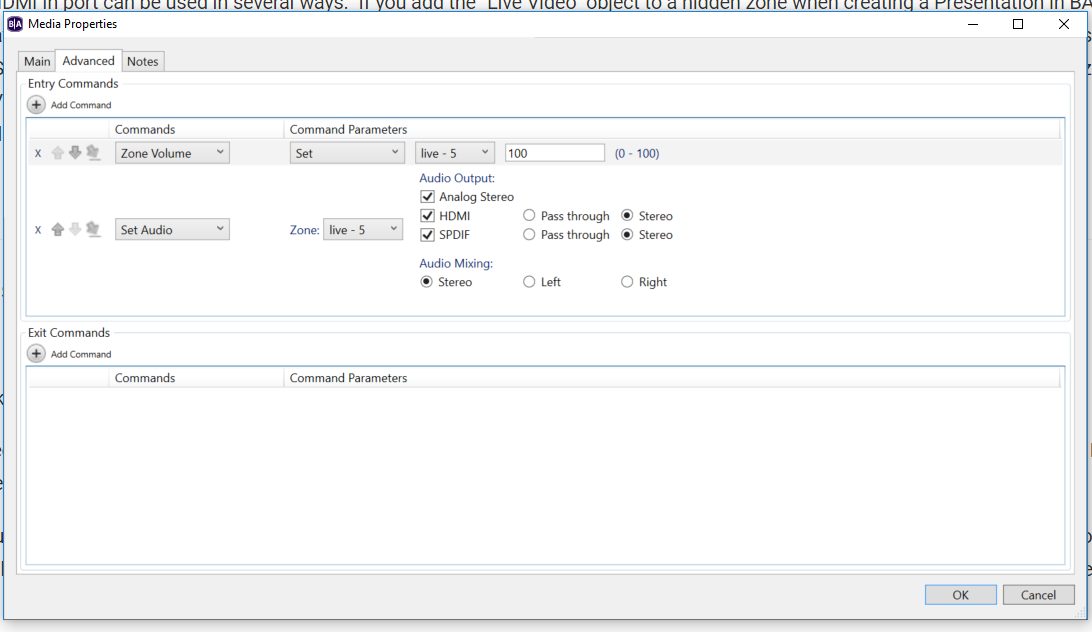
    I am using a laptop now for testing on the bench and it is resizing the video output, and for some reason, the sound will not pass through even though it is set to allow HDMI pass through. I think they may end up just having to switch the inputs on the monitor with an IR remote control. 

  • 0
    Avatar
    Allen H. Porter

  • 0
    Avatar
    Allen H. Porter

    I admit I can't recall for certain but I am fairly sure I have done audio through the live video in before.  We do not do a great deal of audio.


  • 0
    Avatar
    Chris Stambaugh Ctr

    I did get it to come through the audio output, but it was very tinny and scratchy. I have all my settings like that in the same zone as well. Its a head scratcher but Im going to just put it on the back burner for now, until they give me a new device to use as an input to try. 

  • 0
    Avatar
    Allen H. Porter

    I did a quick Presentation to test and the audio sounds good.  So whatever the issue, audio is supported and works as expected through the HDMI In.

  • 0
    Avatar
    Allen H. Porter

    Note of disclosure...I am using an XT1143.  I don't have a 1230.


  • 0
    Avatar
    Chris Stambaugh Ctr

    It could be my unit, It would not be the first time a component we had went all wonky (highly technical term right there!) out of the blue. I may try swapping it, we have 5 of them. 


    Thanks


  • 0
    Avatar
    Allen H. Porter

    Possible.  However, we have approximately 2500 players and I am not sure we have ever had an actual failure.  Lots of human errors and low quality content though.

  • 0
    Avatar
    Lyndon


    If your audio source is ac3, try setting the hdmi output setting to passthrough since the xd1230 won't decode ac3, just passes it through. This assumes your display will do the ac3 decode.


  • 0
    Avatar
    Chris Stambaugh Ctr

    Alas, I swapped units and nothing. I am hooking the HDMI from a PC right into the brightsign unit. and the Live video is the PC. 

    It seems the PC does not see the BS unit as a sound device. I have tried several. It is not just the videos that do not play, but the PC sounds do not play either. I have tried using HDMI out as well as analog stereo out. and both are enabled in the settings. 

Please sign in to leave a comment.