0

unable to complete set up

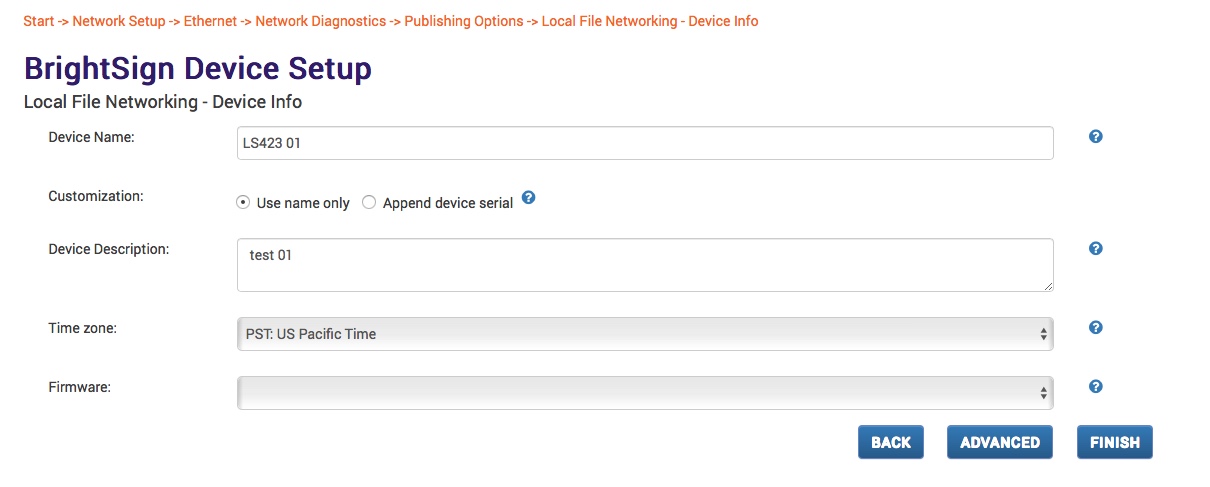
2 brand new devices. one LS423 and one HD223. both behave the same. both successfully play samples from Brightcove. during first set up using a web browser I reach the screen "Local File Networking - Device Info" and no choices are displayed when I click on the field "Firmware" Click on "FINISH" and nothing happens. See attached screen dump.
5 comments

  • 0
    Avatar
    Bright Scripters

    Are spaces allowed in Device Name? Not sure...

    Please try without the space, like "LS423_01". (Without the quotes)

    Please let us know how that went.

  • 0
    Avatar
    Lyndon


    If the player can't reach the internet, it wouldn't show the firmware in the dropdown. This is a limitation in the on unit setup that we're fixing so lack of internet access doesn't cause setup to fail.


    You can use brightauthor to create setup files, and save them to an sd card, and then power up with those setup files.

  • 0
    Avatar
    Scott Fuhriman

    Having the same issue with all 27 of our LS423 units.  Using BrightAuthor doesn't work either.

  • 0
    Avatar
    Scott Fuhriman

    Lyndon you said you were working a 'fix' back in April.  What's the status of this fix please?  ETA?

  • 0
    Avatar
    Lyndon

    That issue was fixed that same week.  We haven't had any other reports. There was a specific 401 error being reported in the system log for that issue. 


    IF you log into the player, ipaddress/index.html, and go to the log tab, please post the contents of the system log. So, the unit has internet access?  If you log into the player and go to the sd tab, it shows the sd card as recognized?


    Also, you can look at the javascript console for the on unit setup:


    http://unitipaddress:2999


    You can visit the console via that url and see where the setup is stuck...


    Another thing you can do is log into the player's ip/index.html to go to the the diagnostic tab, you do a network capture, for 60 seconds. It will save a pcap file to the sd card.

Please sign in to leave a comment.