0

HTML data persistence

Cookies, local storage, etc don't survive a reboot when loading an HTML5 page directly from the root (index.html).

How can data be persisted to the browser storage or file system from Javascript? Docs and forum posts suggest it may be possible by wrapping everything in a script and passing UDP messages, but this is much more complicated than just setting a persistent cookie or writing to local storage or even a system file if need be.

I'd like to avoid the need for BrightAuthor / non-HTML scripting if at all possible, as this project will need to be deployed across a large number of players with few or no support/maintenance opportunities.

9 comments

  • 0
    Avatar
    Bright Scripters

    At first glance that type of limitation, seems like a blessing to me, given that "this project will need to be deployed across a large number of players with few or no support/maintenance opportunities."

    What type of configuration are you trying to retain across reboots?

  • 0
    Avatar
    Brian Richins

    I am building a multi-language HTML5 app with localized video content (11 languages, up to 40 videos each), and need to ship pre-loaded players with the full set of content to 70-100 sites for standalone use. Sites have the potential to use multiple languages and need to be able to switch between them at will on any given day, but will primarily use a single language. 

    The setting I need to persist (as a string) is the default language, so site management can pick a default language locally from the UI, without direct access to the device (physical or remote), and recall it easily after end users have been working in a different language. This is easily done in-memory since the app is the only thing running on the device, but browser memory doesn't survive a loss of power or a reboot. Thus the need to persist to the file system.

    The other option is to set the default in a config file for individual sites, but this will add a lot of effort to the device setup & distribution and we often don't know what language a given site will want. We're aiming for plug and forget setup, so any configuration or user training steps we can eliminate will save a lot of time. Specifically, trying to avoid teaching devs/users about BrightSign-specific authoring/scripting, or editing files on each individual SD card (initially or on-site).

  • 1
    Avatar
    Bright Scripters

    Thanks for the detailed information. The picture is very clear.

    So is your presentation made of a single HTML5 state, and that's it?

    A way of saving the language choice, could be in a User Variable.

    Here is how to access User Variables from HTML

    Accessing BrightAuthor User Variables in HTML.pdf

    As for modifying User Variables from HTML, you can find the answer in the code of the page, from which the players allows setting values to User Vars, through the built in web server. Typically accessed through http://<player IP>:8008

    In your HTML code, it would eventually be http://localhost:8008/...

  • 1
    Avatar
    Lyndon


    Some recommendations from a colleague:

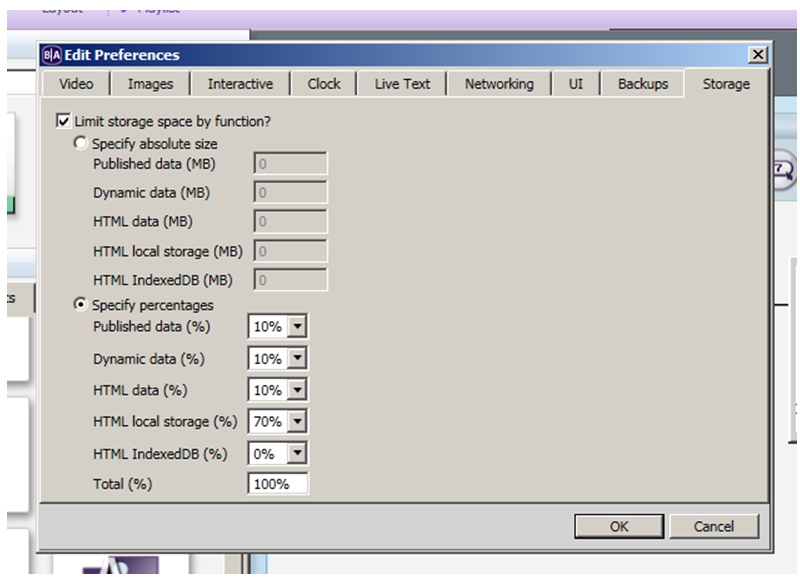
    1. You  need to first enable localstorage in a custom autorun since you're not using BA.

    2. You then need to use the HTML get and set functions to load and read from storage. Storage needs to be in base64 format.


    https://www.w3schools.com/html/html5_webstorage.asp


    If you put this autorun on the sd card with your index file it will enable local storage on the player. 

    https://www.brightsignnetwork.com/download/Tools/htmlautorun/autorun.brs


    If you were using brightauthor, you could enable it at the location below:


  • 0
    Avatar
    Brian Richins

    Thank you both for the helpful responses! Haven't been able to get either approach working yet; the approach Lyndon recommends sounds a little better suited for our needs though, since it involves less configuration / dev training.

    I downloaded the autorun and tried updating the URL, but couldn't get it working with local content. I tried "localhost", "sd/index.html", and similar variations; do you know if it's even possible to mix this autostart with the default local webserver that runs when 'index.html' is the only thing in the SD root? And if so how to link them?

    I also tried setting up players with the BrightAuthor settings shown in your screenshot, but it didn't seem to make a difference in localStorage access / persistence.

  • 0
    Avatar
    Bright Scripters

    If all you have on the SD is HTML content, then the built-in server may not be available, but I cannot say for sure.

    It is easy to find out, by trying to open a web page that lives on the SD card, from a browser on that network.

    http://yourplayerip:8008/thepage.html

    You may need to initialize http service from the autorun, with some code...

  • 0
    Avatar
    Lyndon


    I don't know if this was resolved, but we recently found that local storage seems to be broken in 7.0 firmware, but works fine in 6.2.147. 

  • 0
    Avatar
    Chris Dotson

    I am running the 6.2.62.3 firmware and cannot get the file to save onto the SD. 

  • 0
    Avatar
    Lily
    As for modifying User Variables from HTML, you can find the answer in the code of the page, from which the players allows setting values to User Vars, through the built in web server. Typically accessed through http://<player IP>:8008

    Is there any way to modify these variables dynamically through html (eg through a POST request to this URL)?

Please sign in to leave a comment.