0

Not understanding how a Brightscript Plugin works.

Hello,

I've spent the last week trying to wrap my head around how BrightScript works. I'm not having much luck. I am simply trying (for right now) to get a plugin to play videos on the screen, while reading user variables modified by the web server.

I found I could not add user variables from brightscript, so I had to create a Brightauthor project.

Then I found out I can't just make a blank project file and only send the user variables and plugin file.

Now I have a simple project with just an image and nothing else, but I can't seem to be able to clear the image and play videos from the plugin. The image remains on screen.

Can someone take a look at my project and plugin file and see what the issue could be?

Also, I read somewhere that there used to be a QC_Automate program that allowed quick re-uploads of files to the SD card. That would be SO useful right now.

P.S. Still can't upload files to this forum??

Here is a dropbox link with my files:

https://www.dropbox.com/sh/8scs7rq79itioel/AACxjcPDJSQvQlNAgmUO8h-Ua?dl=0

Thanks

Marcus.

9 comments

  • 0
    Avatar
    Bright Scripters

    Hi Marcus,

    Can you share more information about the application requirements?

    Also, plugins typically communicate with the BA presentation via plugin messages.

    Your presentation should be authored in a way that it would respond to plugin messages events.

    I can look at your files, but would like to know more about the end goal.

  • 0
    Avatar
    Marcus Garfunkel

    Bright Scripters,

    I thought about creating my own autorun.brs, but like I mentioned, with that there is no support for user variables (database, web server).

    My goal is to play video files in sync with the RTC. So there will be (24) 1 hour video files. Upon boot up, it will begin playing the correct video file (I.E. "3pm.mov") and seek to the correct location (I.E. 2,054,000ms if it happened to be 15h34m14s). When the current video ends, it will automatically start playing the next video file, resyncing as best it can depending of the delay in the loading the next file, since I don't believe it can be seamless.

    The user will have the ability to change the clock through the web interface (I was thinking of using user variables for this, I.E. Hour, Minute, Second). And event will trigger when ever the user variables are changes and the video will be resynched accordingly.

    Thanks for the quick reply.
    Sincerely,
    Marcus

  • 0
    Avatar
    Bright Scripters

    Very interesting project.

    From my experience, the combination of BA and a plugin gives you enough freedom and features out of the box, that you'd otherwise have to code yourself, by creating your own autorun.brs.

    What I have in mind is a plugin that would receive a message, and would return a message that is picked up as key by a video play file. The later is a magical state, that you can do a lot with.

    Once the correct video file is playing, we would need to figure out how to fast forward to the correct position.

    Seemps possible.

    What is the type of content that you intend to play as video?

    Can you share any visuals?

    You can also email stuff to support@brightscripters.com


    Storage capacity, and type of file system is also a concern.

    How large is your 1 hour video? 

  • 0
    Avatar
    Marcus Garfunkel

    I'm not sure what you mean by "picked up as key by a video play file". Is that a type of "state" in BA? Do you know how to access the roVideoPlayer objects within the zones built by the BA project from within the plugin script? There seems to be no documentation about what is passed to and actually accessible by plugins.

    Right now I'm just using 1 minute videos with time code display for proof of concept. The production video files will be over 4GB each so I'll have to use a 128GB sd card formatted as exFAT or NTFS, -or- use an external USB drive of some sort.

  • 0
    Avatar
    Shaun

    Hi Marcus,

    Check out the attached Google Drive folder. It is a very old plugin but should still work...

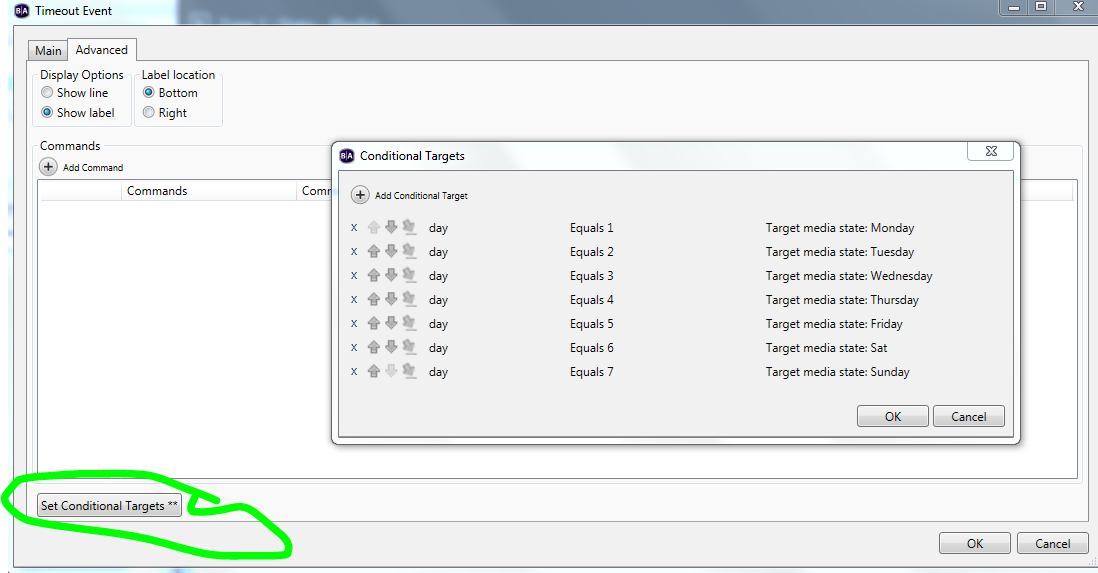
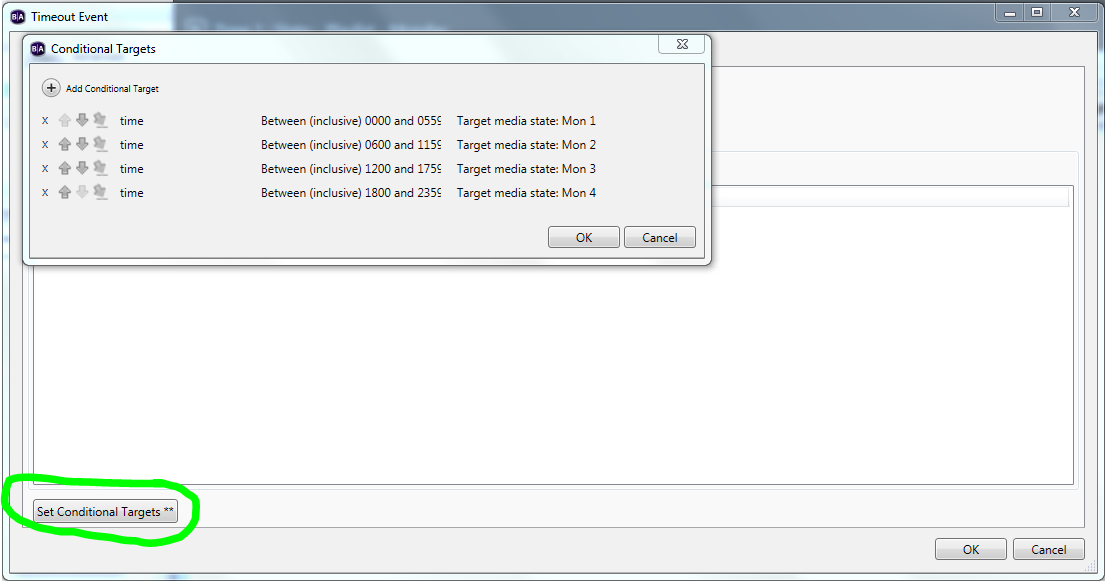
    On boot it checks the day and time and places the content in the correct part of the presentation content and updates the variable. It would be fairly trivial to make your video file sync when it has entered the correct state. Let me know if you can't mod the plugin and I'll take a go at it as it seems like a good extension of the plugin.

    https://drive.google.com/drive/folders/0B4AICAjLEWKyTlhlQ1c4VUJPcWM?usp=sharing

    Originally made it because no function of a BA presentation assumes the player can boot at anytime.

    Cheers, 

  • 0
    Avatar
    Shaun

    Sorry some notes....

    Uses 2 x variables "day" and "time" and the variables update at 1 minute intervals I think...It has been awhile.

    And tests both using conditional targets.

  • 0
    Avatar
    Bright Scripters

    Few more thoughts.

    Setting the time and time zone is easy from the diagnostics web server page.

    Very easy to miss...

    Will your player have access to a time server?


    Also, here is how you can move the video's "playhead".

    s.bsp.sign.zoneshsm[zonenumber].videoplayer.seek(timeInMs)

    First zone number is 0.


    You should be able to handle all playback from the plugin, or a custom autorun.

    There would be a single function, call it say, playmyfile().

    The function would check the current time, and pick the video file by the hour value, seek to the position according to the minutes and seconds values, and play.

    When the video ends, it generates an event that you would need to respond to, by calling your function again.

    That process repeats itself.


    For storage you could use SSD.

    https://www.brightsign.biz/key-features/m2-interface


  • 0
    Avatar
    Marcus Garfunkel

    Hey guys,

    This line here:

    Also, here is how you can move the video's "playhead".
    s.bsp.sign.zoneshsm[zonenumber].videoplayer.seek(timeInMs)
    First zone number is 0.

    really cleared a lot up for me. I've searched everywhere in all the documentation and could not find any information on how you came up with this. But it works, so thank you! Maybe people who want to script just need to sit down with a LARGE bottle of wine, a fireplace, and read the entire autorun.brs file sometime over the winter? Ugh..

    I am starting to piece things together now. I should be able to accomplish everything I need from within the plugin. And I made a "blank" project by just adding a single empty "Super State" into the BA Project :)

    Thanks for the help everyone.

    -Marcus


  • 0
    Avatar
    Bright Scripters

    Thanks for the feedback brother Marcus. We like happy closure here.

    You'll need more than a single bottle of wine... :)

    Besides reading the BA autorun.brs, making friends with the debugger, and digging into objects, can be another useful resource in some circumstances.

    Merry Scripting!

Please sign in to leave a comment.