I use BrightSign LS423.
I want to switch ON / OFF via LAN.
Does BrightSign support Wake On LAN feature?
Sorry my bad english beause I'm japanese.
I use BrightSign LS423.
I want to switch ON / OFF via LAN.
Does BrightSign support Wake On LAN feature?
Sorry my bad english beause I'm japanese.

You English is better than my Japanese so don't worry about that :)
That is a very interesting question, which I cannot answer, but let me ask you this:
Do you need the player to be turned off completely, or will it be enough to put the player in a mode, where no video is sent out?
BrightSign support a way to put the player in energy saving mode, so no signal is sent out. LCD panels and projectors can then go into standby mode, when no input signal is detected.
I hope that helps somehow.

Thank you answer for my question!
I had not known about energy saving mode. I think it's useful for some situation.
I describe for my BrightAuthor project, this project control three LS423.
They play movies for projection mapping that were calibrated and blended.
Now I make simple Windows application sending UDP message for BrightSign. In this application, I want to make reset command for three BrightSign. Reset command means reboot three BrightSign.
I heard from my seniors of the same company when I control some BrightSigns in one project, a parent one must be turn on in the last. (My seniors are not familiar with BrightSign and programing, she had not known UDP.)
I want to reboot two child BrightSign and some seconds later reboot parent BrightSign.
I hope there will be some way to reboot...
Your plan sounds good.
Once you get more involved with BrightAuthor, you'll see that there are other ways to restart the video, other than rebooting the players.
Until then, here is how you would reboot the player with a UDP command.
Lets show your seniors some BrightSign magic :)
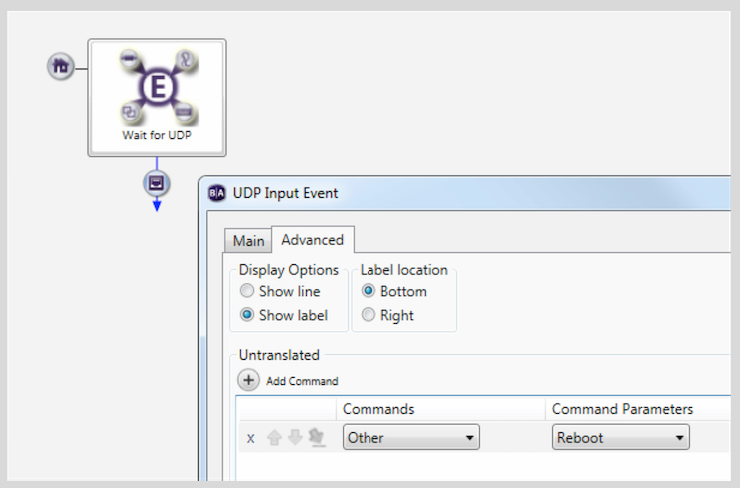
WOW!
It's a very simple and very easy and very amazing solution for me!
BrightSign is really attentive to my needs...
Thank you very much!!
I'm glad I got you excited :)
A lot is possible with BrightSign, once you start exploring.

Hi,
Following up on the above thread... I need to turn on/off LS423 units over LAN, or turn on/off the signal so attached projectors will turn on/off - can you confirm how to do this please?
I can see a reference to "BrightSign support a way to put the player in energy saving mode, so no signal is sent out. LCD panels and projectors can then go into standby mode, when no input signal is detected." but I can't see an explanation showing how this is achieved.
Thanks in advance!
Can't find what you're looking for?
Contact support