0

ssh session hangs when logged in

I added a script named enable_ssh.brs to my sd card and restarted my BrightSign player (HD3 1023). The content of the file was as defined in this link:

http://docs.brightsign.biz/display/DOC/Telnet+and+SSH

When loggin in to the player with ssh, the session freezes. The only text displayed in the terminal is "BrightSign HD1023 35D68U002103 v6.2.33".

I can't even kill the session with ctrl+c. Is this really how it s supposed to work? What I want to do is to reach the shell of my player.

12 comments

  • 0
    Avatar
    Lyndon

    if the script is named that it won't run..

    So, the player's just booting to the default logo screen.

    If you want to actually run the script you'd have to name it autorun.brs.

    Then it would run. You could then remove it, and power up with what you're normally playing, and you can connect to the player via ssh.


  • 0
    Avatar
    par

    Great, that works! But switching autorun.brs and back feels a bit time consuming. BrightAuthor creates a 31455 lines long autorun.brs. Is that not needed after the first bootup? Or do I need to put it back? I have tried to add the ssh code to the BrightAuthor version of autorun.brs but that did not work.

  • 0
    Avatar
    par

    I might be confused here. There are a lot of pieces that I'm not able to fit together. What I'm trying to accomplish is some kind of base autorun.brs that I can use in to install several BS players that is enabling SSH.

    I first created the normal setup files with help of BrightAuthor. I opened the created autorun.brs and tried to add a sub routine that would enable ssh. But that hang the bootup. Removing the SSH subroutine did not make the BS player to bootup.

    So I recreated the autorun.brs with help of BrightAuthor. Inserted it into the BS player and it booted up. After this I opened up autorun.brs and inspected it. It was around 30k lines long. The autorun.brs that came out from BrightAthor was not that long. Is the BrightSign player modifying the autorun.brs file during bootup? Or am I just confused?


  • 0
    Avatar
    Lyndon

    You can use a plugin, and attach the it to a published brightauthor project. 


    when you create setup files, there's a setup autorun, that's short. Once it does its job it's deleted and replaced by the autorun used in the initial publish. The 30k file is the main one that does all the playlist parsing and processing.


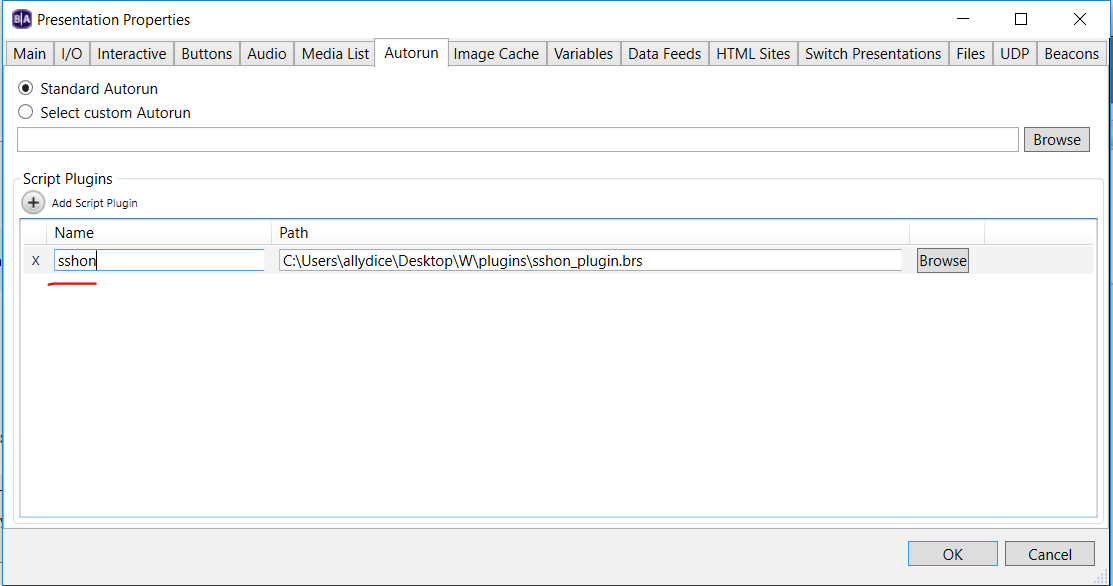
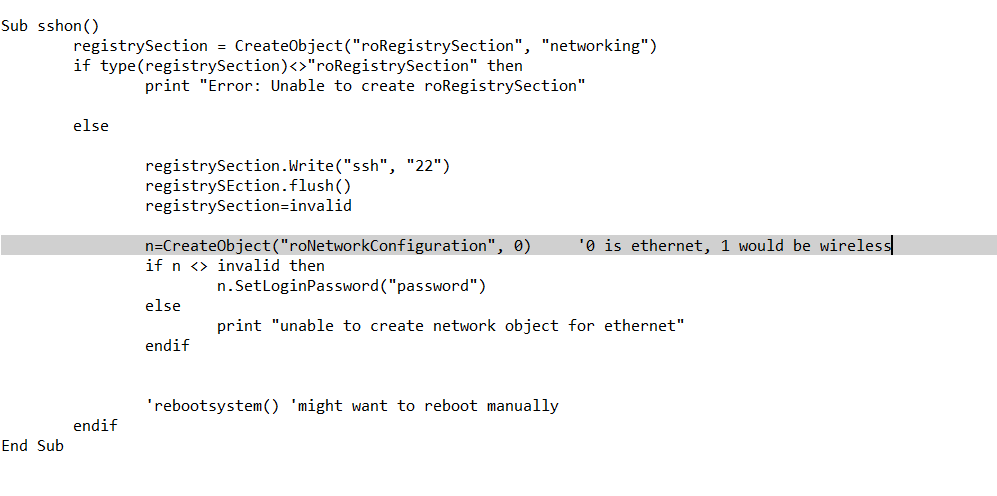
    Here's a plugin that was originally used for turning on telnet. I've done a search and replace to change telnet to ssh.  I added in the code you should need for telnet. I haven't tested it but this is what you'd need to be able to attach the plugin to a brightauthor published project, under file, properties, autorun, plugin..

    https://www.brightsignnetwork.com/download/Scripts/sshon_plugin.brs

    The player needs to reboot after the setting's applied to test this. 


  • 0
    Avatar
    par

    Seems like there is something wrong with the plugin you attached. When trying to ssh in to the player I get only this input: "BrightSign HD1023 35D68U002103 v6.2.94"

    Also, checking the log.html on the debug server I can see this:

    "Plugin for sshon is invalid".

    But as I understand it, it is not possible to create a autorun.bsr that can contain the "normal" setup and turning on ssh at the same time? That will probably be a pain for me since my boss bought a large amount of brightsign players that he wants me to put in use. I was hoping that I would be able to streamline as much as possible. At least the initial config, like turning on ssh and Bonjour. Then I would be able to at least just put in the sd card once and then be able to access the player.

  • 0
    Avatar
    Lyndon


    is this the unit you already enabled ssh on? I'll check if I can duplicate the plugin error. 


    with the plugin, you publsih some default content with setup files. You open some default project in ba, then attach the plugin, then go to publish, local storage, and chose to publish with setup. this process will load your project  at startup while in the background try to complete setup...


    but, even if you didn't want to use a plugin you could still do this.


    You can have our specific custom autorun.brs. 

    You can rename the autorun.brs from the setup files to something like autorun-next.brs.

    At the end of your custom autorun, you can make three calls:


    Deletefile("autorun.brs") 'delete your custom autorun file

    CopyFile("autorun-next.brs", "autorun.brs")  'rename the original setup autorun from autorun-next to autorun

    RebootSystem() 'restart the player

    So, you'd run your special script, delete it, switch to the standard autorun for setup, then reboot and let setup run normally. 


  • 0
    Avatar
    par

    Thanks!

  • 0
    Avatar
    David Bird

    The script worked for enabling access. Previously I would get a "connection refused" message. However, now I receive a "permission denied message". 


  • 1
    Avatar
    Matt Cunningham

    This is an old post, but I'm having the same issue.

    When I first run the ssh script and reboot it works and I can successfully login, but after a time it stops working and I get the same response when attempting subsequent logins.

       login as: brightsign
       brightsign@10.58.100.156's password:
       BrightSign XT1144 D7E93N000836 v8.0.69.2

    That's all I get, no prompt.

    I think I may have narrowed it down after a few goes - after resetting and re-running the ssh script, I run the "log" command after which the system no longer responds.  Not sure if it's related, but that's where I'm at.

    BTW, it would be really helpful to have enable/disable telnet/ssh on the diagnostics webserver tab...

  • 0
    Avatar
    Lyndon

    The ssh connection gives you access to what you'd have if connected to serial. So, any output sent to serial, like a print statement, would show up on the ssh connection. Is there something specific you're looking to do? If you're running a brightauthor autorun file with debug enabled, hitting the svc button on newer players or gpio12 on older players would exit to the brightscript debugger. 

  • 0
    Avatar
    j b

    I'm also trying to ssh into my Brightsign (XC2055) and once logged in just see the model number and can't type anything. I've configured ssh properly in my autorun file.

    I would like to access the filesystem via the command line. Is this possible using ssh? If not, what is the intended use of ssh'ing into a Brightsign if it's read-only?

  • 0
    Avatar
    Brandon

    SSH and telnet provide the serial console output, not a separate shell session.

Please sign in to leave a comment.