0

Storing Live Text data in memory

I'm trying to show some text and image content using RSS feed and it's working ok.

I like always to simulate the situation when the player loses the connection and there is a reboot. Just to asure that the player will be always displaying content.

In this case, when I try that, the image from the RSS feed remains (so I guess that is stored in memory) but the text doesn't. I would like also to have the text stored so it will be display though the conecction is lost.

Thanks,

Carlos

9 comments

  • 0
    Avatar
    Bright Scripters

    Are both images and text from the same feed url?

    Can you post the url so we can examine?

  • 0
    Avatar
    Genuix Audiovisual

    Hi,

    there are two different files: one for the images and one for the text.


    Yo can find them here:


    http://genuix.es/31-8-17/Imagen.xml


    http://genuix.es/31-8-17/Texto.xml


  • 0
    Avatar
    Bright Scripters

    I have not fully tested this hack, so try this at your own risk :)

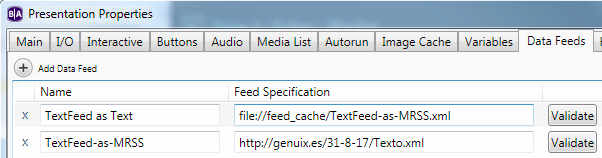
    On the SD card there is a directory called feed_cache in which MRSS feeds are being cached. When a feed is set to content usage as Text, the feed is not cached in feed_cache. What you could do is set the feed for content usage as MRSS, just for caching. The XML will be cached  in the feed_cache directory, so you should be able to define a second Data Feed that reads the cached feed as a local file.

    Let us know if that worked for you.


  • 0
    Avatar
    Genuix Audiovisual

    Thanks for your reply.

    I have checked. In normal conditions it works, but when the connection is lost and the unit is rebooted the text content is missing.

    It's strange since I check the SD and the file TextFeed-as-MRSS.xml is created in the feed_cache directory and it remains after the reboot


  • 0
    Avatar
    Bright Scripters

    It is working here.

    I've disconnected the network cable, and rebooted. The Text is showing in an RSS on a Ticker zone.

    If you post your presentation, I could take a closer look.

  • 0
    Avatar
    Genuix Audiovisual
  • 0
    Avatar
    Bright Scripters

    It is working offline after a few correction made to the presentation.

    Please check how you assign the fields in the Live Text

  • 0
    Avatar
    Genuix Audiovisual

    Yes... It's working. I realized about the mistake asigning the fields.


    Thank you

  • 0
    Avatar
    Bright Scripters

    Perfect :)

    Remember that that is sort of a hack, so test well.

Please sign in to leave a comment.