0

Fade audio in video by GPIO

Hi!

I would like to add a little smoothness to my project, please. The project works but it changes volume a bit too sharp/fast. Is there any way to add a fade feel to the changes in a videoloops audio levels triggered by GPIO?

Project description: My project changes the audio volume in a videoloop when a motion detector triggers on and off. I use "connector volume" and "set audio" function triggered via two ports in GPIO on a xd1033. The sound goes from 20% to 80% when visitor enters triggered area and then back to 20 when visitor leaves area.

Is it possible to make the audio changes smoother? I use brightauthor and have no scriptskills.

thank you

/Nils 


10 comments

  • 0
    Avatar
    Bright Scripters

    Here is how to fade the audio using BrightAuthor.

    Ingredients

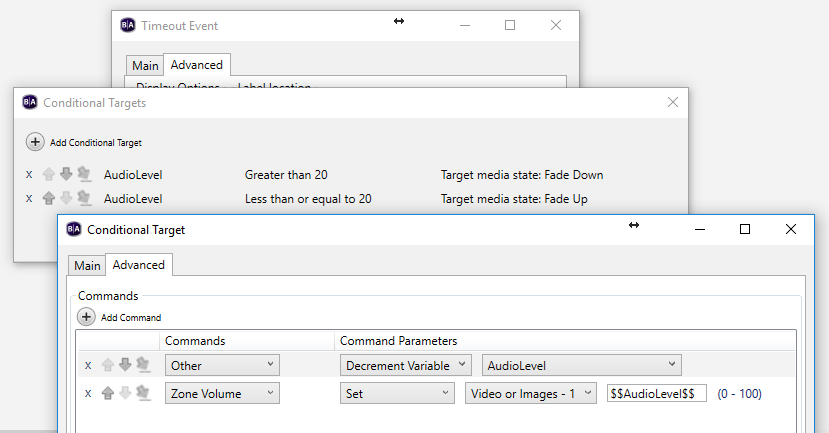
    User Variable named "AudioLevel", initialized to the default audio level 80. Will be used to control audio level

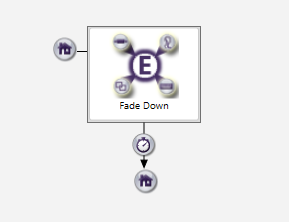
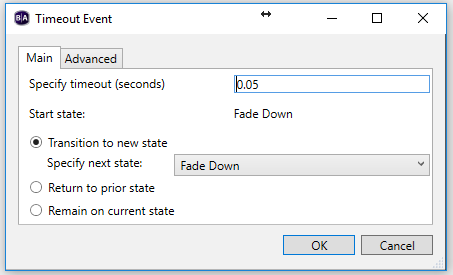
    Timeout Event set to 0.05 seconds, or similar value. That would be the time interval between volume change during the fade process.

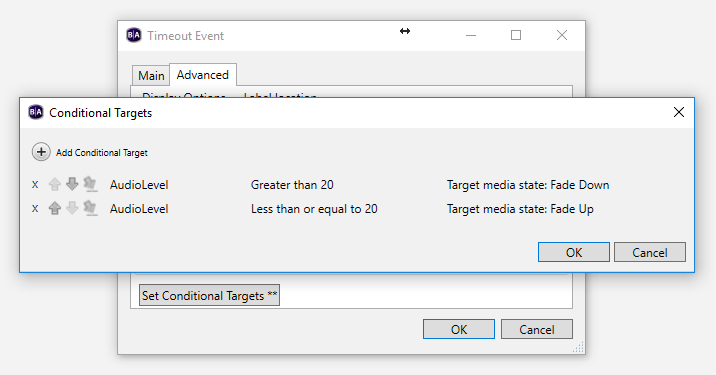
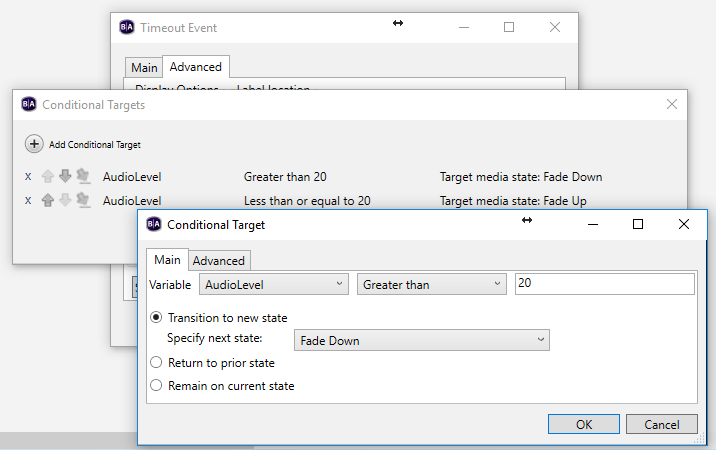
    Conditional Targets in the Timeout Event.

    Conditions:

    If AudioLevel greater than 20, decrement AudioLevel, and set the zone level to the value of AudioLevel, using $$AudioLevel$$

    If AudioLevel less or equal to 20 stop fading (transition to a different state)


  • 0
    Avatar
    Nils Marklund

    Thank you!!

    Will give it a try.

    /nils

  • 0
    Avatar
    Nils Marklund

    Hats off! Thank you for great instructions! It' took me a while as I had to figure out the whole user variable thing.


    As it happened I made three different  mediastates/eventhandlers. Don´t know if it is necessary or if there are other better ways to do it, but hey, it works!

    My movement sensor acts as two buttons, 1 and 2, triggered by a relay set as normal closed. Button 1 acts upon push and button 2 upon release.

    Posting a pic of project as it may help someone else. Or if someone has a better way they can correct me.

    Thanks!

    /Nils


  • 0
    Avatar
    Bright Scripters


    I found that it helps managing future changes, by separating visible media from control related elements.

    You could add a second zone, and place the event handlers in.

    A zone typically contain visible media, but is not required to.


  • 0
    Avatar
    Chris Russell

    Hi - I have tried using this method to fade the audio on a playing audio track when a button input is received, then move on to another track. When this track has completed, it should loop back to the initial state, and then go to play Track 1 again, and have a query. When Track 1 plays the first time through, the fade down works properly when the button is pressed. I then set the audio zone level back to 100 so that I can hear Track 2. However, when Track 1 plays the second time round and the button is pressed again, the audio just cuts out and doesn't fade down.

    I am unsure of why this is - any suggestions? I can post some images of my playlist if needed. I've used Brightsigns for a few years but haven't had to use variables before.

    Thanks.

  • 0
    Avatar
    Bright Scripters

    A download link to your presentation, would be helpful.

  • 0
    Avatar
    Chris Russell

    Hi - I have resolved the issue, with help from the Brightsign support desk. I had not reset the variable to 100 when exiting one of the states, so the audio was not fading down. Thanks for your reply, and for the original post - it was exactly what I needed. 

  • 0
    Avatar
    cmckelvey

    I am attempting something similar, but I do not see Audio Level as an option in the drop down menu, it is blank. How can I find these commands?

  • 0
    Avatar
    Bsound

    Just to add to this conversation.  I hacked together a volume fading script plugin which I now feel reasonably confident to share. Not GPIO control, it's UDP, but should be possible to adapt to GPIO.  My use case is Brightsigns for multimedia art installations, and giving staff some convenience volume control via UDP msg apps.

    https://github.com/bsoundnz/fade_volume/

    Note only tested with HD224, BOS 8.5.47

  • 0
    Avatar
    Dallas Nichols

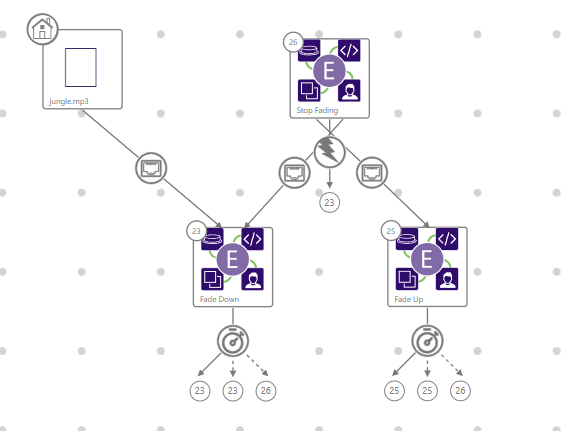
    Hey all, just to add this was tricky for me but very helpful in solving my fade options. I needed to have a trigger that would fade down zone 1, while starting the audio in zone 2, and when zone 2 neared completion, begin fading up zone 1 again.

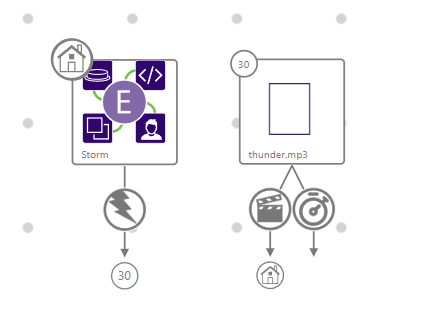
    After some trial and error it worked great. Here are screenshots of my setup inside of Bright Author Connected:


    My Zone 1 includes a jungle sounds effect that plays on startup. When it receives a udp message event, it will transition to the Fade Down Event handler. This includes the logic from the solution found in this thread. When it completes the fade, it will transition to the Stop Fading event handler. This then waits for either the fadeDown udp message event, a fadeUp udp message event, or a zone message from zone 2.

    To trigger Zone 2, I added a send zone message command to the udp message event going from the stop fading event handler to the Fade Down Event handler.

    On Zone 2, I have it stand by in the Storm Event handler to start. Waiting for a zone message event. I set my timeout of the thunder to be a little shorter than the length of the audio to begin fading up zone 1. The thunder time out sends a zone message that zone1 listens for.

    One thing to note is in BrightAuthor Connected a variable will need to be formatted as  {{variable}} and not $$variable$$

    Another thing to note is that I have the jungle.mp3 (initial state) have an entry command of: Other - Set Variable. Which sets the variable of AudioLevel to 100 (starting volume level). If this doesn't happen, I had issues with the fade operating correct upon startup or after publishing.

    I am going to do more work and cleanup on this, but thought this would be helpful to anyone else working on this.

Please sign in to leave a comment.