0

Weather : Brightsign HTML Widget, Weather Underground (api key required)

Notice: The Weather Underground API is being retired at the end of 2018.  

This weather widget shows date and time along with animations. The widget includes the various weather images so you could easily use another weather service for the data that controls which animations are displays. You'll need to register with Weather Underground to get an API key. 


The widget works full screen or in a zone, landscape or portrait. 

Download HTML Weather Widget Here


Add HTML Site (your local weather html)


Variables

There are three variables that the weather uses: Key, City, and US State or Country. You'll need to fill those in.


Custom Device Page

On the variables tab, you will also need to browse and select the custom device page url, in the DWP folder.  


With the custom device page, you will be able to log into the player at port 8008 and change the city and state or your key.


Time Format: 12 Hour / 24 hr

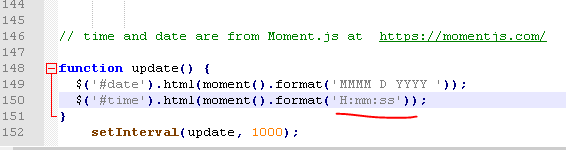
The time defaults to 24hr format, but you can change it to 12hr format by editing the weather.js file.


Find this line:

  $('#time').html(moment().format('H:mm:ss'));


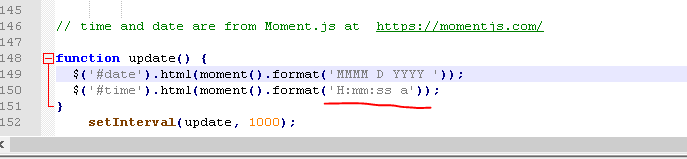
Change to this:

  $('#time').html(moment().format('H:mm:ss a'));


46 comments

  • 0
    Avatar
    Ed Blumberg

    Thank You Lyndon!!  I have been away from my desk all day so I haven't been able to fix that spelling error in the JS file until now -

    Worked like a CHARM!  Thank you so very much for your patience, and assistance! 

  • 0
    Avatar
    Anthony

    @Lyndon

    Thank you for your time to put this widget out here. I have been learning BrightSign and it has been a sure learning curve. I was able to get your widget to work but I did have to change the variable in BrightSign from 'Weather Underground Key' to just 'Key' after looking over the javascript. What I did notice is that although i am getting my local weather it is cycling between my city and Spokane. Further investigation of the files i found that in the html page Spokane was hard coded.  I am learning the HTML, JS as well as brightsign so not sure how to go about changing this so it won't cycle between the two cities. My apologies to drag you back into this topic however i hope you see and can offer a simple solution or maybe others that have used this will offer something? 

  • 0
    Avatar
    Lyndon

    I did change the variable to key, but spokane is hard coded only if the city can't be found or the api key doesn't work. Please log into the player ip address, and go to the log tab, and send me a copy of what's in the log tab. That should tell us why it's failing..


  • 0
    Avatar
    Anthony

    Thank you for the reply Lyndon. I am working on getting the logs. When i came in the unit would not respond to http connection. Did some reboots and various troubleshooting but can't seem to figure out why it went south on me. I am an IT veteran so handled all troubleshooting from network side. I say this to save troubleshoot tips unless it directly relates to the player. :-) I say this to let you know i am working on getting this information for you once i can get back into the XT1143 player. Of course it was working fine last night when i left and here last night and it was locked in my office. 

  • 0
    Avatar
    Lyndon


    Try powering it up without the sd card in case something running on the card is what's causing it to be responsive...

  • 0
    Avatar
    Anthony

    i did do that and then it asks for storage device. I put it in and it goes back to its state. I checked setup xml and it has the right IP config in it still so not sure what or why it is doing it and won't let me access http. I am going to recreate the setup files and wipe the storage and basically start from scratch. I still have the same presentation so i will publish it and then send you the log file. 


  • 0
    Avatar
    Anthony

    Well after a day of on and off troubleshooting network issues i was able to get this back online. here is the log portion. Not sure how far back you need to look at but i think this is enough from when the weather app would kick off. Note my api key was replaced with "My Key". 

    As mentioned above, it does show my local weather but when time on screen is set to 10 under HTML 5 settings it flashes between spokane and Findlay. Should this be left at 0 so it is not redrawing all the time? 

    [ 34.487] [0308/165630:WARNING:resource_bundle.cc(291)] locale_file_path.empty() for locale
    [ 34.824] GPU worker thread priority: 49 (0)
    [ 35.039] BSPLAY: file:///WeatherUnderground-/weathertable.html
    [ 35.372] V8::ResourceConstraints::ConfigureDefaults reg flag not set limits low 692060160 medium 1073741824 high 2147483648
    [ 35.372] V8::ResourceConstraints::ConfigureDefaults physical 2082406400 swap 0 - [2] - max 8 old 512 exe 256
    [ 36.442] ### 00:00:06.636 nexus_audio_decoder: Decoder not started or suspended
    [ 37.323] [INFO] [source file:///WeatherUnderground-/js/weather.js:20]: getUserVars
    [ 37.369] [INFO] [source file:///WeatherUnderground-/js/weather.js:28]: <?xml version="1.0" encoding="UTF-8"?>
    [ 37.369] <BrightSignUserVariables>
    [ 37.369] <BrightSignVar name="City">Findlay</BrightSignVar>
    [ 37.369] <BrightSignVar name="Key">My Key</BrightSignVar>
    [ 37.369] <BrightSignVar name="US State or Country">Ohio</BrightSignVar>
    [ 37.369] </BrightSignUserVariables>
    [ 37.369]
    [ 37.369] [INFO] [source file:///WeatherUnderground-/js/weather.js:29]: fetching variables...
    [ 37.372] [INFO] [source file:///WeatherUnderground-/js/weather.js:32]: City
    [ 37.373] [INFO] [source file:///WeatherUnderground-/js/weather.js:41]: undefined
    [ 37.373] [INFO] [source file:///WeatherUnderground-/js/weather.js:42]: Findlay
    [ 37.374] [INFO] [source file:///WeatherUnderground-/js/weather.js:43]: undefined
    [ 37.374] [INFO] [source file:///WeatherUnderground-/js/weather.js:32]: Key
    [ 37.374] [INFO] [source file:///WeatherUnderground-/js/weather.js:41]: undefined
    [ 37.375] [INFO] [source file:///WeatherUnderground-/js/weather.js:42]: Findlay
    [ 37.375] [INFO] [source file:///WeatherUnderground-/js/weather.js:43]: My Key
    [ 37.375] [INFO] [source file:///WeatherUnderground-/js/weather.js:32]: US State or Country
    [ 37.375] [INFO] [source file:///WeatherUnderground-/js/weather.js:41]: Ohio
    [ 37.375] [INFO] [source file:///WeatherUnderground-/js/weather.js:42]: Findlay
    [ 37.376] [INFO] [source file:///WeatherUnderground-/js/weather.js:43]: My Key
    [ 39.323] [INFO] [source file:///WeatherUnderground-/js/weather.js:58]: http://api.wunderground.com/api/My Key/conditions/q/Ohio/Findlay.json
    [ 39.323] [INFO] [source file:///WeatherUnderground-/js/weather.js:59]: 16:56:35
    [ 39.764] [INFO] [source file:///WeatherUnderground-/js/weather.js:75]: Light Snow
    [ 39.769] [INFO] [source file:///WeatherUnderground-/js/weather.js:139]: Checking web
    [ 45.106] V8::ResourceConstraints::ConfigureDefaults reg flag not set limits low 692060160 medium 1073741824 high 2147483648
    [ 45.106] V8::ResourceConstraints::ConfigureDefaults physical 2082406400 swap 0 - [2] - max 8 old 512 exe 256
    [ 45.114] BSPLAY: file:///WeatherUnderground-/weathertable.html
    [ 45.638] BSPLAY: about:blank
    [ 46.548] [INFO] [source file:///WeatherUnderground-/js/weather.js:20]: getUserVars
    [ 46.574] [INFO] [source file:///WeatherUnderground-/js/weather.js:28]: <?xml version="1.0" encoding="UTF-8"?>
    [ 46.574] <BrightSignUserVariables>
    [ 46.574] <BrightSignVar name="City">Findlay</BrightSignVar>
    [ 46.574] <BrightSignVar name="Key">MyKey</BrightSignVar>
    [ 46.574] <BrightSignVar name="US State or Country">Ohio</BrightSignVar>
    [ 46.574] </BrightSignUserVariables>
    [ 46.574]
    [ 46.575] [INFO] [source file:///WeatherUnderground-/js/weather.js:29]: fetching variables...
    [ 46.589] [INFO] [source file:///WeatherUnderground-/js/weather.js:32]: City
    [ 46.591] [INFO] [source file:///WeatherUnderground-/js/weather.js:41]: undefined
    [ 46.591] [INFO] [source file:///WeatherUnderground-/js/weather.js:42]: Findlay
    [ 46.591] [INFO] [source file:///WeatherUnderground-/js/weather.js:43]: undefined
    [ 46.592] [INFO] [source file:///WeatherUnderground-/js/weather.js:32]: Key
    [ 46.592] [INFO] [source file:///WeatherUnderground-/js/weather.js:41]: undefined
    [ 46.592] [INFO] [source file:///WeatherUnderground-/js/weather.js:42]: Findlay
    [ 46.592] [INFO] [source file:///WeatherUnderground-/js/weather.js:43]: My Key
    [ 46.593] [INFO] [source file:///WeatherUnderground-/js/weather.js:32]: US State or Country
    [ 46.593] [INFO] [source file:///WeatherUnderground-/js/weather.js:41]: Ohio
    [ 46.593] [INFO] [source file:///WeatherUnderground-/js/weather.js:42]: Findlay
    [ 46.593] [INFO] [source file:///WeatherUnderground-/js/weather.js:43]: My Key
    [ 48.552] [INFO] [source file:///WeatherUnderground-/js/weather.js:58]: http://api.wunderground.com/api/My Key/conditions/q/Ohio/Findlay.json
    [ 48.552] [INFO] [source file:///WeatherUnderground-/js/weather.js:59]: 16:56:44
    [ 48.960] [INFO] [source file:///WeatherUnderground-/js/weather.js:75]: Light Snow
    [ 48.966] [INFO] [source file:///WeatherUnderground-/js/weather.js:139]: Checking web


    I will be out of office until Monday so i will not be able to respond or reply till then. I appreciate the time and help but wanted to let you know why there will be a delay in response. 

  • 0
    Avatar
    Lyndon

    Anthony, yes, you should leave it set to zero. It will refresh on its own. The javascript updates the values. When it's set to a timer, then the html object reloads, and the reason it shows spokane briefly is that's the default, and it shows that till it pulls down the data the city you've specified. 

  • 0
    Avatar
    Anthony

    Thank you Lyndon. Where would be the setting to switch from 24hour time to 12 hour time? It is showing 24hr time on the weather widget and i looked around and could not spot where to change it. Is it a setting in the player?


  • 0
    Avatar
    Lyndon


    In weather.js, find this section, and add an "a" to the time string. See example below.  That's all you need. 


  • 0
    Avatar
    Troy Holden

    I get Spokane on the screen

    here the log what can i do???

    my key works from a url.

    Arlington look like the state???

    [ 1942.670] BSPLAY: about:blank
    [ 1943.562] [INFO] [source file:///ANCC%20weather-/js/weather.js:20]: getUserVars
    [ 1943.631] [INFO] [source file:///ANCC%20weather-/js/weather.js:28]: <?xml version="1.0" encoding="UTF-8"?>
    [ 1943.631] <BrightSignUserVariables>
    [ 1943.631] <BrightSignVar name="City">Arlington</BrightSignVar>
    [ 1943.631] <BrightSignVar name="Key">my key</BrightSignVar>
    [ 1943.631] <BrightSignVar name="US State or Conutry">Virginia</BrightSignVar>
    [ 1943.631] </BrightSignUserVariables>
    [ 1943.631]
    [ 1943.632] [INFO] [source file:///ANCC%20weather-/js/weather.js:29]: fetching variables...
    [ 1943.688] [INFO] [source file:///ANCC%20weather-/js/weather.js:32]: City
    [ 1943.688] [INFO] [source file:///ANCC%20weather-/js/weather.js:41]: undefined
    [ 1943.688] [INFO] [source file:///ANCC%20weather-/js/weather.js:42]: Arlington
    [ 1943.688] [INFO] [source file:///ANCC%20weather-/js/weather.js:43]: undefined
    [ 1943.688] [INFO] [source file:///ANCC%20weather-/js/weather.js:32]: Key
    [ 1943.688] [INFO] [source file:///ANCC%20weather-/js/weather.js:41]: undefined
    [ 1943.688] [INFO] [source file:///ANCC%20weather-/js/weather.js:42]: Arlington
    [ 1943.688] [INFO] [source file:///ANCC%20weather-/js/weather.js:43]: my key
    [ 1943.688] [INFO] [source file:///ANCC%20weather-/js/weather.js:32]: US State or Conutry
    [ 1943.688] [INFO] [source file:///ANCC%20weather-/js/weather.js:41]: undefined
    [ 1943.688] [INFO] [source file:///ANCC%20weather-/js/weather.js:42]: Arlington
    [ 1943.688] [INFO] [source file:///ANCC%20weather-/js/weather.js:43]: my key
    [ 1945.562] [INFO] [source file:///ANCC%20weather-/js/weather.js:58]: http://api.wunderground.com/api/my key/conditions/q/undefined/Arlington.json
    [ 1945.563] [INFO] [source file:///ANCC%20weather-/js/weather.js:59]: 19:24:38 pm
    [ 1946.060] [ERROR] [source file:///ANCC%20weather-/js/weather.js:65]: Uncaught TypeError: Cannot read property 'temp_f' of undefined
    [ 1946.081] BSPLAY: Image "/storage/sd/pool/2/3/sha1-2f2d536e6e6e74262eb0016ae34c75c17a7e3e23" O 1000x500 transition 0
    [ 1952.216] BSPLAY: Image "/storage/sd/pool/7/e/sha1-cfe7d8f9fbc67a6be61865b47f09a4047ab0267e" O 1000x500 transition 0
    [ 1955.148] TIME: Screenshot = 0.027663
    [ 1955.247] TIME: WriteJpegFile = 0.098532
    [ 1958.383] BSPLAY: Image "/storage/sd/pool/3/a/sha1-d82615252d33fc412c8c0981f283086712ce8c3a" O 1000x500 transition 0
    [ 1964.534] BSPLAY: Image "/storage/sd/pool/e/e/sha1-477ac5353c23a535d0aca81bda737847528d59ee" O 1000x500 transition 0
    [ 1970.693] BSPLAY: Image "/storage/sd/pool/8/d/sha1-66e220a5826b0c43aa33bebbd07c0d21b1aa7e8d" O 1000x500 transition 0
    [ 1976.814] BSPLAY: Image "/storage/sd/pool/2/3/sha1-2f2d536e6e6e74262eb0016ae34c75c17a7e3e23" O 1000x500 transition 0
    [ 1982.951] BSPLAY: Image "/storage/sd/pool/7/e/sha1-cfe7d8f9fbc67a6be61865b47f09a4047ab0267e" O 1000x500 transition 0
    [ 1989.117] BSPLAY: Image "/storage/sd/pool/3/a/sha1-d82615252d33fc412c8c0981f283086712ce8c3a" O 1000x500 transition 0
    [ 1995.266] BSPLAY: Image "/storage/sd/pool/e/e/sha1-477ac5353c23a535d0aca81bda737847528d59ee" O 1000x500 transition 0
    [ 2001.433] BSPLAY: Image "/storage/sd/pool/8/d/sha1-66e220a5826b0c43aa33bebbd07c0d21b1aa7e8d" O 1000x500 transition 0
    [ 2001.977] BSPLAY: file:///ANCC weather-/weathertable.html
    [ 2001.999] V8::ResourceConstraints::ConfigureDefaults reg flag not set limits low 692060160 medium 1073741824 high 2147483648
    [ 2001.999] V8::ResourceConstraints::ConfigureDefaults physical 478445568 swap 0 - [0] - max 1 old 128 exe 96
    [ 2002.749] BSPLAY: about:blank
    [ 2003.641] [INFO] [source file:///ANCC%20weather-/js/weather.js:20]: getUserVars
    [ 2003.721] [INFO] [source file:///ANCC%20weather-/js/weather.js:28]: <?xml version="1.0" encoding="UTF-8"?>
    [ 2003.721] <BrightSignUserVariables>
    [ 2003.721] <BrightSignVar name="City">Arlington</BrightSignVar>
    [ 2003.721] <BrightSignVar name="Key">my key</BrightSignVar>
    [ 2003.721] <BrightSignVar name="US State or Conutry">Virginia</BrightSignVar>
    [ 2003.721] </BrightSignUserVariables>
    [ 2003.721]
    [ 2003.721] [INFO] [source file:///ANCC%20weather-/js/weather.js:29]: fetching variables...
    [ 2003.755] [INFO] [source file:///ANCC%20weather-/js/weather.js:32]: City
    [ 2003.771] [INFO] [source file:///ANCC%20weather-/js/weather.js:41]: undefined
    [ 2003.771] [INFO] [source file:///ANCC%20weather-/js/weather.js:42]: Arlington
    [ 2003.771] [INFO] [source file:///ANCC%20weather-/js/weather.js:43]: undefined
    [ 2003.771] [INFO] [source file:///ANCC%20weather-/js/weather.js:32]: Key
    [ 2003.771] [INFO] [source file:///ANCC%20weather-/js/weather.js:41]: undefined
    [ 2003.771] [INFO] [source file:///ANCC%20weather-/js/weather.js:42]: Arlington
    [ 2003.772] [INFO] [source file:///ANCC%20weather-/js/weather.js:43]: my key
    [ 2003.772] [INFO] [source file:///ANCC%20weather-/js/weather.js:32]: US State or Conutry
    [ 2003.772] [INFO] [source file:///ANCC%20weather-/js/weather.js:41]: undefined
    [ 2003.772] [INFO] [source file:///ANCC%20weather-/js/weather.js:42]: Arlington
    [ 2003.772] [INFO] [source file:///ANCC%20weather-/js/weather.js:43]: my key
    [ 2005.648] [INFO] [source file:///ANCC%20weather-/js/weather.js:58]: http://api.wunderground.com/api/my key/conditions/q/undefined/Arlington.json
    [ 2005.648] [INFO] [source file:///ANCC%20weather-/js/weather.js:59]: 19:25:38 pm
    [ 2006.115] [ERROR] [source file:///ANCC%20weather-/js/weather.js:65]: Uncaught TypeError: Cannot read property 'temp_f' of undefined
    [ 2007.582] BSPLAY: Image "/storage/sd/pool/2/3/sha1-2f2d536e6e6e74262eb0016ae34c75c17a7e3e23" O 1000x500 transition 0
    [ 2013.733] BSPLAY: Image "/storage/sd/pool/7/e/sha1-cfe7d8f9fbc67a6be61865b47f09a4047ab0267e" O 1000x500 transition 0
    [ 2015.329] TIME: Screenshot = 0.025669
    [ 2015.434] TIME: WriteJpegFile = 0.104332
    [ 2019.901

  • 0
    Avatar
    Lyndon

    Please export your brightauthor project, and send support a zipped file so we can test..


  • 0
    Avatar
    Jim Kluka

    I'm new to Brightsign and I have a XT1143. I'm trying to get a WU API Key and getting nowhere. I found this on the WU site stating they are no longer providing keys. https://www.wunderground.com/weather/api/

    So what do I do?

  • 0
    Avatar
    Jim Kluka

    Can anyone help? Adding weather should not be this difficult.

  • 0
    Avatar
    Jim Kluka

    I just saw this on https://apicommunity.wunderground.com/weatherapi/topics/weather-underground-api-changes.

    $850 is ridiculous. Any other options to display weather.

  • 0
    Avatar
    Lyndon


    My colleague is looking at changing the javascript to download the weather information from a different service. Anyone with javascript expertise can also take a look at making the same change. The weather widget includes all the images already, the only thing the unit downloads from any weather service is a json file telling it today's weather conditions: temperature and description. It's the description, like cloudy, that determines what image plays.

    This is in now only way to do weather on the unit. This was a free widget that my colleague had put together. We have partners that offer weather widgets wither they're mrss or html as a service. This includes ds-weather and screenfeed.com to name two. There are other weather services out there. We also have partners that build custom weather widgets, like creatingmargin and reddot.  If you're using the brightsign with a 3rd party cms providers, some of them have their own weather widgets, often subscribing to a service like screenfeed. 


Please sign in to leave a comment.