All, I am hoping that someone can help me with a way to power on and off some Christie Projectors via standalone bright sign XD1033. On at 8am off at 10pm. There is no network where they are located so this would require using the Serial port (1/8"?) possibly usb or is it possible to communicate from ethernet port to ethernet port? Any help would be greatly appreciated.
Date
Votes
5 comments
-

Steffen Hi Patrick
I found this link to an PDF file, describing the protol to the DWU-599.
https://www.christiedigital.com/SupportDocs/Anonymous/Christie-DS65-RS232-Communication-Protocol.pdf
As far as I can see, page 5 in the manual, shows IP addresses and LAN configuration.
In the very good Brightsign documentation, there is written a lot of good stuff, concerning communication:
http://docs.brightsign.biz/display/DOC/XDx33+Hardware+Interfaces.
What is essential is, that Your projector understands UDP commands. As far as I am concerned, the Brightsign units do not understand PJ-link commands.
I don't use network based controlling, but serial commands, that's easier. I can see the XD1033 has a 3,5 mm jack-plug, which You can use for that purpose.
I hope You can use some of the things I have described
/Steffen
-

Brandon The TCP Network Command plugin was originally made for PJlink but if this is a one-off, serial would be easier to implement.
-
Steffen You are right Brandon, much easier.
If You see this Patrick, I can tell, that the link Brandon shows here, is very good if You want to control other features on the projector. (PJLinkOn.brs) It is infact very much better to use networked based control, if the projector is located more than 50 meters away from the Brightsign unit, because of signal loss in the serial-cable.
-

patrick131 Thanks, I’ve ordered the appropriate serial cables and the players are within 10 feet of the projectors. We’re using a simple contact closure to GPIO pins to trigger a black jpeg to display and stop audio. Is there a way to attach the serial commands to the black jpeg so that when that file is triggered via gpio, it then sends the (PWR0) command to the projector? Also when the media play it would send the (PWR1) command. Apologies, I’m sure this is very simple for you, but your assistance is greatly appreciated. I plan to review all of this tomorrow and begin testing.
is it as simple as just using the send command function? Am I over thinking this?
-
Steffen Hi again Patrick
There might be a little delay, in my reply to You, due to time-differences :-) Are You sitting somewhere in America?
Well, first of all I'm happy to help You, if I can. :-)
My suggestion, first of all, is to control the projector from the event that triggers it. OR You may schedule the "Power down" or "black" screen, when You make the schedule in Brightauthor. Example: 7.00 pm 7.01 pm "Power Down"
I can see from the manual to Your projector, that it is possible to "mute" the light, when You need "black" picture. (see Your manual page 18, on the buttom of the page). Take a look at the serial command protocol for commands for that feature
I hope these are inspirations for You
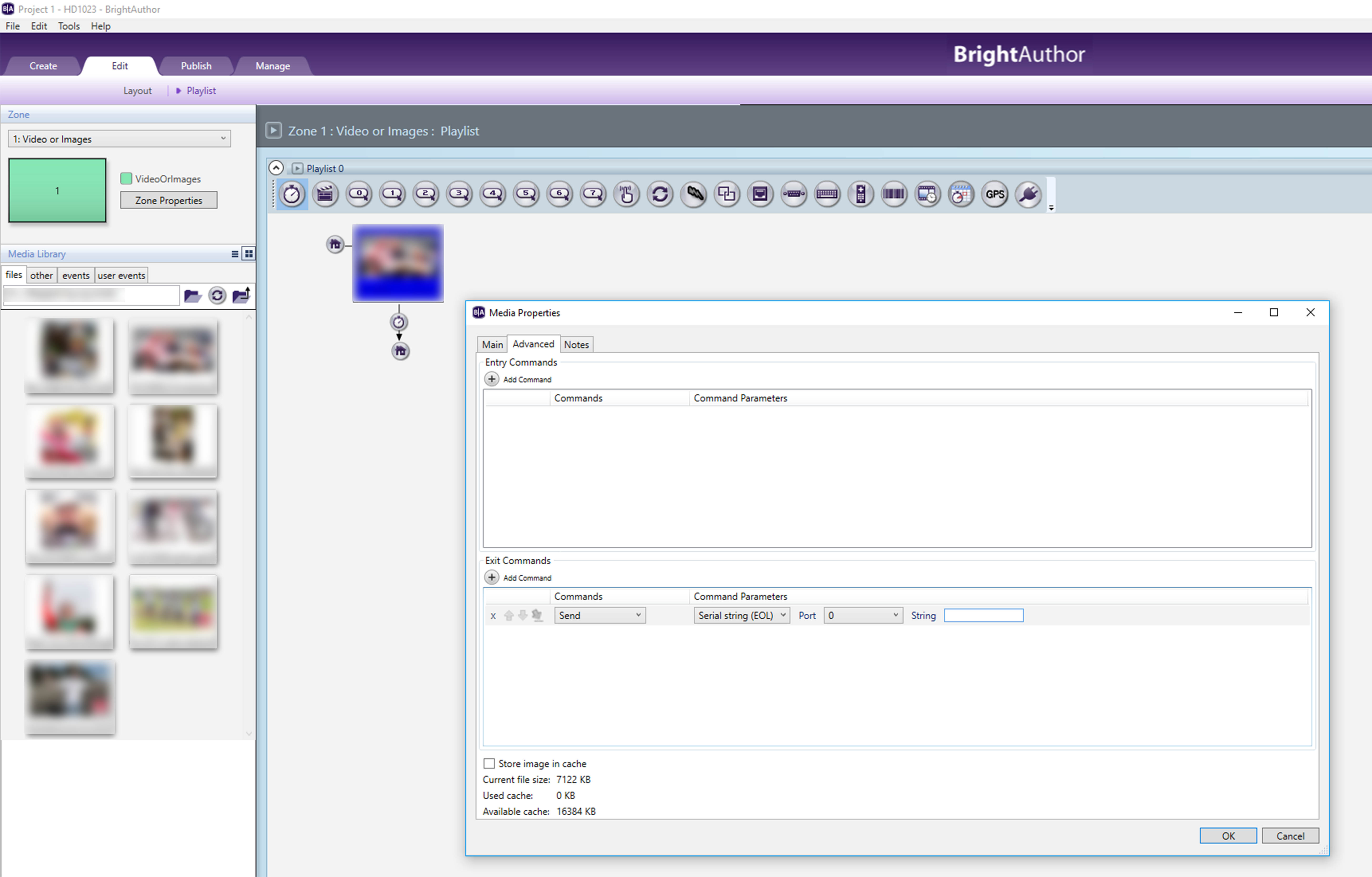
Here You can see, where to input your serial commands, Double click the event (marked with blue color) and click the pane "Advanced".
Please sign in to leave a comment.