0

UDP to multiple Devices

I have a network that has several brightsigns for several exhibits.  I am trying to get one exhibit changed to use 2 brightsigns (one for touch control and the other for video playback).  I can get the UDP to work just fine between the 2 devices.  The problem comes in where I also need to control an LED light controller.  This controller also uses UDP.  How can I send a UDP message to 2 different devices (and 2 different ports)?  I don't need to have a response back from the LED controller, so the communication between the 2 brightsigns would be on the port that has been configured.

I am guessing I will need to send a message using a script.  I just need an example and can go from there.  Can anyone give me an example?

Thanks!

14 comments

  • 0
    Avatar
    Bright Scripters

    Can you change the port used for UDP with BrightSign to match the port number used by the LED controller?

  • 0
    Avatar
    Matt Zundel

    They are already the same UDP port number.  If you are going down the route of using the broadcast address, this will not work because there are other devices listening on the same UDP port and will react to the broadcast message.

  • 0
    Avatar
    Bright Scripters

    This script might be a good baseline to be developed further.

    https://github.com/brightsign/BrightAuthor-Plugins/tree/master/UDP-CR-Command-Sender


    Notice how destination address and destination port can be set at line 85.

    s.bsp.udpSender.SetDestination(s.bsp.udpAddress$, s.bsp.udpSendPort)


    You could add more fields to the command sent from the presentation. Something like:

    Udp!<string>!<destination host>!<destination port>

  • 0
    Avatar
    Matt Zundel

    Thanks for the reply.  I have been working with the script but it does not seem to behave as expected.  I figured out the s.bsp.udpAddress$ pulls the IP address that is configured in the presentation; s.bsp.udpSendPort is also pulled from the presentation config.  If I hard code line 85 to be a special IP address and port, the script does not seem take the changes.  Here is an example of the change:

    s.bsp.udpSender.SetDestination("192.168.1.55", 10001)

    I have also tried setting up more parameters (changing the 2 if statements to handle more fields and using fields[2] and fields[3] for the host and port.

    What am I missing?  I am using a XD1034.

  • 0
    Avatar
    Bright Scripters

    Please be aware that the plugin's purpose is adding a Carriage Return character to messages. (ASCII 13) which you might not need.

                command_with_cr$ = command + chr(13)
                mybytes=createobject("roByteArray")
                mybytes.FromAsciiString(command_with_cr$)
                s.bsp.udpSender.Send(mybytes)


    Also, are you using any tool to analyze the messages that are being sent out?

    https://packetsender.com/

    https://www.hw-group.com/software/hercules-setup-utility

  • 0
    Avatar
    Matt Zundel

    I was aware of the char(13) being added.  I took it out for my testing.

    I am using packetsender.  It helps to debug.  i have it running on 2 machines so that I can verify UDP is working.  One of the machines has the IP address specified in the plugin and the other machine is specified in the UDP Destination Address of the Presentation Settings/Interactive.

  • 0
    Avatar
    Bright Scripters

    Do you still need any help or have you figured it out?

  • 0
    Avatar
    Matt Zundel

    Yes.  The script still relies on the address in the UDP Destination Address.

  • 0
    Avatar
    Bright Scripters

    What would you like the destination address to be?


  • 0
    Avatar
    Matt Zundel

    Let's try 172.30.43.61


    Thanks!

  • 0
    Avatar
    Bright Scripters

    Like this?

    s.bsp.udpSender.SetDestination( "172.30.43.61", 1234 )

    Notice that IP address is a string while port number is an integer.

    https://brightsign.atlassian.net/wiki/spaces/DOC/pages/370673110/roDatagramSender


    Worth noting that the code implies that IP and port are taken from the settings in the presentation.

    s.bsp.udpAddress$

    s.bsp.udpSendPort


  • 0
    Avatar
    Adam Liebreich-Johnsen

    Has there been any update on this? I am also interested in sending UDP to multiple devices.

  • 0
    Avatar
    Matt Zundel

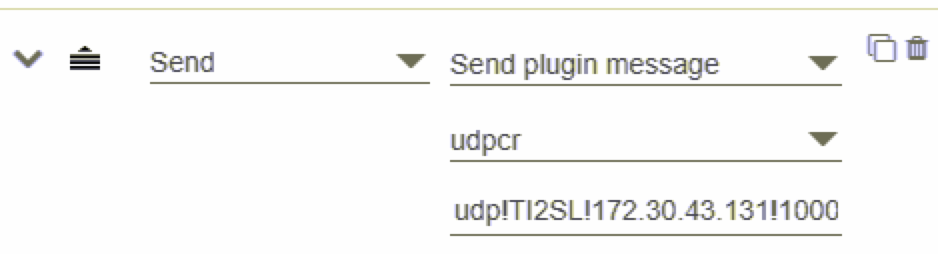
    I was able to get things working.  After following the directions to create the script plugin, I can no specify the UDP to send from the Advanced section in the Event Properties section.  The port didn't come through in the screenshot, but the port is 10001.


    Here is my script:

    Function udpcr_Initialize(msgPort As Object, userVariables As Object, bsp as Object)


        'print "udpcre_Initialize - entry"


        udpcr = newudpcr(msgPort, userVariables, bsp)


        return udpcr


    End Function


    Function newudpcr(msgPort As Object, userVariables As Object, bsp as Object)

    'print "newudpcr"


    s = {}

    s.version = 0.1

    s.msgPort = msgPort

    s.userVariables = userVariables

    s.bsp = bsp

    s.ProcessEvent = udpcr_ProcessEvent

    s.objectName = "udpcr_object"

    s.debug  = false

    return s

    End Function


    Function udpcr_ProcessEvent(event As Object) as boolean

    'print "processing event udpcr plugin"

    retval = false


    if type(event) = "roAssociativeArray" then

            if type(event["EventType"]) = "roString" then

                 if (event["EventType"] = "SEND_PLUGIN_MESSAGE") then

                    if event["PluginName"] = "udpcr" then

                        pluginMessage$ = event["PluginMessage"]

    'print "SEND_PLUGIN/EVENT_MESSAGE:";pluginMessage$

                        retval = ParseudpcrPluginMsg(pluginMessage$, m)

                    endif

                endif

            endif

    else if type(event) = "roDatagramEvent" then

    msg$ = event

    if (left(msg$,3) = "udp") then

        retval = ParseudpcrPluginMsg(msg$, m)

    end if


    else if type(event) = "roTimerEvent" then


    end if


    return retval


    End Function


    Function ParseudpcrPluginMsg(Msg as string, s as object) as boolean

    'Print "Parseudpcr function"

    retval  = false

    command = ""

    param =""


    ' convert the message to all lower case for easier string matching later

    ' msg = lcase(Msg)

    'print "Received Plugin message: "+msg

    r = CreateObject("roRegex", "^udp", "i")

    match=r.IsMatch(msg)


    if match then

    retval = true


    ' split the string

    r2 = CreateObject("roRegex", "!", "i")

    fields=r2.split(msg)

    numFields = fields.count()

    if (numFields < 2) or (numFields > 4) then

    'print "Incorrect number of fields for udpcre command:";msg

    return retval

    else if (numFields = 4) then

    command=fields[1]

    'print "two fields found "; command 


    if type(s.bsp.udpsender) <> "roDatagramSender" then

    'print "creating udp sender"

    s.bsp.udpsender = createobject("roDatagramSender")

    endif


    s.bsp.udpSender.SetDestination(fields[2], strtoi(fields[3]))

    'cr 13

    'lf 10

    'command_with_cr$ = command + chr(13)

    command_with_cr$ = command

    mybytes=createobject("roByteArray")

    mybytes.FromAsciiString(command_with_cr$)

    s.bsp.udpSender.Send(mybytes)

    'print(fields[2])

    'print(fields[3])


    end if


    end if


    if command = "debug" then

        s.debug=true

    end if


    return retval

    end Function

  • 0
    Avatar
    Adam Liebreich-Johnsen

    Thank you so much! This works perfectly and really saves my current project. I am not a programmer, so the scripting language is a bit beyond me. I really appreciate your help.

Please sign in to leave a comment.