0

Multiple BS players playing different videos at different times, synchronized

Hi All-

I am trying to set up a scenario for a video exhibition that will feature 8 different videos, each playing separate video files, but at different times, one after the other, in sequence.

In other words, I want one player/video to start playing, then pause at the end of file playback; the next video start up and play, then pause; and so on; but ultimately for the timing to be synched so eventually it will go back to player number one, then two, etc. and keep the playback order/cycle- as opposed to all videos synched to start/play at the same time. 

I am racking my brain trying to set up a scenario with interactive features and commands, with a master player followed by the slave/follower players. I guess the 'dumbfounded' way could be to set up 8 different presentations, each player as a master with different domains and with different timeouts for their start/stop time; however my understanding is that the videos will not be truly synced, even if on a schedule. 

Any help, assistance, or guidance would truly be appreciated; and thank you! 

Mike

2 comments

  • 0
    Avatar
    Sean McKinty

    Hey Mike - not sure if you already have a solution but a content-based option would be to build a single video for each player that's the duration of all the content combined, then offset the content for each player by the length of the clip(s) that play before it.
    For example:
    If each clip is 1 minute long then each player has an 8 minute video - 
    Player1: 1 minute clip, 7 minutes blank
    Player2: 1 minute blank, 1 minute clip, 6 minutes blank
    Player3: 2 minutes blank, 1 minute clip, 5 minutes blank
    etc, etc.

    This means that only one synch command has to be sent to trigger the rest and the content shouldn't drift.

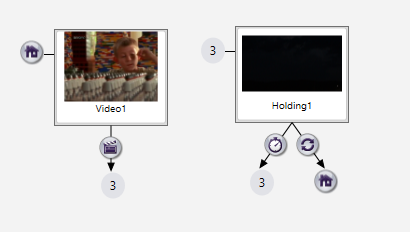
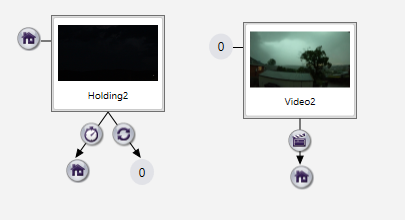
    Another way would be to add a holding image/video to each project then use Media End and Synchronise events to do the triggering - eg the Media End event on Player 1's video would send a Synchronise message ('PlayVideo2') as it transitions to the holding graphic, then would wait to receive a 'PlayVideo1' Synchronise event before it switched back to the video.

    Player 2 would start on the holding graphic & wait for the 'PlayVideo2' message to run the video, then send 'PlayVideo3' when it ends & transitions back to the hold.

    etc, etc.

    This should give pretty much the same result, as each player is waiting to be told to play by the previous one.

    Hopefully this is useful - and not too late!

    Thanks,

    Sean

  • 0
    Avatar
    Mlschuetz

    Hey Sean!

    Thanks for your comments and suggestions from way back when- I really appreciate them! Sorry it took me so long to get back to your comments. So, I did initially about using black/dead frames to 'fill in' the space in and around the videos, but as the curation of the exhibition got increasingly complex- mix of single and double-channel videos, players having to play separate videos at different times, and two separate videos coming on at the same time- I had to get increasingly creative in order to make this so-called 'sequenced/synchronized' loop to work. Good news is- I figured it out and it works great!

    I ended up using a mixture of master and slave players, with the master players sending out UDP commands to the other videos, along with a mixture of various Event Handlers in the individual presentations. I have a total of 7 players total, with 2 of the players each running one channel from two separate videos (they are double-channel vids); some of the players playing their video once within the loop, and other players playing their video 2x or 3x to match the length of another player's longer video; and all are running to and communicating via a data switch.

    It turned out to be a bit mad- but IT WORKS- going on 4 weeks now (I should bite my tongue).

    Thanks!

    Mike

Please sign in to leave a comment.