0

BrightWall Presentation Display Issue - XT244

Equipment Used

  • 6 x Model: XT244
  • 6 x Display Panels: LG ELECTRONICS LGE55VM5EA LCD, 55" 1080P
  • BrightAuthor Version: 5.0.1.4
  • Boot Version: 8.0.94
  • BrightSign OS Version: 8.5.36
  • Video Mode: 3840x2160x30p (3840x2160x30p)


Issue
We have a 2 by 3 video wall that has been working flawlessly for almost 2 years.  After upgrading BrightAuthor & the BrightSign OS, the video wall no longer displays properly (See Images).

Expected Output:
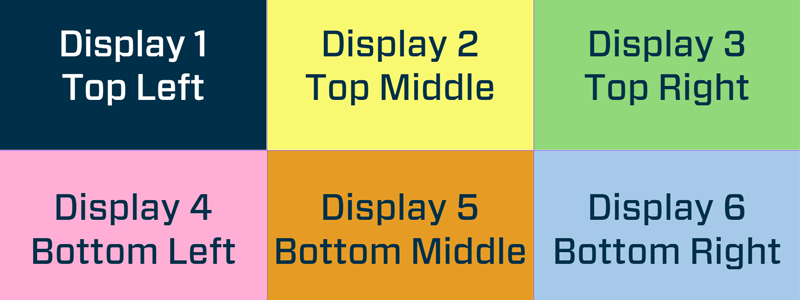
Actual Output:
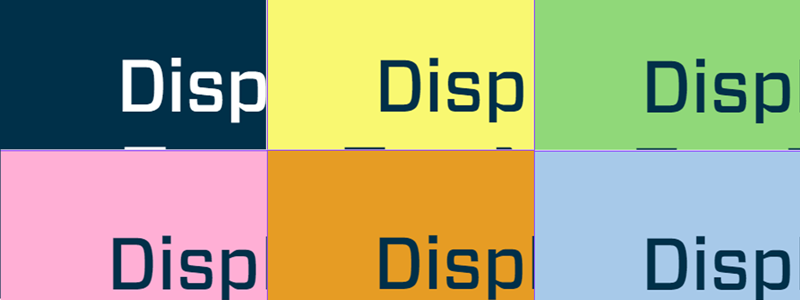
As you can see, the positioning of the slices is correct, but the scaling is way off.

I've tried republishing presentations from the past that have been working fine, but they no longer display like they used to either.  Old or new, nothing displays properly, everything is in the correct position but wrong scaling.  Any help would be greatly appreciated.

Thank you in advance for your time and help!

Cheers,
Clint

3 comments

  • 0
    Avatar
    Bright Scripters

    It looks like video output format is UHD instead of FHD.

    Are you using video extenders or the players are behind the monitors and connected directly?

    I'm curious; What is the feature you were looking for by upgrading BA and OS? 

  • 0
    Avatar
    Clint Anderson

    First off, thank you for the reply!

    This "screen test" presentation has been working perfectly for over a year and a half.  How would the output have changed?  Would a firmware update change the output of a presentation?

    • The XT244s are directly connected to each individual display.
    • We try to keep our firmware\software as up to date as possible, we weren't looking for any particular feature.

    Thank you for your help!!!

    Cheers,
    Clint

  • 0
    Avatar
    Bright Scripters

    Somehow the player is detecting the FHD display as UHD capable, which does makes sense given that the LG displays can be daisy-chained to make a video wall.

    Check the LG monitor settings and make sure it was not set for video wall mode...

    I'd try to leave the OS version as it is, and try publishing from BA 4.x and see if that fixes the issue.

    Possibly BA 5.x is not forcing the chosen resolution?

    Hard to tell at this point.

    Would be interesting to know if that is a bug that should be reported.

Please sign in to leave a comment.