0

Interactive Button Tutorial gives errors and won't publish

Hi. Using a Brightsign HD225 - latest BA Connected and firmware.

I'm trying to create an interactive button based system, but following the 'Interactive Button Tutorial' gives me errors (tutorial link here)

The logic is very simple:

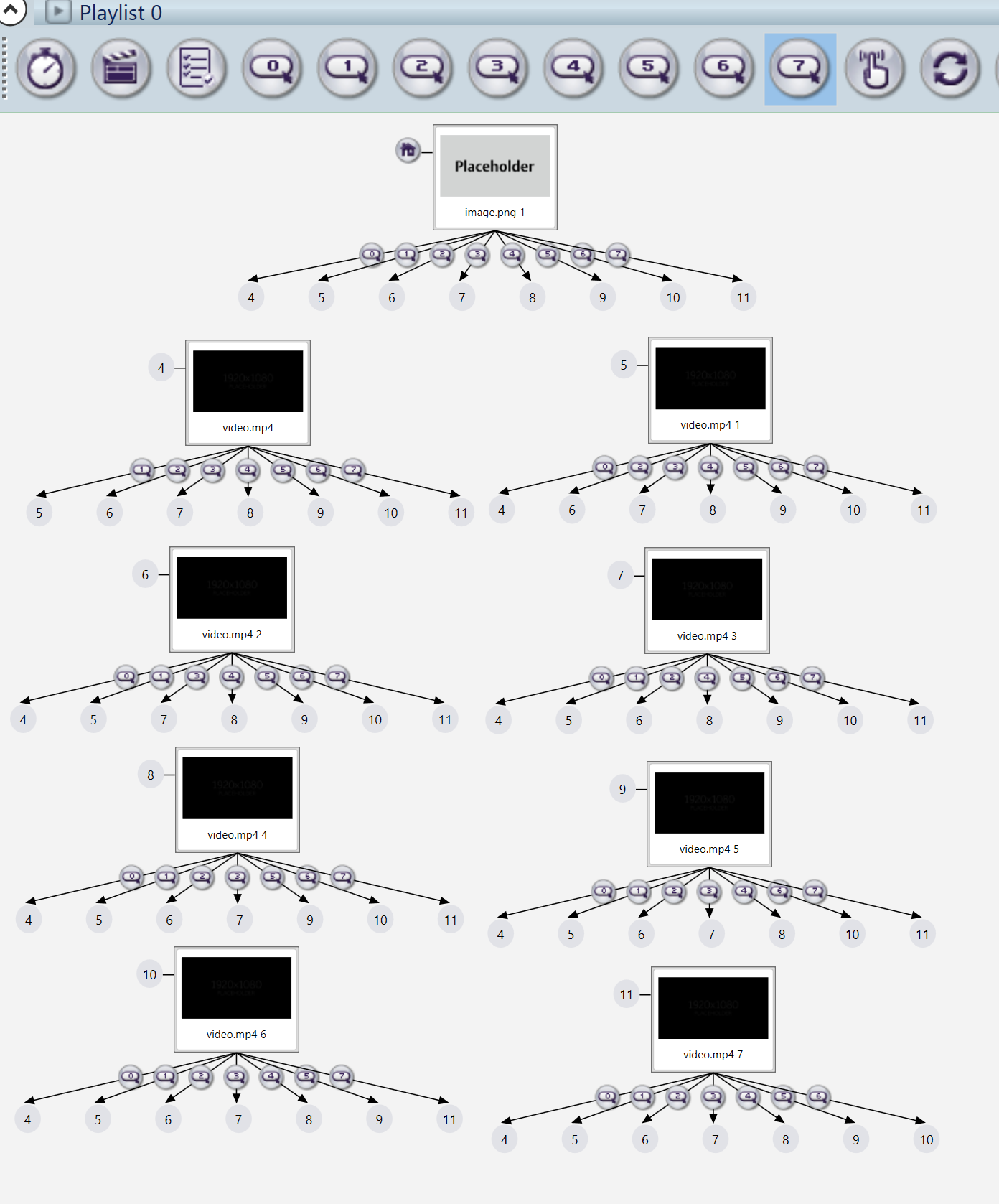
A looping home screen, plus 8 videos, each of which are triggered by a GPIO (0-7).
These are to be triggered whenever a button is pressed: i.e. they can interrupt other videos etc.

This is the exact same as the tutorial.

However, following the tutorial exactly - I've tried numerous times - produces the following errors:
"The event is a duplicate of anothert event already assigned to the media"

The issue is at 1:45 in the tutorial.

I notice the tutorial is 4 years old, so I'm wondering whether this functionality is now implemented in a different way, and the tutorial is deprecated?

Can anyone suggest a solution to this? I'm pretty surprised this is an issue with a tutorial.

Thanks!


2 comments

  • 0
    Avatar
    Monica Knutson

    **Disclaimer Note:  I use BrightAuthor Legacy v. 5 for my Interactive Presentations.  I feel it gives me a little more discrete control when using some of the things I really make these players do.  **

    When the duplicate error occurs, that means you're likely using the same GPIO event twice.  Be sure to use the correct GPIO numbered event from the toolbar.  They are labeled 0-7.  Also make sure that in your Presentation properties that your GPIOs are all set to INPUT and not OUTPUT.

    The message you are getting likely looks like this or similar (this is in BA v5):

    When you use all of the GPIO events correctly, they should look like this (also screenshot from BA v.5):

  • 0
    Avatar
    Monica Knutson

    Also!  Be sure in your presentation for best practices to add a Media End event to your videos in order for them to cycle back to the looping home screen otherwise it will dead end there until a button is pressed.  ;o)

    I do not have them in the screenshot demo above because I was just showing the GPIO events.  In a normal presentation, I would add in the Media End event and drag that back up the home "screensaver" state.

Please sign in to leave a comment.