0

controlling by buttons


I was looking for programmable videoplayers and found Roku player to be apopropriate for the project I have. Can anybody give me some hints how to program the following. I could not find similiar sample scripts. - Starting the player it shows image 1 - If an IR motion detector sends a signal picture 2 should be displayed for 15 seconds - If the visitor presses the forward button the next image should bei displayed (up to 50 images) - If the visitor presses the back button the previous button the previous image should be displayed - If 15 seconds no button is pressed image 1 should be displayed carolus

5 comments

  • 0
    Avatar
    RokuLyndon


    You could do this with BrightAuthor, so no custom script would be required.

    Does your IR motion sensor connect to the brightsign through gpio, or is it sending info to the brightsign.
  • 0
    Avatar
    carolus


    I would do it via GPIO. I know that BrightAuthor is the appropriate programming software. As beginner I have a problem how to start. Does somebody have a sample programme which is similiar so that my learning curve is not to steep. Carolus
  • 0
    Avatar
    RokuLyndon


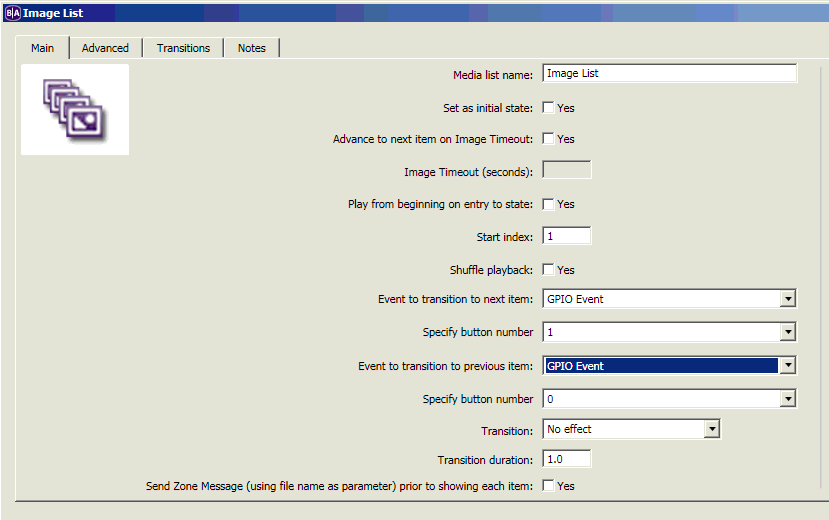
    Here's a simple example with a start image, button 1 advances to the next image, button 0 takes you back to the previous image, and all images timeout to the start image after 15 seconds.

    BrightAuthor Playlist - GPIO Example
  • 0
    Avatar
    Elise

    If anyone else has the above or similar example, could you please post it? I am also a newbie looking for a back button and forward button example. Thank you in advance!

  • 0
    Avatar
    Bright Scripters

    Please describe what exactly you need, as far as the user experience.

    Also, you are looking at a thread that is 7 years old.

    Since then, BrightAuthor's features have evolved.

    For a simple interactive next/previous image navigation, you can use the Image List state, that has everything that you need.

    See screenshot

Please sign in to leave a comment.