0

Networked Units window is blank but Managed tab shows unit

I have a LS422 unit that I went thru and setup initially with a presentation. The unit crashed and I set it up again from scratch as a new unit and it worked but now the unit will not show up in the Networked Units window (On the Publish tab / Local networking option selected).  I've tried resfreshing and adding the IP address but I get a popup with "This brightSign has already been added. Its serial number...."

The IP address is still good - I can log into the webpage from the Manage tab.

How do I get the unit to show up in the Networked Units window.


8 comments

  • 0
    Avatar
    Alex

    Hi Terry,

    Close BrightAuthor.

    Navigate to this folder on your PC:

    C:\Users\"name_of_your_user"\AppData\Local\BrightSign\BrightAuthor\"BA_version"

    Delete the BrightSignUnits.xml file.

    Open BrightAuthor > Publish > Local Network > Networked units > add a unit via IP address.

  • 0
    Avatar
    Terry Chacko

    Hi

    Thanks for responding. I tried but it doesn't work. When I delete the file and start it back up, the unit still shows in the publish/status tab (even after I deleted and exited BA).  After restarting, I tried to add the IP, and I got  the same message "This brightSign has already been added. Its serial number...."

  • 0
    Avatar
    Terry Chacko

    If I remove it from the manage/status tab and try to add it in the publish/local network / network units window, it shows up for a second then disappears.

  • 0
    Avatar
    Brandon

    It might be a Bonjour issue.

    Try disabling Bonjour by going to Edit>Preferences, and un-checking the Enable Bonjour box.
    Then close BrightAuthor and open it again.

    If you still have the problem after that, update your Bonjour version via the latest iTunes installer from http://itunes.apple.com/

  • 0
    Avatar
    Terry Chacko

    That did the trick - Thanks

  • 0
    Avatar
    Robert Litchfield

    I know this has been asked in the past, but I'm having the same issue.  We see some of the units listed in the Manage tab, but not all of them.  This is happening on a few of our BrightAuthor installations, so it is not specific to a single desktop. I have tried both fixes in the attached message stream, but neither of them have worked. 

    Along with these suggested fixes, I've tried the following with no success:

    • Wiping (factory reset) the brightsign unit completely
    • Format the SDD card, and republish using local storage

    This is a very frustrating issue that is really souring our usage of this solution.  Thank you in advance for whatever support you can offer.

  • 0
    Avatar
    Brandon

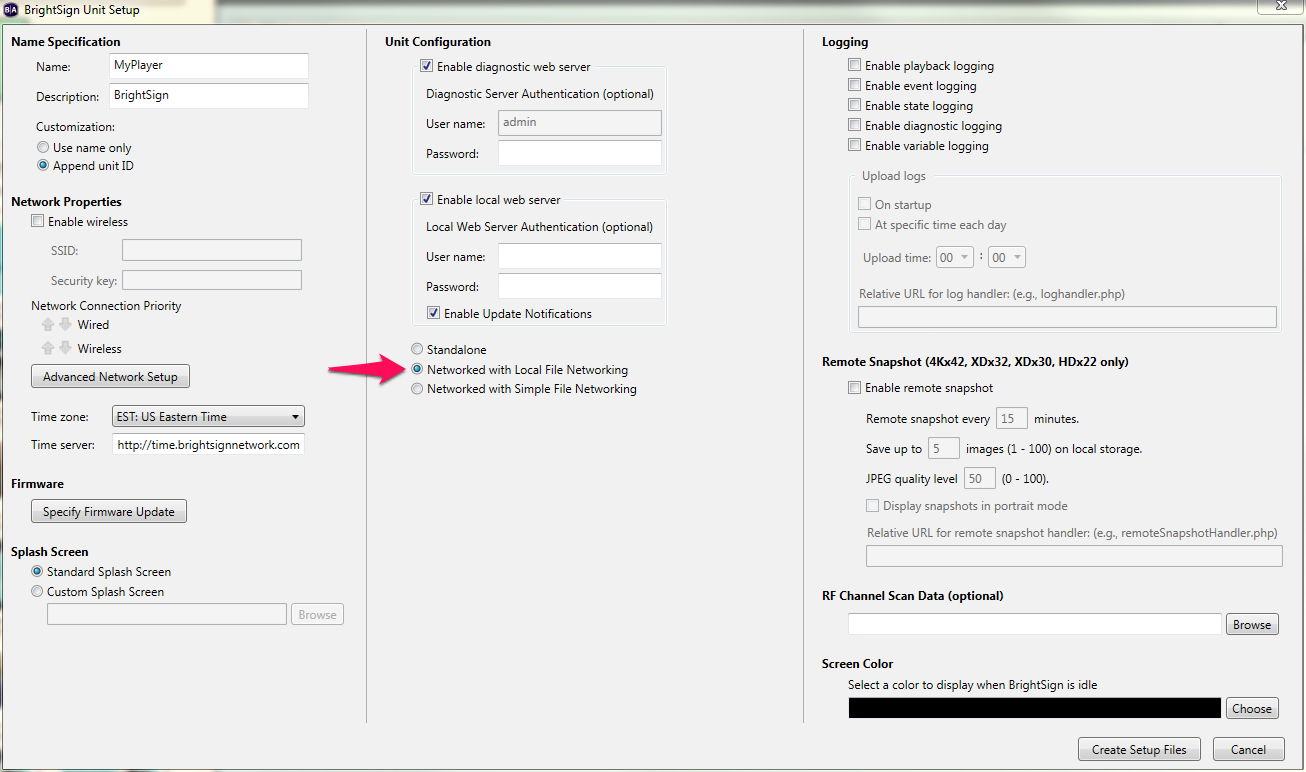
    If you're publishing using the Local Storage view of the Publish tab, then the player is not configured for Local File Networking and therefore you won't be able to access it on the Local Network view of the Publish tab.

    Also, after factory reset, you need to reapply a Local File Networking configuration to the player since the publishing mode is cleared in a factory reset.

    If the player isn't configured for Local File Networking, it won't respond to BrightAuthor in the Local Network view.

  • 0
    Avatar
    Robert Litchfield

    That did it...  Not sure how the other 15 units work on our network as that is not how I set them up.  Thank you for the support!!!

    Robert

Please sign in to leave a comment.