I am trying to create a presentation using a brightsign 4k1142 that will play a full screen looping video with sound and upon a live input being plugged in, the live input would be full screen playing it's sound and mute the looping video. Upon unplugging the live input, the looping video's audio would turn back on. Any suggestions?
Date
Votes
8 comments
-

^UD\_$ You would probably need to custom code a BrightAuthor plugin, in order to response to a change in HDMI connection state.
The documentation is showing a relevant event.
I hope that helped.
roHdmiInputChanged, roHdmiOutputChanged
The roVideoMode object generates an roHdmiInputChanged or roHdmiOutputChanged event object whenever the hotplug status of the HDMI input or output changes.
At least one roHdmiOutputChanged event object will always be generated for a hotplug event, even for very quick disconnect/connect hotplug events. In most cases, a disconnect/connect hotplug event will generate two event objects.
Interfaces: ifInt, ifIntOps
The ifInt interface provides the following:
GetInt()AsInteger
SetInt(aAsInteger) -

Ryan Russell I've found a custom plugin but it doesn't seem to just work. Are there any setup files that you have to create before using a plugin?
-
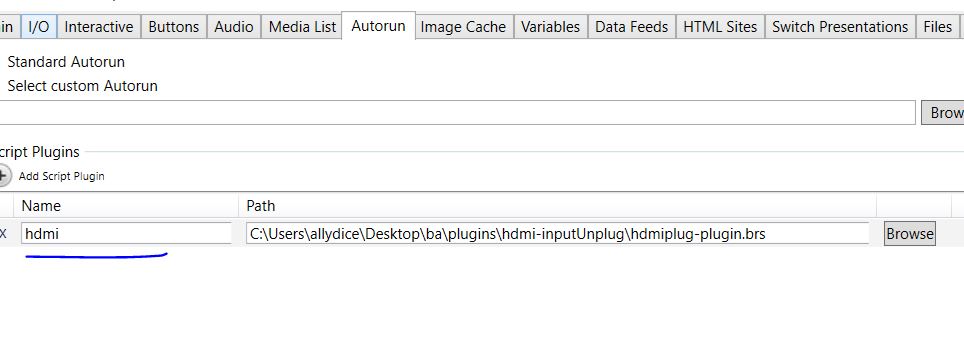
^UD\_$ A plugin is a single script that you would attach to your BrightAuthor presentation, from Presentation Properties -> Autorun -> Script Plugins.
Please attach the plugin that you have found here, so we can take a look.
-
Ryan Russell Here is what I found in another thread -
Function hdmi_Initialize(msgPort As Object, userVariables As Object, bsp as Object)
print "hdmi_Initialize - entry"
hdmi = newhdmi(msgPort, userVariables, bsp)
return hdmi
End Function
Function newhdmi(msgPort As Object, userVariables As Object, bsp as Object)
print "newhdmi"s = {}
s.version = 0.4
s.msgPort = msgPort
s.userVariables = userVariables
s.bsp = bsp
s.ProcessEvent = hdmi_ProcessEvent
s.checknow = hdmi_checknow
s.hdmistatus$ = ""
s.objectName = "hdmi_object"
s.debug = false
s.mymode = createobject("roVideoMode")
s.mymode.setport(msgport)
s.checknow() 'checks if hdmi plugged in at when project runsreturn s
End Function
Function hdmi_ProcessEvent(event As Object) as boolean
print "Processing myhdmi plugin events"
retval = falseif type(event) = "roAssociativeArray" then
if type(event["EventType"]) = "roString" then
if (event["EventType"] = "SEND_PLUGIN_MESSAGE") then
if event["PluginName"] = "hdmi" then
pluginMessage$ = event["PluginMessage"]
print "SEND_PLUGIN/EVENT_MESSAGE:";pluginMessage$
retval = ParsePluginMsg(pluginMessage$, m)
endif
endif
endifelse if type(event) = "roHdmiInputChanged" then
m.bsp.diagnostics.PrintDebug("hdmi plug event")
status$="hdmichange"
hs = m.mymode.gethdmiinputstatus()
status$ =mid(str(hs.device_present),2)
'send plugin event
hdmi_send_event(m.msgport, status$)
retval=true 'don't let ba process the event again
end ifreturn retval
End Function
'added 5-7-15
Sub hdmi_send_event(msgport as object, status$ as string)
pluginMessageCmd = CreateObject("roAssociativeArray")
pluginMessageCmd["EventType"] = "EVENT_PLUGIN_MESSAGE"
pluginMessageCmd["PluginName"] = "hdmi"
pluginMessageCmd["PluginMessage"] = status$
msgPort.PostMessage(pluginMessageCmd)
end SubSub hdmi_checknow()
hs = m.mymode.gethdmiinputstatus()
status$ =mid(str(hs.device_present),2)
hdmi_send_event(m.msgport, status$)
end Sub -
^UD\_$ Sorry but as-is, this plugin does not seem to work on our XD1230.
You may want to reach out to support via email.
-

Lyndon The plugin looks correct. But, did you also get the sample project to use it with.
https://www.brightsignnetwork.com/download/Scripts/hdmi-inputUnplug.zip
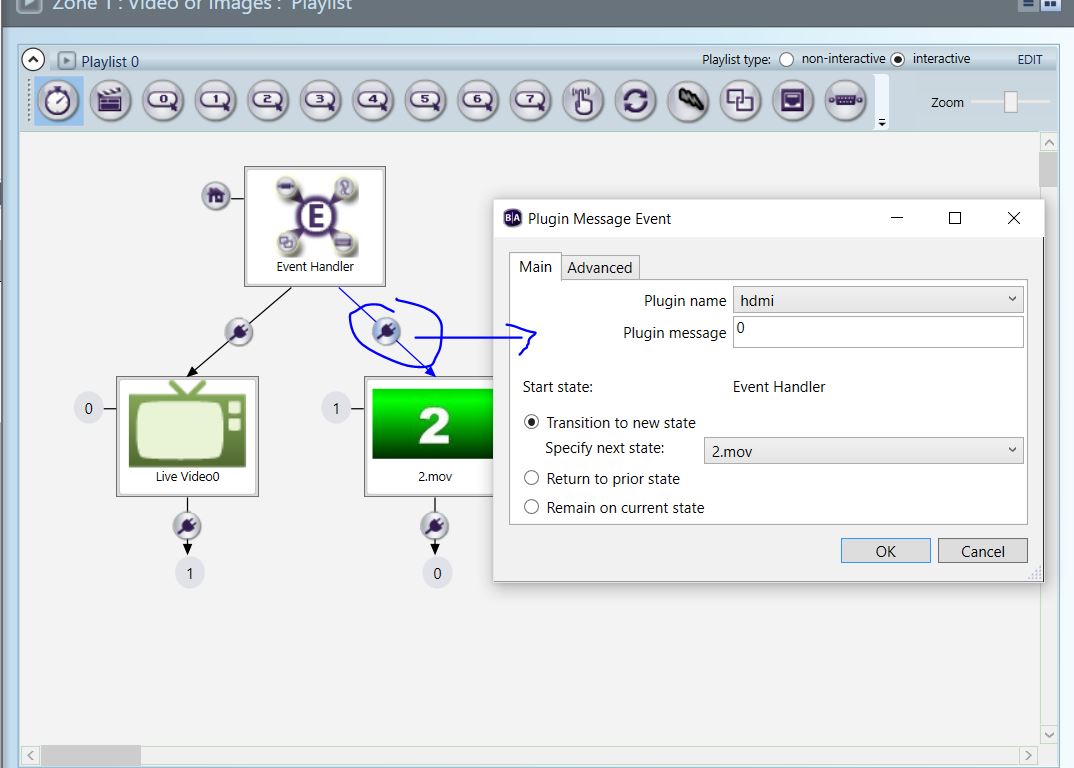
The plugin sends a plugin event with a value of zero, 0, when the cable is unplugged. It sends a plugin event of one, 1, when the cable is plugged in. The plugin name you'd use to add it to brightauthor is "hdmi". I'm attaching images as well. It works exactly as I'd expect.
-

Kevin Gage I've installed and run this example but with no result.
I'm using an XD1230. fw: 6.1.76, BA : 4.4.0.15
Unless this doesn't work on this older unit, what is next on the troubleshooting path?
Cheers!
Kevin
-
Lyndon Please send the brightauthor project you're using to support@brightsign.biz. I'll test it on my end on my 1230.
Please sign in to leave a comment.