1

TCP commands

Could you please add an easy way to add TCP commands. Now it's very difficult due scripting. only UDP is to less.

I need an easyway to give ip adress and message. it is so simple to write it in your software. One way is enough, so no receiving. Receiving would be nice but not needed very often.


56 comments

  • 0
    Avatar
    Lyndon


    what brightauthor version are you testing with? That's very odd. It's saying that getuserdata isn't returning a string. I can try and duplicate with the same ba version you're using. 

  • 0
    Avatar
    David Gaither

    Thanks for looking into it!


    I am using BrightAuthor 4.7.0.20.  I can also provide a presentation with it configured if you want.  I don't see a way to upload files here, so let me know the best way to get it to you.


    Thanks!

  • 0
    Avatar
    Jon Holtze

    Hi all

    I have a XT243 player.


    Im trying to utilize your provided plugin. I want to send this command: *power = on

    No matter what i do i cannot get it to work. It works fine in packetsender. I have tested these combinations:


    tcp!*power = on

    tcp!power = on

    tcp!power = on\r


    None seem to work. But i can ping the projector from the brightsign, and on the same network i can use packetsender with this command with success.


    Please help me. Im two inches away from throwing this piece of shit player in the trash!


  • 0
    Avatar
    Timo

    Hello,

    I am stuck with the "port$ = event.GetUserData()" problem, too.

    Any news or solution?

    Timo

  • 0
    Avatar
    Jon Holtze

    I got it to work. Send me an email and i can sent you the show file. jon@holtze.dk

  • 0
    Avatar
    Ben Cleland

    Could the TCP command that Lyndon was referencing above be used to PRINT a PDF---Using user variables?

    https://brightsign.zendesk.com/hc/en-us/community/posts/210604577/comments/212217788 


  • 0
    Avatar
    krt

    Hi!

    I have Barco, HD233 and XT1143. 

    Barco uses JSON RPC. 

    The purpose is to control Barco's shutter. 

    The command for it is:

    {

    "jsonrpc": "2.0",

    "method": "optics.shutter.toggle",

    "id": 310,

    "params": {}

    }


    How can it be converted for Brightsign?

  • 1
    Avatar
    krt

    Solved.

  • 1
    Avatar
    Laurent de Goede

    But how, how did you solve it @krt ?

  • 0
    Avatar
    Jgrogan

    It looks like several people have had a similar issue, and perhaps I'm missing it, but I don't see a posted answer.


    I'm using the control command "setstate,1:1,0 \r" and it works flawlessly with packet sender, but my XD1034 is unsuccesful. Is the space in front of the carriage return whats throwing things off? How do I skirt that?


    Thanks in advance


  • 0
    Avatar
    CHRISTIAN DURIX

    Hi,

    I am not at all  clever with brightsign but try to use this TCP script to start on a vivitek  videoprojector  DU4771

    The IP adress of the projector is 10.0.0.5

    I use port 23 which is the port designed in the ptrojector'smanual to send RS232 commands via telnet ( I test via telnett that this port is open) 

    I send command   power.on    it does not work

    I also try    power.on <CR>   it does not work

    Is any body so kind to help me ?

    Many thanks

  • 0
    Avatar
    Joan R.

    Hi Everyone,

    We are trying to use this script to control an external light controller (LANBOX LCX). 

    We're having the same issues than Jeff and Janosch with the rebooting of the unit (XD234). I changed the IP address and port directly on the script but it seems when the BS tries to send the message (or really sends it, as tested with packet sender) the unit reboots.

    Any idea of what can be happening?

    Thanks in advance,

    Joan R.

  • 0
    Avatar
    Bernd Strobl

    @krt: Can you please specify how you solved the issue?

  • 0
    Avatar
    assaf yosef

    hi,


    trying to use this plugin (tcp_plugin.brs) , herkules on the other side, but it doesn't open the socket.

    is there a way to use tcp as client, not server ?


    thank you


    assaf


  • 0
    Avatar
    Romeo

    Hi,

    Please see the below exported BA:Connected presentation and instructions for using a BS player as both a TCP server and/or TCP client:

    http://brightsignnetwork.com/download/Romeo/PublicShare/TCPPluginServerClient.zip 

    http://brightsignnetwork.com/download/Romeo/PublicShare/TCP%20Demo%20Presentation.docx 

    Please note that you may need to copy and paste these links into your browser to download them.

    Regards,

    Romeo

  • 0
    Avatar
    Werner Zelinka

    Hi Romeo,

    pls could your repost both files. the links above are not working.


    thanks

    Werner

  • 0
    Avatar
    Romeo

    Hi Werner,

    It seems that you may need to copy and paste the links into your browser. 

    Regards,

    Romeo

  • 0
    Avatar
    Werner Zelinka

    thanks for the info


    br

    Werner

  • 0
    Avatar
    Danny Keren

    @Romeo 

    Dude, U R THE MAN!!
    ur demo project looks great, and it's working perfect for me on a LS424.

    but, I'm stuck with sending HEX commands to a Samsung professional display.

    Ex. AA 14 01 01 21 37 for HDMI1, no matter how I'm trying to parse it, it won't work.

    tried comma separated bytes, \x, $, $x, 0x....

    if I'm sending it as it is, the AA goes to aa, probably cause it's sending ascii.

    any idea maybe?

  • 0
    Avatar
    Romeo

    Hi Danny,

    I think that plugin would need to be enhanced so it would send hex payload using a robyteArray. 

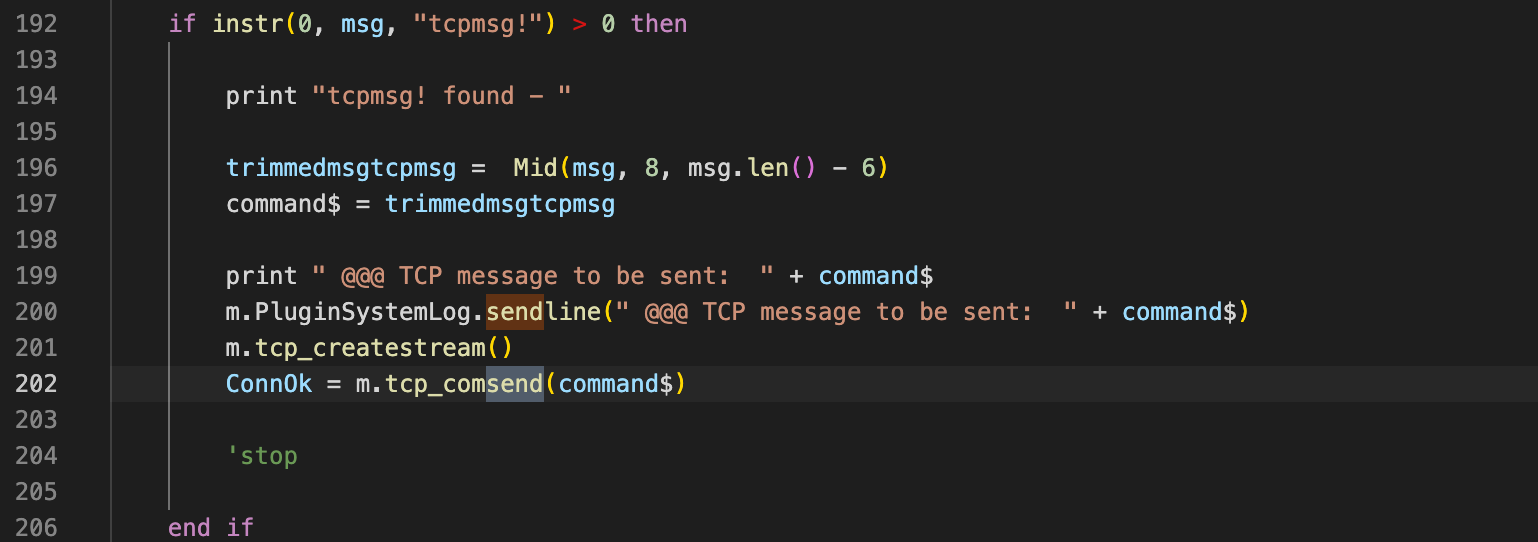
    The "command$" variable would need to be converted to a roByteArray before it is sent on line 202

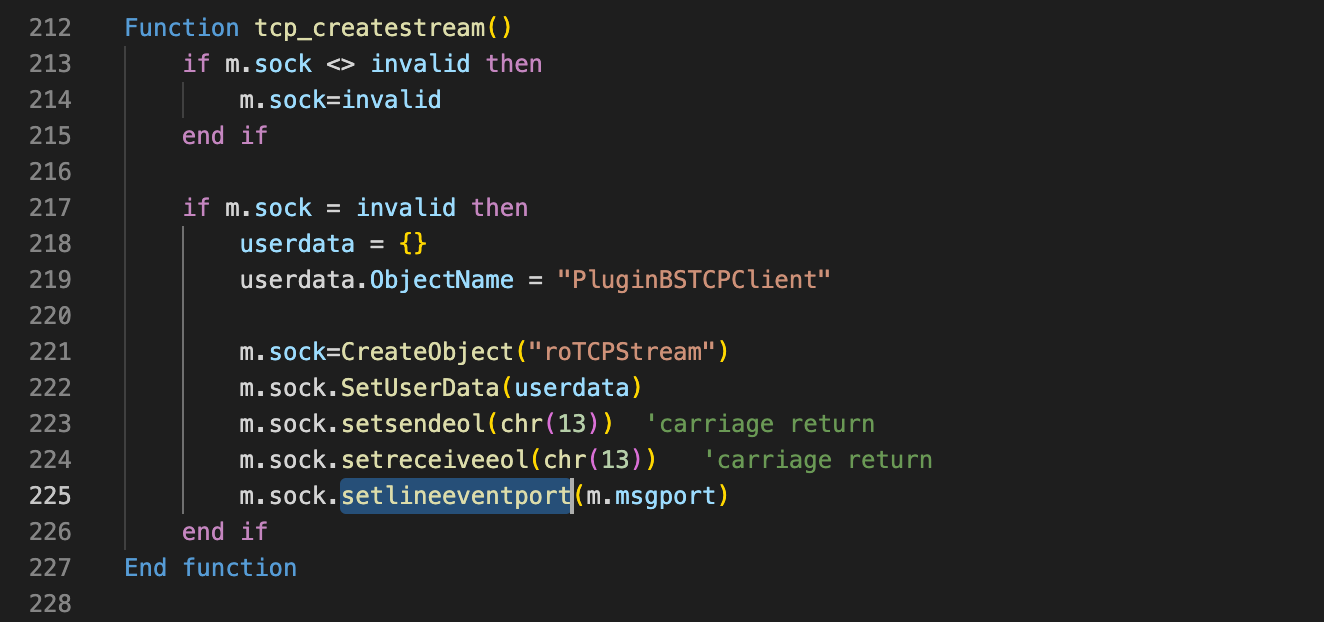
    You would need to modify the tcp_createstream() function

    https://brightsign.atlassian.net/wiki/spaces/DOC/pages/370673230/roTCPStream#roTCPStream-SetByteEventPort(messagePortAsObject)

    you would need to modify the plugin to post messages via m.sock.SetByteEventport(m.msgport) rather than what is highlighted in the above print screen on line 225

    I'm unable to test this at the moment but I believe this would be the direction that I would take to support your requirement..

  • 0
    Avatar
    Danny Keren

    Thanks for the elabareted explanation mate.

    unfortunately, I'm not a "code" person, more like a logic kind of programmer, hence why I love brightsign and Crestron so much :)
    so I guess I'll have to wait for someone in the group or for brightsign support to upgrade that plugin to fit others.

    thank you very much for your time.

  • 0
    Avatar
    Adam Liebreich-Johnsen

    Hi Romeo!

    So far this plugin works beautifully in the demo project you made. In my own projects, I have not been able to get it to work properly. according to the log it looks like it can set the IP and port of the remote server, but not the port of the BrightSign server. I am so very confused.

    [  222.342] +  @@@ SEND_PLUGIN/EVENT_MESSAGE:  tcpremoteserver!10.0.91.236!7500
    [  222.343] +  @@@ Target Server IP:  10.0.91.236 - Target Server Port: 7500
    [  222.343] +  @@@ SEND_PLUGIN/EVENT_MESSAGE:  tcpbsserver!7500

  • 0
    Avatar
    Simon Humphries

    Hi

    Thanks for this, I've using v3 from the above links and I'm able to send TCP commands to Hercules but to unit I am trying to send the commands to is not responding and I believe this is because the command is sent in lower case. I have tested this  in Hercules and the unit does not respond if I send the command in lower case. 

    Does anyone have any suggestions that I could try? Any advice is appreciated.

  • 0
    Avatar
    Simon Humphries

    Hi 

    I've managed to find a solution to my question above - the code was changing the message to lower case - I changed this and all has worked for my project.

    Thanks for the work on this, it has probably saved our Museum (a charity) quite a few quid!

  • 0
    Avatar
    Danny Keren

    @Romeo

    just got around to explore that again...
    can't seem to find the files (new computer...)

    links don't work, can you please re-link those?

  • 0
    Avatar
    Bohuslav Gruber

    EDIT:

    I'm sorry, it's working now


    Hello,

    I was wondering if there’s a working plugin for TCP communication that works with brightAuthor?

    I have an LS445 player and I’d like to use TCP to turn the projector on and off.

    The plugin available here isn’t working.

Please sign in to leave a comment.