0

Synchronization of two units.

Hello there,

This is my first time working with Brightsign players so please bare with me :-)

I need some help synchronizing two HD223 units, that should play two different videos. The videos are the same lenght, so really all i need is them to start at the exact same time. They are connected to each other with an ethernet cable.

Can i achieve this at all or do i need to put the videos together into one, and make a brightwall presentation?


Cheers


6 comments

  • 0
    Avatar
    Allen H. Porter

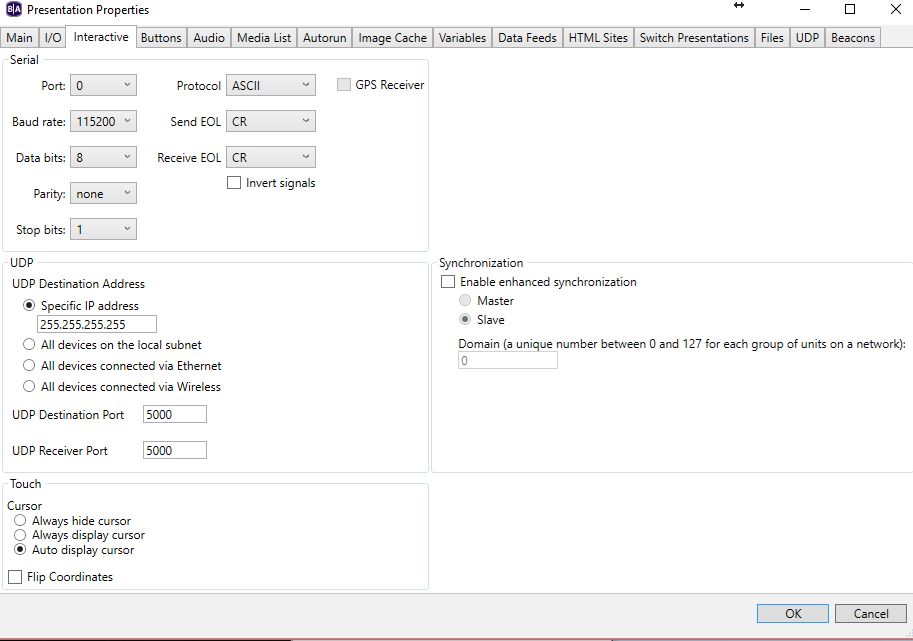
    Brightwall isnt necessary.  BrightAuthor - New Presentation - Presentation properties.  Make one player/presentation the master and one the slave.  You can leave everything else default I think.  Drag an mp4 or whatever to BA.  Attach a media end event that loops the mp4.  Double click the MP4 pointer, Advanced tab, add a Link-Synchronize command with synch1 as the word.  Save and upload.  Do the same with the Slave presentation but make it the slave.  Add the MP4 but instead of a media end event, add a Synchronize widget to the mp4 to make it loop then double click it and there is a box to add the synch word synch1.


    When the slave sees the synch1 word it will start playing its mp4.  Beware, if the slave does not see the sync1 word it will stop at the end of the video.


  • 0
    Avatar
    Allen H. Porter

    I have never tested connecting the players back to back without a switch.  Also, some switched suck at passing UDP.

  • 0
    Avatar
    Allen H. Porter

    Pull this zip and extract.  I made a master and slave presentation that is synchronized.  These are JPG but you could make them mp4 or whatever.

    https://www.dropbox.com/s/a1g8lw7m5zdhuex/bugsbunny%20master-slave%20presentations.zip?dl=0


  • 0
    Avatar
    JRB Technical

    If just 2 players, you should be fine without a switch. I just did this for a exhibitor with a pair of 4K242 players. Some of the older players may have Ethernet ports that do not do auto crossover for the cable, but the newer ones should be fine.

  • 0
    Avatar
    Shelwick

    Thanks for that mini tutorial Allen. Would the process be the same with 3 x XD230's connected to a switch? And making the third an extra slave?

    The switch would be a standalone and not connected to any other LAN. 

    Thanks!

  • 0
    Avatar
    Allen H. Porter

    I don't know the XD230 but I think all players will do Enhanced sync.  As to the number of players...I don't think there is a limit beyond how many you can have on the same subnet.  We have done 2-6 often.  I think I read of a Brightsign project in an airport that was hundreds of players synced.  Each slave just has to be on the subnet, the videos should be of the same length (we have cheated on this), and the correct "sync" word needs to be listened for.  In my example, "sync1".


    When we build large playlist/presentations we actually have the master throw a synch word at the start of each mp4.  So if the list has 10 mp4 to play we throw 10 different sync words...one at the start of each clip.  And each slave listens for each sync to start their 10 mp4s.

Please sign in to leave a comment.