Dear All,
I would like to schedule an audio playlist on 2 different days. Example. I have an audio file of 4 hours. I want to schedule it from 10:00 pm until (D1) until 02:00 am (D2). How can i do so as the scheduling template finish at midnight?
Dear All,
I would like to schedule an audio playlist on 2 different days. Example. I have an audio file of 4 hours. I want to schedule it from 10:00 pm until (D1) until 02:00 am (D2). How can i do so as the scheduling template finish at midnight?

You could use the BrightAuthor Time/Clock Event, to transition from one playlist to the other, at the specified hours.
http://docs.brightsign.biz/pages/viewpage.action?pageId=983417
You'll need to carefully handle the player's startup, so the correct playlist gets to play.

well the time / clock event as a format of 12 hours as you can see on the picture
If my event starts at 10:00 pm I can't go over midnight.
I do not have the possibility on the interface to go at the other day.
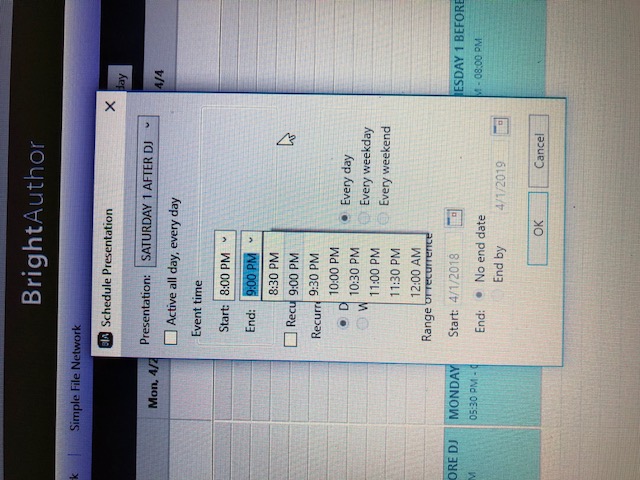
the audio file is a DJ set of 4 hours. 2 hours on the first day, and 2 hours on the second day after midnight, how can I schedule this in "one piece"
The time / clock event is a BrightAuthor interactive event. What you are looking at, is the presentation scheduling.
Those are two different things.
With time / clock event you can instruct your presentation to switch do different content, at a specific time, regardless of whether the playlist's time range crosses midnight.
Also, if you are looking to deploy to multiple locations, and manage playlists remotely, we'd love to talk to you, and offer a solution.
Please connect via info@brightscripters.com

ok then but how to create a time clock event and schedule it after on the same schedule than my other playlists?
Can't find what you're looking for?
Contact support