0

XT1143 switching between SD card and HDMI

Hi BrightSign Community,

Sorry to ask this question, its my first time to perform control on a BrightSign.

It is possible to perform switching inputs between SD card and HDMI input in an interactive way?  if Yes, will the video be seamlessly displayed ? My idea is to use the GPIO to toggle between SD card and HDMI input if possible.

Appreciate your thoughts in this.

7 comments

  • 0
    Avatar
    Allen H. Porter

    You mean switching between video on the SD card to the live input?


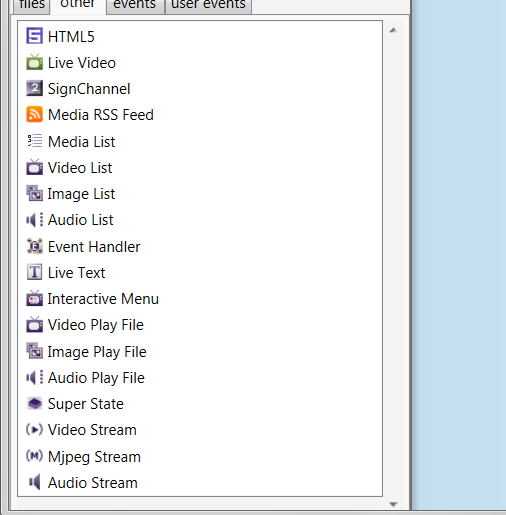
    Assuming the answer is yes, that is exactly the point of the external input.  You can run the video from an external input source as a Zone/layer with other content around it or you can run the external video input as full screen.  The showing or hiding of this zone can be triggered in many ways by GPIO, IR, UDP, touch, date/time events, etc.


    You can attach a Resize Zone command to shrink the zone or expand it or a simple Show Zone or Hide Zone command to make the Live Video show or go away.

  • 0
    Avatar
    Aljohn Mogol

    Thanks Allen for you reply. Really appreciate it.

    Yes the idea is switching between video on the SD card and Live input.

    Will the video switch seamlessly?both are in full screen.

    By the way, under the brightsign author:

    HDMI input  is the "Live Video", for the SD card, may i know its equivalent  media?


    Thanks Allen. 

  • 0
    Avatar
    Chandler, Stuart - York

    Hi Allen,

    I am working with Alijohn to set this upow would we achieve this?

    We have an occupancy sensor connected to an RMC3.

    When no one is near the screen digital signage will play from the SD card.

    When someone approaches the screen the occupancy sense will fire the RMC3 to change to an interactive presentation on the HDMI input.

    Is there a tutorial anywhere for configuring this on the XT unit using the GPIO? Or could you provide instructions?

    any help would be appreciated.

    thanks


    Stuart

  • 0
    Avatar
    Allen H. Porter

    With only a rough understanding  of what you are trying to do, here is what I would do:


    Create a new presentation and make the video/image zone that is "internal content" interactive.  Drag a video/image that is the "attract loop" (plays when no one triggers the sensor) out into the zone.  Also drag the Live Video icon onto that zone.  Then select one of the 0 through 7 buttons across the top (these correspond to the GPIO closures on the GPIO connector) and attach that to the video/image.  Set that to switch to the Live Input when triggered.  Wire up this RMC3 thingy to the appropriate GPIO contact.  Now when the closure happens you should switch to the external HDMI Input of the XT1143.


    Now the question is how to get back to "internal" video?  You could set a timer widget on the Live Input to go back after X seconds.  Or set a user variable to 60 and set conditional statements on the Live Input that decrements the variable by one (might have to do this on an invisible zone playing a black PNG that is see thru or the entire zone is just set to small size or hidden) and when this variable reaches zero, the player goes back to the internal video and that variable gets reset by the RMC3 closure getting triggered by the sensor thus keeping the Live Input up as long as someone is standing there.


    Some version of this will work.  looks like fun.  I wish I had the time to do it here.


  • 0
    Avatar
    Chandler, Stuart - York

    Thanks Allen,


    We will give it  at try and let you know what works.


  • 0
    Avatar
    Chandler, Stuart - York

    Hi Allen, We are having trouble getting this to work. We use another platform as our digital signage management tool. Appspace. Is it possible to have the Appspace registration running with a brightauthor configuration behind it? thanks 

  • 1
    Avatar
    Ben Johnson

    Hi all...  (This is for anyone willing to chime in)


    I'm working on a similar puzzle.  I have a multi-zone presentation that includes a small CATV feed zone in the bottom right.  It's utilizing the HDMI passthrough of the XT1143 for this.

    As it stands right now, I created a touch zone that lays over the small zone that I would like to resize.  When the zone is touched, the small CATV zone resizes to a full screen size but I can't figure out how to get it to return to the original small size with another touch input. 

    Is this possible?  I'm stumped!

Please sign in to leave a comment.