0

XT243 SAMPLE ENCODE PLAYS, BUT FULL LENGTH DOES NOT

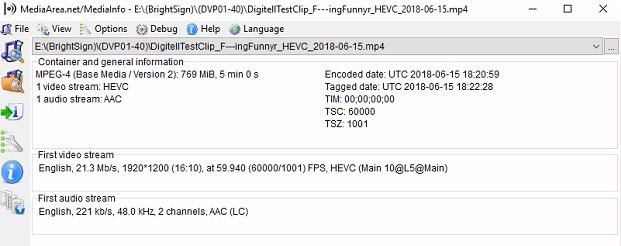
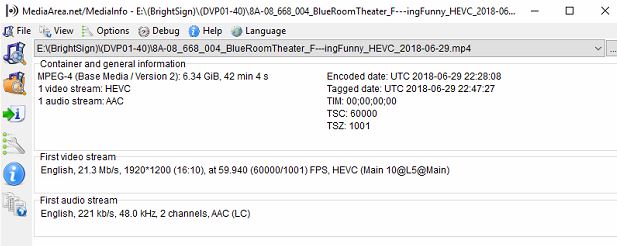
I have an issue with playback on a piece of content that plays fine in a 5 min sample... but then using the identical encoding, fails to play the full-length file.
ENCODING DETAILS BELOW.

They are encoded as H.265 and are 1920x1200 files which are setup correctly for playback to a Christie projector at 1920x1200 native.  Like I said, the sample plays pefectly fine.

The log doesn't reveal anything other than something like "can't find anything to load" but it's clearly looked like it loaded fine without issue.

The sample that is playing now, seemingly fine, has this log...

[26875.983] TIME: Probe = 0.000010
[26875.983] BSPLAY: Container: MP4;Video: H265[1 (prog 0 PCR 0)]: 1920x1200 1.60; 10bpp 59.94 FPS;Duration: 60060ms; Ref PTS: 0; File: "/storage/sd/pool/9/7/sha1-6593569f73acdeaf6c06d17d8fb5173ff8b90997" O player 0xf00480
[26875.983] Playing: /storage/sd/pool/9/7/sha1-6593569f73acdeaf6c06d17d8fb5173ff8b90997
[26875.985] Setup: decoder_settings.ptsOffset 0
[26875.990] Playing video to video layer
[26875.990] FireEvent 27 MEDIAPREPARED (line 1114)
[26875.990] TIME: PlayFile = 0.007280
[26875.991] *** 07:27:26.201 bmp4_track: b_mp4_edit_stream_load: 0xf05110 not supported entry in the EDIT box media_time:2002:5405400
[26875.991] NEXUS_Playback_Start returned 0
[26876.198] FireEvent 3 PLAYING (line 1235)


3 comments

  • 0
    Avatar
    Rick Nelson

    I was able to CLEAR the SD card... for some reason, it's not deleting the existing files on the card.

    Once I did that, I was able to load the video...

    HOWEVER... the file plays fine for a few minutes... then starts showing signs of dropped frames, then gets as bad as stutter and hiccups.

    Once it finishes playback and loops back around... it plays fine for the first few minutes again, etc.

    What could be causing this accumulation of issues as it plays back?  It plays fine on a windows media player... and from what I can tell, is within the encoding spec of the Brightsign.

    see encoding spec's before this comment...  any ideas??  By the way, it's a CLASS 10 card.

  • 0
    Avatar
    JRB Technical

    So, one thing to check, and is not clear in the Basic View of MediaInfo (but you can see in Text view) is if your video files are encoded with Variable Bit Rate (VBR) or Constant Bit Rate (CBR).

    This issue is usually common when playing VBR encoded video on BrightSign players, as portions of the Video are at a bit rate that is higher then the Player can play back. So some of the video will play fine, but if there is a lot of motion, the bitrate will exceed what the player can handle.

    Unfortunately as good as MediaInfo is, it does not tell you max bitrate of a VBR video.

    If your video is in VBR, try encoding it again in CBR. I typically use a Target Bitrate of 22 Mbps for HD.

    If it is in CBR but at 24 or 25 Mbps, try bumping down to 22 Mbps.

    Hopefully that is all that it is, and a reasonably easy fix.


  • 0
    Avatar
    Bright Scripters

    There is a tool in the diagnostics web server, that could help. Read about it here:

    https://brightsign.zendesk.com/hc/en-us/articles/360003401794-Some-video-encoding-advice-on-video-bitrate-


Please sign in to leave a comment.