I have set up our Brightsign XD232 with the use of PST time from the brightsign servers. It is one hour off and I already created new set up files in the hope that it would fix the issue but it keeps being one hour late. I was contemplating using the GMT -8 hours to set the time but does anyone have any suggestions so i can properly display the current local PST time. Thank you
Date
Votes
2 comments
-

JRB Technical If you have the Diagnostic Web Server turned on, you can go to the players IP address for web access, and you can check as well as set the Time.
It's at the top of the Info Tab when you first log on, click on (set) at the end of the date/time as listed:
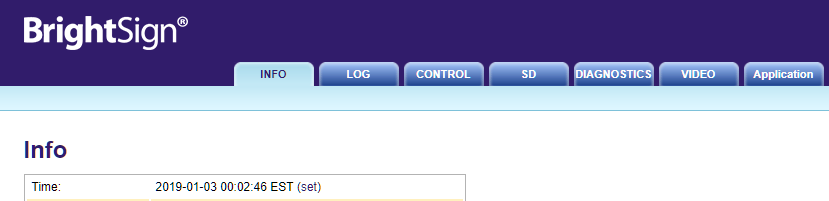
Then you can Use Client time (the computers time you are accessing from), or Manually Set.
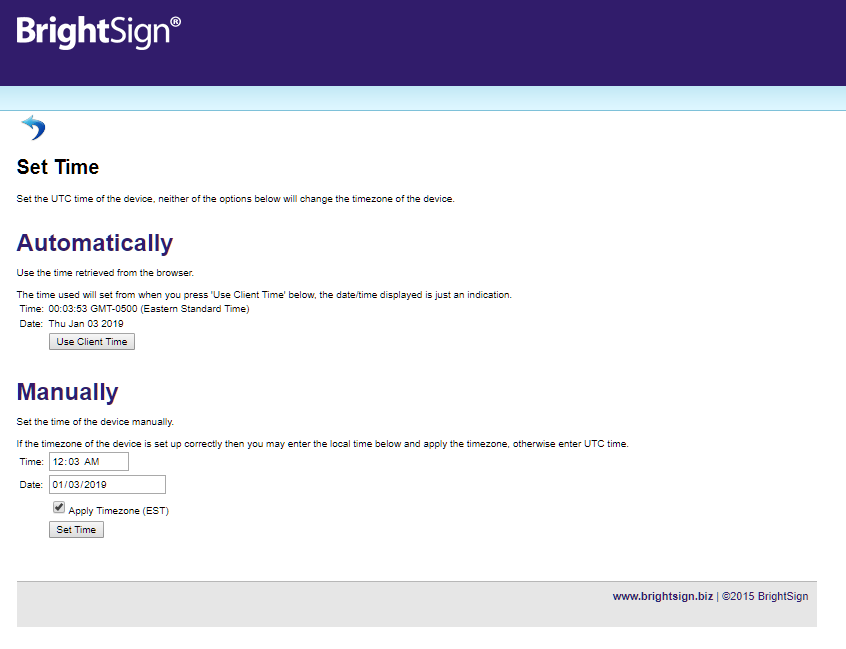 This way you can verify what time and time zone the player is actually set to, and change if needed.
 -

Ddewachter I did not activate the Diagnostic Web Server but I opted not to use the PST file from the server. I reset it to the GMT-8 time because that is where Los Angeles is at and it still displayed the wrong time. I ended up trying GMT-6 and now it displays the correct time. I am only assuming here that the server that generates the time is located in a time zone two hours ahead of California based on the fact that the GMT-6 displays the correct PST time.
Please sign in to leave a comment.