0

Buttons and auto mode

Hi!

I´m looking for someone to help programming the following functionality:


One movie, called Movie1, loops automatically

Unless:

Operator pushes GPI button - triggers Movie2

Each consecutive GPI button push will jump to Movie3, Movie4, Movie5 etc etc.

Movies 2 - 5(etc) will hold/pause at end.

If no further button push is registered for X minutes, Movie1 will start looping again

Paid by the hour :)

5 comments

  • 0
    Avatar
    video star

    Alternatively - if someone can tell me wether this is even possible, that´d be awesome :)

    I might be able to figure it out myself if I know it´s possible..

  • 0
    Avatar
    Allen H. Porter

    Yes.  It is possible.  I have done something similar.  My only reason to hesitate is that I am unclear what you mean by movies 2-5 pause at the end.  You can make the playback stop at the end of the file by attaching a pause command to the media end event (or other ways to do this as well) but I am not sure what will be on the screen.  I have never intentionally set up so that nothing is actively playing.  This whole thing will also involve a variable that is set to some value X and then a conditional statement that counts down the variable...or some such.


    At any rate, yes this should be doable even without any BrightScript coding.

  • 0
    Avatar
    video star

    Thanks for the reply Allen! 

    Maybe the countdown can be solved by just adding a 3 minute (or whatever) blank screen at the end of each movie.

    So, if no button press within 3 minutes, go automatically to Movie1 at the end.


    I´m unsure of whether the sequential GPI button presses will work, though.

  • 0
    Avatar
    Allen H. Porter

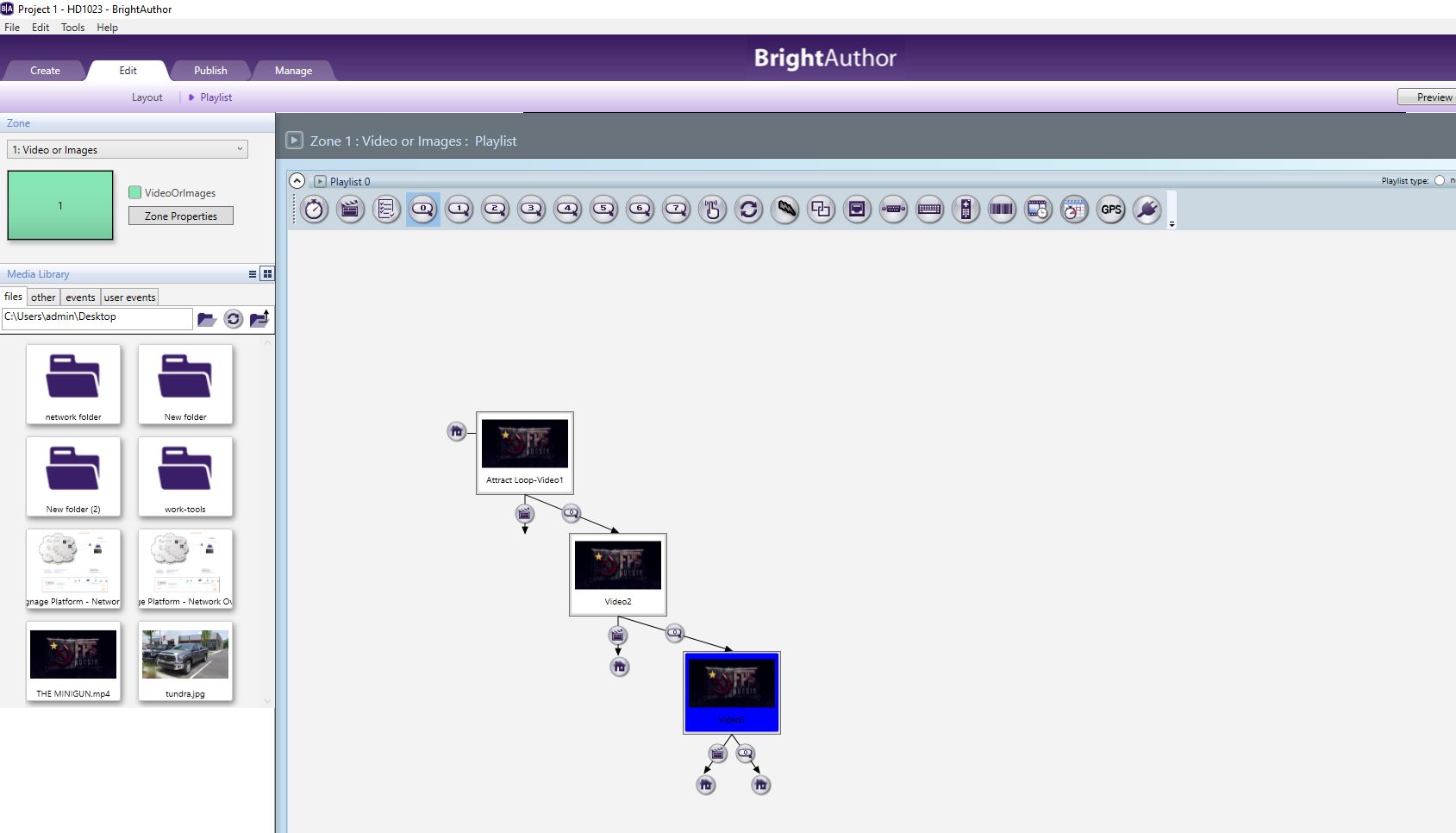
    The sequential GPIO button press is the easiest part.  When you want the same button to do multiple things you just attach it to every object where you want the function available.  So if you want GPIO 0 to trigger advancement to the next video then you attach GPIO 0 to every other video.  Attached is an image of the BA desktop showing this.  Also in the image I have the playback looping back to video 1 at the end of each of the other videos.  So if someone presses GPIO 0 during the playback of any video then you advance to the next video.  If no one presses the button then at the end of whatever video is playing it will go back to video 1.  I did not include a timer because I don't see the need and I don't know the entire scope of what you are doing.


  • 0
    Avatar
    video star

    Wow, thanks! If you share this BA file with me somehow, I´ll happily share $50 with you through your payment platform of choice :)


Please sign in to leave a comment.