0

Full screen playback - how to? Is it possible?

Hello all,


I have a presentation where the VideoandImages zone is resized to allow for RSS scrollers below.  Occasionally, I'd like a video to play full screen.  Is there a way to do that with instructions in the playlist, or would it have to be a scheduling thing where the player moves to a different presentation where the VideoandImages zone is the full screen?

Thanks for your assistance!

jpb

4 comments

  • 0
    Avatar
    Allen H. Porter

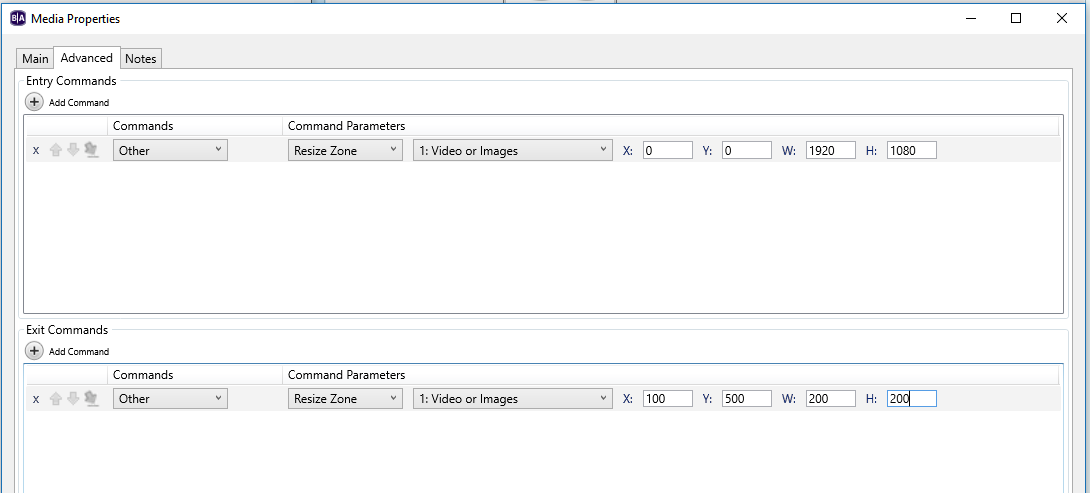
    There is a resize zone command available via BrightAuthor that could be attached to almost any object including video and images.

  • 0
    Avatar
    John-Paul Bonadonna

    Thanks for the reply Allen, can you shed more light on this?  The only properties I see are still length and transition type?  Where do these commands exist?

  • 0
    Avatar
    JRB Technical

    Go to Media Properties for the clip and on the Advanced Tab, and when you use Add Command, Resize Zone is under Other.


    Also, depending on the player, what I have done on occasion is add another full size video zone on top, and create a full size transparent PNG and set this as the default for that zone.  Then use the timer to transition to play the full screen video over everything else if you want the video to play something like every 10 minutes (600 seconds). Then a media end to connect back to the transparent PNG, or timer to another Transparent PNG with timer to another video if you have more than one video in that loop.


  • 0
    Avatar
    John-Paul Bonadonna

    The only media properties I have access to is by click on the image in the playlist, and I get a single menu item - EDIT.  This only allows me to change duration.  I cannot find the properties shown above anywhere in BrightAuthor.  This is a simple VideoOrImages zone, with a playlist containing video clips and still images.

    Sorry to be struggling with this.

Please sign in to leave a comment.