0

UDP Command Reply

Hi,

I am controlling a brightsign HD1023 over a network using UDP from a Kramer VP-440.
Control works fine, but I never get a response from the HD1023 back to the Kramer when testing and not sure how to send a command from the player back to to the Kramer so I can trigger an event at the Kramer end (i.e. when the video ends).

What should I be doing at the Brightstar end to make it talk back to the kramer? 

7 comments

  • 0
    Avatar
    Martinidean

    Correction I am controlling the Brightstar using a Kramer SL-12, the VP-440 is the switcher in the system.


  • 0
    Avatar
    Bright Scripters

    Assuming that you are looking for a way to send UDP from the player. Here is how you can send UDP:

    http://docs.brightsign.biz/display/DOC/Commands#Commands-Sendsend

  • 0
    Avatar
    Bright Scripters
  • 0
    Avatar
    Martinidean

    Yep doing that, tried bot sending to the controller specifically and a broadcast on the subnet in general and no luck. Other pieces of equipment reply back to he controller via UDP fine, acknowledging receiving commands correctly.

    How do I make sure the UDP send is set correctly. I know this is defined in the project properties dialog, but where can I find this in the config files to make sure this has been set correctly? It would be much easier of the send UDP allowed you to specify a destination, rather than there being a single project UDP destination.

    What is the best way to test that the unit is sending out valid UDP messages?


  • 0
    Avatar
    Allen H. Porter

    See screenshots below.

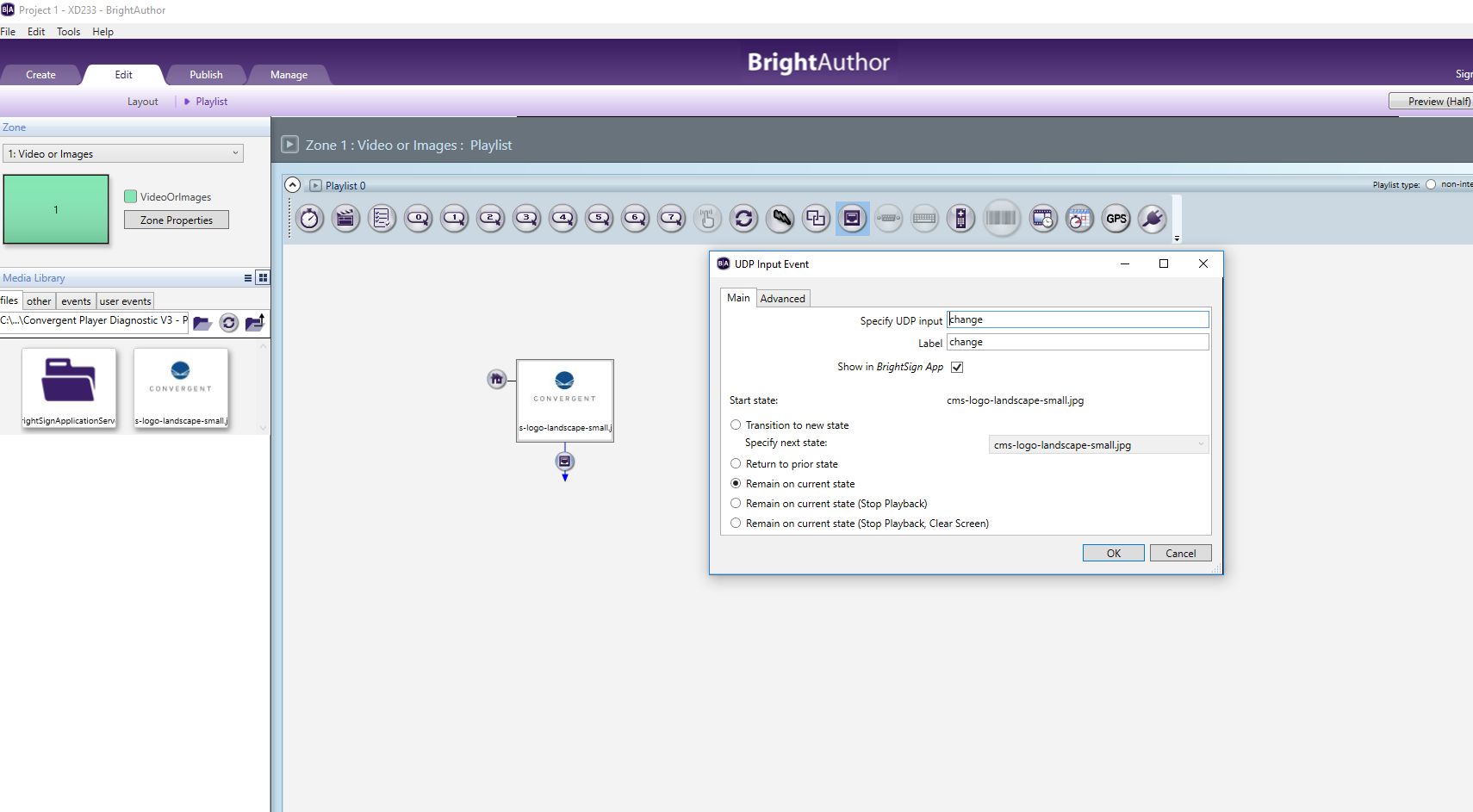
    In BA, File - Presentation Properties - Interactive tab (bottom pic).  This allows you to set the port, a specific IP, broadcast, etc.


    Then in the Presentation work-space you can attach a send or receive UDP handler to any object.  The first pic below is me attaching a UDP listen to a jpg.  The word it is listening for is "change".  The second pic is a UDP send attached to the same JPG.  The UDP word is "changecomplete".  Double click the JPG and select Advanced tab.


  • 0
    Avatar
    Martinidean

    Thanks I will give this a try!

  • 0
    Avatar
    Michal Moraszczyk

    Hello,

    I have another question about replies to commands sent to a player. I have a control system located in a different VLAN than the player. While the player receives commands from the control system, it's not working in an opposite way - the control system is not receiving replies from the player. Has anyone had such a case and can confirm whether commands from a player can be sent to another VLAN?

    In the Presentation Properties tab I have checked "Specific IP address" radio button and the IP address of the control system entered.

Please sign in to leave a comment.