0

Bright Author XT4 HTML5 Issue

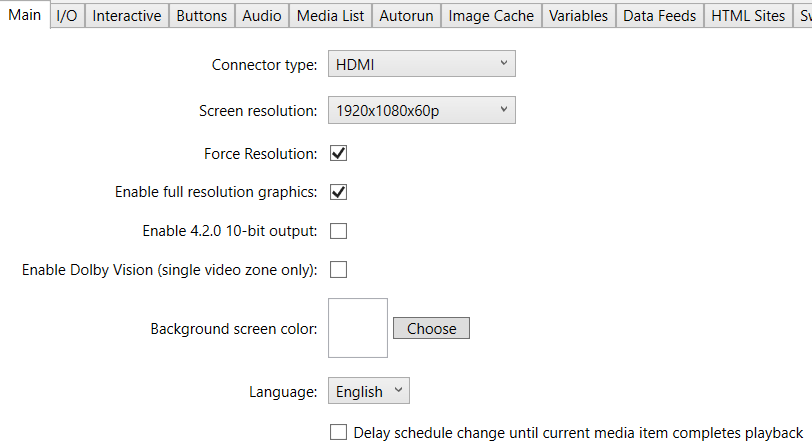
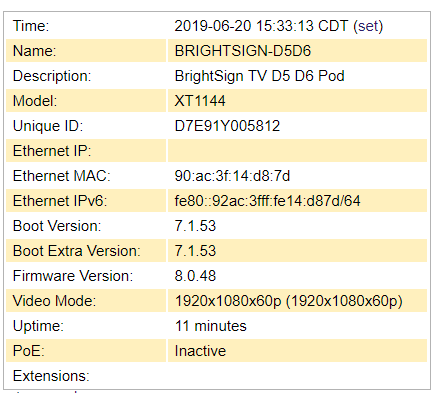
I have a XT4 with firmware 8.0.48 and setup a presentation with a single image zone with a width of 960 and height of 1080. There is a single HTML5 object that pulls from an internal web server.

The issue I am having is when the content is displaying from the Xt4 it appears to o resize or zoom the html when displayed on the device. When looking at the web page in Chrome with a monitor that has the exact same resolution it shows up perfect.

The body tag is set like this <body style="width:960px;height:1080px;">

I have been reading on this all day and am stuck. Anyone have an idea?


5 comments

  • 0
    Avatar
    Monica Knutson

    Have you tried to set your meta viewport?  This should go into the document head, along with the other meta tags.

    <meta name="viewport" content="user-scalable=no, width=960, height-1080" />


    Cheers,
    Monica

  • 0
    Avatar
    Monica Knutson

    Correction!  [I had a dash vs an equals before height]


    <meta name="viewport" content="user-scalable=no, width=960, height=1080" />

  • 0
    Avatar
    Shannon Cole

    Did not make a difference. Here is my full html with your change. This is basically a bulletin board with our employee schedule on it.

    <!DOCTYPE HTML>
    <html>
    <head>
    <meta name="viewport" content="user-scalable=no, width=960, height=1080" />
    <meta http-equiv="X-UA-Compatible" content="IE=edge" />
    <meta charset="utf-8">
    <script type="text/javascript" src="/js/jquery-1.11.2.min.js"></script>
    <script type="text/javascript" src="/js/jquery-ui.min.js"></script>
    <script type="text/javascript" src="/js/geturlvars.js"></script>
    <link href="/css/jquery-ui.css" rel="stylesheet" type="text/css" />
    <script>
    $(document).ready(function () {
    var sDate = new Date();
    if (sDate.getDay() === 0)
    sDate.setDate(sDate.getDate() + 1);
    sDate = sDate.toISOString().split('T')[0];
    $.post('empbb_sch_load.php', {seldate: sDate, day: 'today'}, function (r) {
    $('#schtoday').html(r);
    });
    $.post('empbb_sch_load.php', {seldate: sDate, day: 'next'}, function (r) {
    $('#schnext').html(r);
    });
    });
    </script>
    <style>
    * {
    font-size: 10px;
    }
    td {
    padding: 1px;
    border: 1px solid #d3d3d3;
    }
    table {
    border-collapse:collapse;
    }
    .lscribe {
    background:white;
    color:black;
    }
    .schcontainer {
    display:flex;
    margin: 0 0;
    }

    </style>
    </head>
    <body style="width:960px;height:1080px;">
    <div class="schcontainer">
    <div style="width:50%;" id="schtoday"></div>
    <div style="width:50%;" id="schnext"></div>
    </div>
    </body>
    </html>

  • 0
    Avatar
    Monica Knutson

    Try adding positioning and sizing to the container DIV

    .schcontainer {

    position:absolute;
    top:0;
    left:0;
    height:1080px;
    width:960px;
    display:flex;
    margin:0px;

    }

  • 0
    Avatar
    Shannon Cole

    Made the change and it is still getting cut off. But I did go into BrightAuthor and i changed the Image Zone Layout.

    I resized the image zone to width 500 and height 1000 with a position of X: 169 and Y:28, now the content is showing but with a Y: position of 28 it is right at the top of the actual TV.

    It apparently has nothing to do with the HTML or Bright Author. The TV is a LG 55LV340C LV340C and the settings show 16:9 1080p. 

    In the picture settings it was set to 16:9 so I changed it to JustScan. Now everything is fitting but kinda of looks crappy.

    Is there some settings on the box or in Bright Author that I am missing.

    Here is the properties

Please sign in to leave a comment.