0

testing serial data

Hi

I'm trying to do some testing but not getting on well.

I've got a 3.5mm to 9 pin D (male) cable from Brigthsign XT1144.

I've got a USB to 9 pin D (female) cable from my laptop.

My thoughts were that I could connect the two and check the commands that have been set to be issued by the player.

I'm not getting anything so I'm thinking, either :-

- The cable set up is not correct

- The tools I'm using to monitor the serial data isn't working


Has anyone tried similar and has any advice? 

Many thanks

Stephen

5 comments

  • 0
    Avatar
    Brandon

    Unless your USB Serial adapter has a an option for it, you need a null-modem or cross-connect adapter to swap the RX and TX lines - and RTS/CTS lines if those were connected, but it's irrelevant in this case as they're not.

    _________________________________________________________________________

    Friendly reminder, the community forum is intended for user-to-user discussion.  It is not regularly monitored. For troubleshooting problems and to ensure a timely answer from a BrightSign representative, please submit a support ticket.

  • 0
    Avatar
    Stephen Elkington

    Thanks Brandon, will look into that.

  • 0
    Avatar
    Allen H. Porter

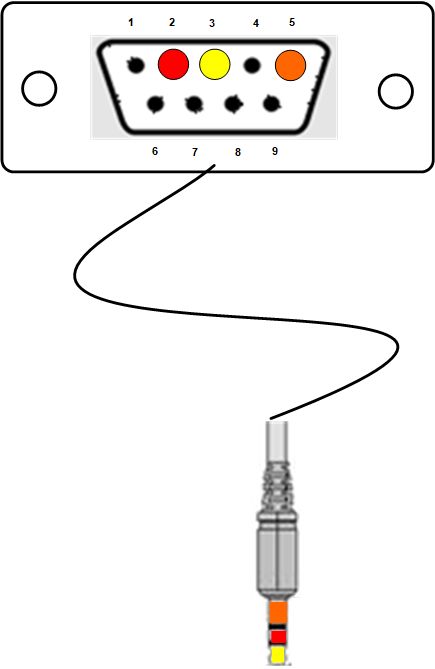
    I have verified the commands from the XT using a laptop and adapter.  I prefer to use UTF-TeraTerm as the terminal on the laptop.  And as Brandon says, you likely need a null-modem adapter.  Pins 2, 3, and 5 on the 9 pin side.  Below is a null-modem version of that adapter with the 9pin side being male.  Normally the tip is pin 2.  If you need to control a Samsung, LG, or Dynascan display, I posted that info somewhere in the forums several years ago.  Anything else and you would just need to experiment.


  • 0
    Avatar
    Stephen Elkington

    Ah brilliant, thanks Allen

  • 0
    Avatar
    Stephen Elkington

    Hi Brandon and Allen

    Just to confirm this worked perfectly, thanks both!

    TeraTerm is useful too!

Please sign in to leave a comment.