I would like to delete a video on the SD card. Is it possible?
Date
Votes
5 comments
-

Christian Hi! you use brightauthor connected?
-

Noopara I am using BrightAuthor Legacy.
-

Kuowei Liao I use this py script to delete unnecessary files on SD card
'''written by kuowei.liao@schot.com
Note: the player must running with LFN
1. install python on your laptop
2. open command prompt and enter the command below to install the "requests" modulepip install requests
3. run the "deleteSdFiles.py" py script from your file location to delete SD unnecessary filespython d:\deleteSdFiles.py <BS player ip> <DWS password (option)>e.g.:with DWS password enabled:python d:\deleteSdFiles.py 192.168.0.43 password
with DWS password disabled:python d:\deleteSdFiles.py 192.168.0.43'''
import sysimport requestsimport jsonfrom requests.auth import HTTPDigestAuthfrom xml.etree.ElementTree import fromstring, ElementTreeip = Nonepassword = ''args = sys.argvpresentationFiles = []delFiles = []videoFiles = []if(len(args)>1):ip = args[1]if(len(args)>2):password = args[2]
def getPresentationFiles():filelist = []r = requests.get(f'http://{ip}/api/v1/files/sd/local-sync.xml?contents&stream', auth=HTTPDigestAuth('admin', password))if(r.status_code==200):try:xml = ElementTree(fromstring(r.text))root = xml.getroot()for child in root:for ele in child.findall('download'):# print(ele.tag, ele.attrib, ele.text)link = ele.find('link')name = ele.find('name')isVideo = ele.find('probe')filelist.append(link.text)if(isVideo != None):videoFiles.append(link)except Exception as e:print('format xml error, ',e)elif(r.status_code==401):print('password incorrect.')return filelist
def getAllSdFiles():filelist = []r = requests.get(f'http://{ip}/api/v1/files/sd?raw=', auth=HTTPDigestAuth('admin', password))if(r.status_code==200):try:j = json.loads(r.text)if('data' in j):if('result' in j['data']):if('contents' in j['data']['result']):for c in j['data']['result']['contents']:if(c['path']=='/storage/sd/pool' and c['type']=='dir'):# print(c['path'], c['type'])for f1 in c['children']:if(f1['type']=='dir'):for f2 in f1['children']:if(f2['type']=='dir'):for f3 in f2['children']:if(f3['type']=='dir'):for f4 in f3['children']:# passprint('^^', f3['path'])else:filelist.append(f3['path'].replace('/storage/sd/', ''))else:print('@@', f2['path'])else:print('##', f1['path'])except Exception as e:print('format json error, ',e)elif(r.status_code==401):print('password incorrect')return filelist
def delFile(fn):print(f'deleting file [{fn}]...')r = requests.delete(f'http://{ip}/api/v1/files/sd/{fn}', auth=HTTPDigestAuth('admin', password))if(r.status_code==200):try:j = json.loads(r.text)if('data' in j):if('result' in j['data']):print(f'result={j["data"]["result"]["success"]}')# print(f'result={j}')except Exception as e:print('delete file json error, ', e)elif(r.status_code==401):print('password incorrect')presentationFiles = getPresentationFiles()if(len(presentationFiles)>0):allFiles = getAllSdFiles()if(len(presentationFiles)>0):for f in allFiles:if(f in presentationFiles):pass# print('ok', f)else:# if(f in videoFiles):delFiles.append(f)# print(delFiles)if(len(delFiles)>0):for d in delFiles:delFile(d)print('finish')else:print('cannot get the sd files list from player')else:print('cannot get the presentation files list from player') -

Brandon Note that BrightAuthor and BrightAuthor:connected publishes manage storage on their own and files are deleted only as space is necessary to avoid unnecessary card wear.
_________________________________________________________________________
Friendly reminder, the community forum is intended for user-to-user discussion. It is not regularly monitored. For troubleshooting problems and to ensure a timely answer from a BrightSign representative, please submit a support ticket -

JRB Technical Unfortunately, unless something has changed, the "Limit storage space by function" option is disabled by default when installing BrightAuthor and BA:Con (it should be enabled by default).
People need to go in and enable it themselves, or SD cards will fill to capacity and the player will stop loading updated content, especially if you are using HTML and/or MRSS content that is updating all the time (like weather images).
For BrightAuthor:Go to Edit->Preferences and then click on the Storage tab.Make sure "Limit storage space by function" is checked, and "Specify percentages" selected, with values based on your content usage.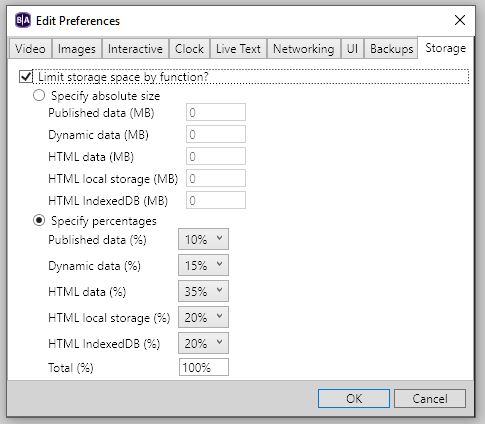 For BA:Con:Click on the Down Arrow next to ADMIN on the top menu, and select Application Preferences. At the bottom of the list click the Right Arrow next to Storage to expand the options, and make sure "Enable Limit Storage" is checked, and "Percent" is selected, with values based on your content usage.
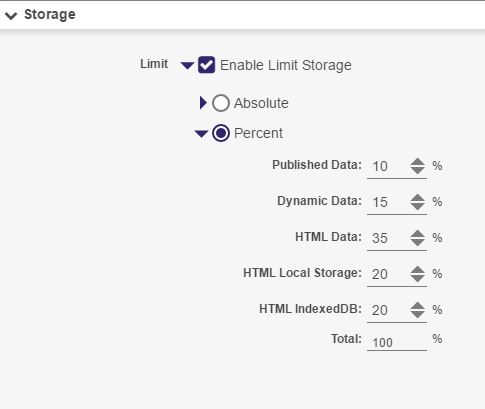 After these changes are made, re-publish your presentation to your player(s), in which they will now delete older accumulated content on the storage card.Depending on player model and firmware, your player may (or may not) reboot several times in the process of catching up over the next approximately 20-60 minutes depending on size of SD card. After the player has caught up, then typically it will continue the process automatically without rebooting, deleting older files as needed so the SD Card does not fill up completely again.
Please sign in to leave a comment.