Hello,
We are trying to set up a playlist for playing music at a Zoo.
We would like to be able to have a UDP option in the Browser interface to pause and resume the music, or switch playlists if needed.
I know how to set up volume control, but not the rest. Please share any specific instructions you may know of.
Using with an HD224 for now.
Thanks
Date
Votes
6 comments
-

Mark Richards I would setup a project with two interactive zones as follows:
Zone1 contains an event handler widget. This is where you process the incoming UDP messages.
- Attach a selection of UDP events with a specified input of Pause/Resume/Playlist1/Platlist2/etc.
- Make sure the target state is "remain on current state"
- Under Advanced, add a new command and use one of the following:
1) Other > Pause zone playback > Zone2
2) Other > Resume zone playback > Zone2
3) Send > Zone message > Playlist1/Playlist2/etc
Zone2 contains the audio playlists:
- This could be either media lists for each playlist (preferred as its neater), or individual audio files with an end media event to transition to the next audio file.
- Make sure you add a zone message event to each of the states in zone2 that you want to be able to transition out of.
- These need to match the zone message string above and are case sensitive.
More on zone messages here:
https://support.brightsign.biz/hc/en-us/community/topics/200594547-BrightSign-General-Community
Zone 2 contains a
-

ITS Audiovisual Hello Mark,
Thanks for the suggestions. A couple of questions as I try to set this up.
I am using BrightAuthor 4.7 for this.1. What type of zone should the event handler be?
Video and Image? Audio? Or does that not matter.2. When I go to add the Commands to Zone 1, I see a "Pause" option but not a "Pause zone playback" option.
I also do not see a "Resume zone playback" option. If I select "Pause" It wants me to enter milliseconds in the next box.
I got kind of stuck after that point. -
Mark Richards 1) Event handlers can be used in any of the zone types. I generally put them in an audio zone as I usually have a display attached. This isn't a problem for you as you are just using audio.
Please bear in mind the HD224 is limited to 1 video & images zone, 2 audio zones. You will be using one of the audio zones for your playlists, but its up to you where you put an event handler.
2) Apologies, pause/resume zone playback are features of BA:Connected. these are not part of Brightauthor. A couple of options you could consider:
1 - Implement this is BA:Connected instead of Brightauthor. NOTE: You may need to update firmware on the brightsign and you will need to create the setup files through ba:connected
2 - Use a script to access the pause and resume controls within brightauthor:
https://developer.roku.com/en-gb/docs/references/brightscript/interfaces/ifaudioplayer.md
This will be more complicated but should provide the functionality you've requested
3 - Use Zone volume > Set to a value of 0/100 to effectively mute the output of the Brightsign. Your audio will still be playing in the background though, so when you resume you will be further through the playlist.
-
ITS Audiovisual Mark,
This is super helpful.
I tried to set this up with BrightAuthor:Connected
I ended up just using one zone with UDP events.
The Pause, Resume, and Playlist buttons show up on the BrightSign app, and work, as well as on the browser.
Thanks -
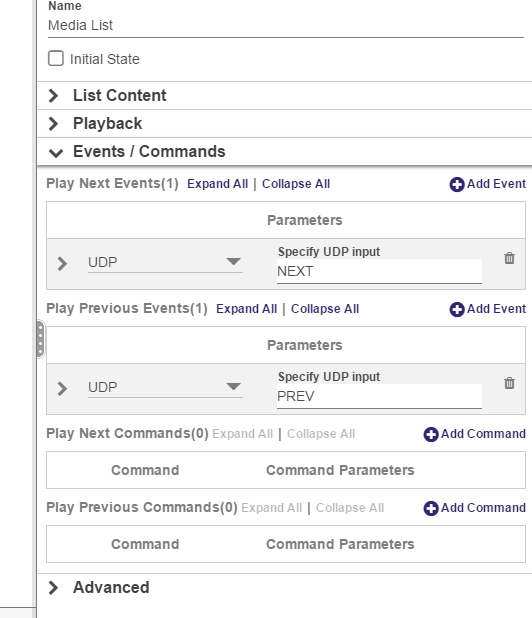
Mark Richards To skip a song: If you are using a media list / audio list widget to store each playlist, Select this state and go:
Events / Commands > Play next events > Add event
Make this new event a UDP event with an input of NEXT
Now if you send the UDP packet "NEXT" it will skip to the next song in the playlist. You can also add a UDP command PREV to "play previous events" as well.
-
ITS Audiovisual Got it - thank you!
Please sign in to leave a comment.