0

2 playlists with one slide difference

I have 2 presentations that are identical (except that the second one contains one extra slide).  I am using my local network to broadcast them so I cannot use dynamic playlists. 

The extra slide is an announcement that happens in the afternoon.   So I simply schedule one for the morning and one for the afternoon.


I update both presentations daily.  As a result,  I have to update the exact same slides twice because they are identical.


There must be a better way to do this.   How can I create presentation A and then presentation B (where B is A+1 slide)

6 comments

  • 0
    Avatar
    Bright Scripters

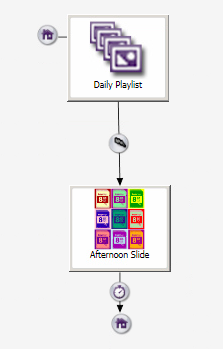
    Would something like that work for you?


  • 0
    Avatar
    VM

    Yes,  How do I do that?

  • 0
    Avatar
    Bright Scripters


    The ingredients are:

    User Variable named "afternoon", that can hold two values: true, and false.

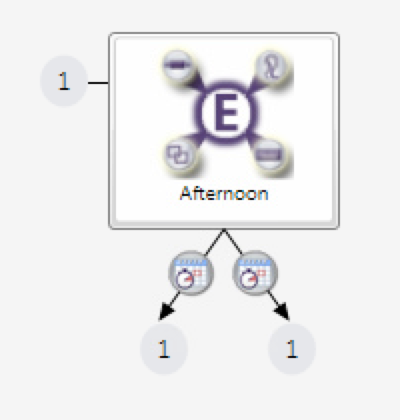
    Conditional targets inside the Zone Message Event, that checks the value of the above variable.

    If true, then play the additional slide ( the "+1" slide)

    if false, then play the Daily playlist again.


    The variable value changes between true and false, by means of two instances of a Time/Clock event.

    Those would be in a separate zone from the one containing the visual content.


    There is a challenge in exiting the playlist, which typically just cycling through the listed content, that is populating the Image List.

    We need a little hack in order to exit at the end of the list.

    Check "Send Zone Message..."


    Use an image file, that is all black, and name it lastslide.jpg.

    That image will not get a chance to actually show.

    When lastslide.jpg plays, the Image List state sends out a zone message "lastslide".

    The Zone Message event picks that message up, and exits the Image List.

    If afternoon is true, the +1 slide plays, and the timer event transitions to the Daily Playlist.

    If afternoon is false, the Daily Playlist starts from the top.


    I hope that helped.

    Please let us know how that went.


  • 0
    Avatar
    Bright Scripters

    Any luck?

  • 0
    Avatar
    VM

    You assumed that I knew what I was doing.   But I don't.   After reading your thread,  I had to learn how to use interactive presentations and variables.   I am still reading.
    So far,  I found how to add the event but not how to control the "afternoon" variable to change from true to false.  
    Still trying, though.

  • 0
    Avatar
    Bright Scripters

    We are here to help you, become a capable bright scripter :)

    You could send over your presentation, and we'll add the functionality that you need.

    You'd need to either create a download link from cloud storage, or email to support@brightscripters.com

Please sign in to leave a comment.